
![]() |
|||||||||||||||||||||||||||||||||
![]() |
|||||||||||||||||||||||||||||||||
| 2 | |||||||||||||||||||||||||||||||||
| welcome to my webpage. Here I will go into depth on how to back up your own DVD collection to DVD-recordable. In order to do so, you must have the following: | |||||||||||||||||||||||||||||||||
![]() |
|||||||||||||||||||||||||||||||||
![]() |
|||||||||||||||||||||||||||||||||
| 1) DVD Burning Software e.g. Nero or Record Now Max. | |||||||||||||||||||||||||||||||||
| or | |||||||||||||||||||||||||||||||||
| 2) DVD Decryptor | |||||||||||||||||||||||||||||||||
| 3) IfoEdit | |||||||||||||||||||||||||||||||||
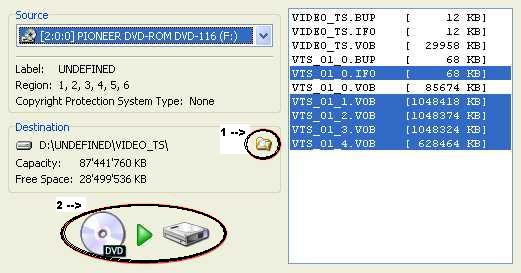
| 4) Put your original DVD in the DVD Drive 5) Open DVD Decryptor 6) Go to 'File' Mode, to do so, select it from the 'Mode' Menu 7) Select DVD Drive from the drop down arrow in the 'Source' box (see picture A) |
|||||||||||||||||||||||||||||||||
| Picture A | |||||||||||||||||||||||||||||||||
![]() |
|||||||||||||||||||||||||||||||||
| 8) Choose the "Edit" Menu, then "Select All" option 9) Select a place for where you want your ripped files to go. Click on the folder icon (circled 1 in Picture A) To complete this process you'll need at least 10Gb, maybe more. 10) To start ripping the files, just click on the icon circled in Picture A The process of ripping could take up to several hours and may vary. You will now be left with the following files: .IFO, .VOB and BUP. You are now finished with the original disc. |
|||||||||||||||||||||||||||||||||
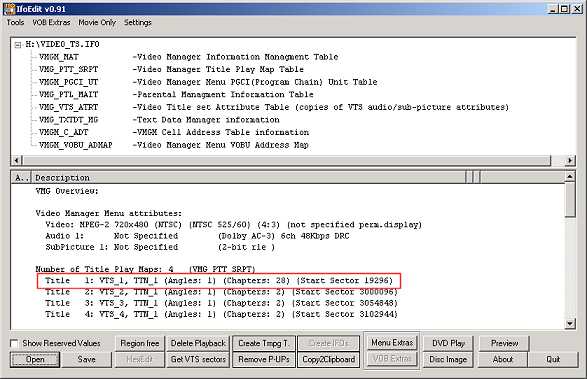
| LOCATING THE MOVIE'S FILES 11) Open up IfoEdit 12) Click 'Open' and find your .VOB, .BUP and .IFO files are being held. 13) Open VIDEO_TS.IFO. |
|||||||||||||||||||||||||||||||||
![]() |
|||||||||||||||||||||||||||||||||
![]() |
|||||||||||||||||||||||||||||||||
| NEXT PAGE | |||||||||||||||||||||||||||||||||
![]() ![]() |
|||||||||||||||||||||||||||||||||