

HOME
MAPPING
NEWS
DOWNLOADS
CHEATS
WALKTHROUGH
LINK US
CONTACT US
MY MAPS
I will say you, this tutorial is split up in several parts, this is because if you forget something like placing a light, you would have to search to the right tutorial!
Now, i'll tel you this, on allmost every tutorial site, you start your first map with hallowing out, i wont do this cause it doesn't looks that good and its hard to switch from this to the better way, sow, ya know?
OK, let's get to the point, in this tutorial you will make a room and get to know the basic things, in the next part, you will make it sunny, what you mean with sunny,
in the tut after that, you will get yourself a collored wall, then we will ad a second room and create a door, now a place for our player to start, and at least, we will let you get outside!
Los gets! (let's go! i know i said this manny times before, but you'll see this in every tutorial!)
First i'll tel you basic things you will see in all the tutorials:
ZOOM IN: delete ZOOM OUT: insert
CHANGE VIEW: XYZ button in the tool bar CHANGE GRID: in the upper bar click grid
CHANGE TEXTURE: textures in the top bar ENTITY MENU: Right click in top view
SAVE: click the disk in the toolbar DESELECT: Shift click on what to deselect
SELECT: the same as deselect DESELECT ALL: escape
OPEN: the open icon in the toolbar OPEN PROPERTIES: hit "n"
Let's start working!
Make sure you are in top view. Set your grid to 64.
Draw a box, mine is 704 units on 704, change grid to 8, in side or front view, make it 8 units high.
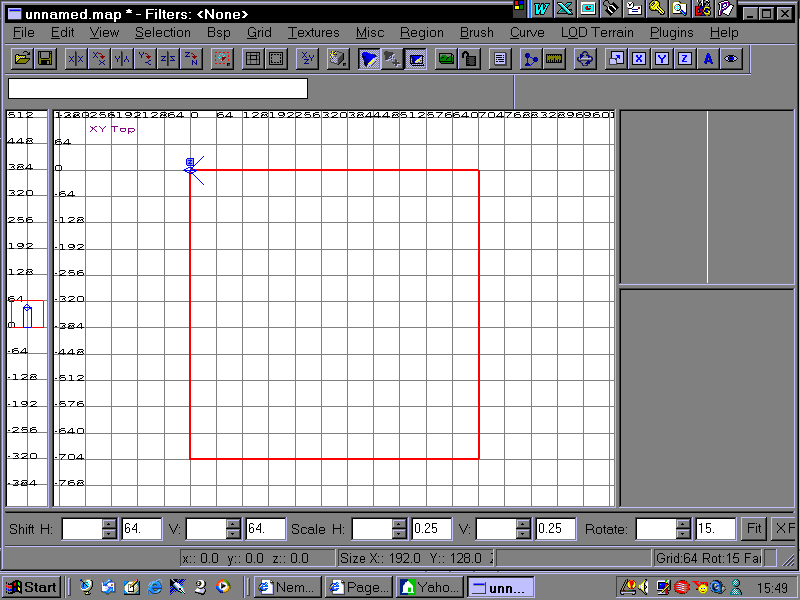
put this walls on al sidesof the floor, make sure that the walls start on ground level! Make them 320 units high. Now, you gotta make a roof in yoor room, select the ground, click on "selection" "clone exact". Now go in side view with th cloned brush still selected, move it with the upper side of it to the upper side of your walls, back in top view place it between your wals,
but i don't hallow it out because everything would overlap then.