

HOME
MAPPING
NEWS
DOWNLOADS
CHEATS
WALKTHROUGH
LINK US
CONTACT US
MY MAPS
Ok, like you know, you're gonna create a light in you room in this tutorial!
This will be an easyone!
Los gets! (Let's go!)
--------
In the real game you wouldn't see your map right now, sow we better add a litlle light, he!
You need to know basic commands out of the "My first map!"tutorial for this tutorial.
Normally you wuold have a room to place your light in, sow if you don't have, just make one.
Now, bring the entity list down (right click, this is the last time i'll say this!!!), click on light, a weard circle thing will pop-up, this would be your light.
drag it to the place you wan't it, for now on the middle of your roomdon't forget to drag it in side view too!!!
OK, now you have a light, but where does it comes from???
From a lightbulb! But where is my light bulb?! You gotta add one!
And that is what we will do!
OK, put your light away for a sec, we'll make a light bulb in the collor you want.
Open up the entity list, now go to static/lamp/ and now choose the lamp you wish.
Place the lamp on the roof, now open the entity list and click static/corona/util,
put it over your bulb, with that util selected, hit "k", choose one of the colors,
now deselect that util-thing and place your light under your bulb.
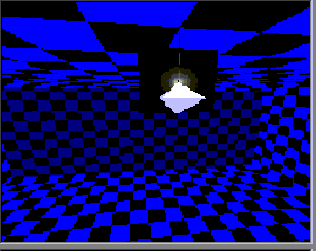
It should look something like this: