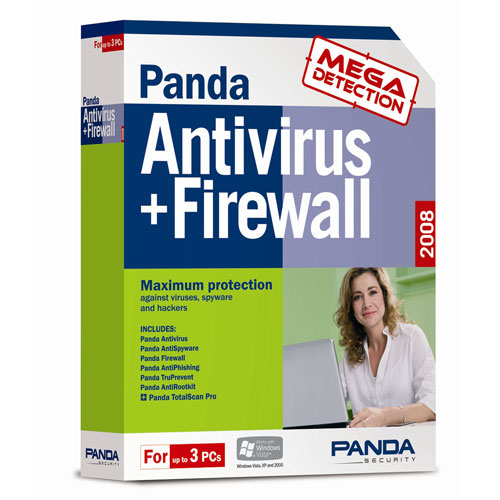
Panda
Antivirus + Firewall 2008
Features:
Latest
generation
antivirus
Automatically detects and
eliminates all
types of viruses.
If content
is missing from your hard disk,
if you have problems starting your computer, or if some of your files
are
unusable, you can be sure you've been hit by a computer virus. You can
be
infected just by surfing the Net, downloading a file, or opening an
email
attachment. There are also the dangers of worms and Trojans which now
use new
stealth techniques to evade detection.
With Panda
Antivirus 2008 you can use the
Internet and download or share files in the knowledge that you are
fully
protected against all types of viruses, worms and Trojans. Forget about
infections!
Powerful
AntiSpyware
Keeps your PC free from
spyware.
Computer
slowdowns, annoying and
aggressive pop-up ads, sudden changes to your system settings... these
are just
some of the effects that spyware can have on your PC. The real danger
however
is that these threats can steal information about your Internet
activity and
then use it without your knowledge.
Panda
Antivirus 2008 detects and
completely removes spyware and other annoying programs automatically.
AntiPhishing
Protects against online
fraud.
Certain
emails are designed to trick you
into revealing your confidential bank details. They may appear to have
been
sent from your bank, but they have not. Falling into the trap can be
costly: it
could give the phishers complete access to your accounts. Panda
Antivirus 2008
can identify these fraudulent emails, and prevent you from revealing
your bank
details, account numbers or other confidential information.
Panda
Antivirus 2008 will keep you safe
from these dangerous scams. Bank and shop online with complete peace of
mind!
Protection against dangerous
websites
Many
infections occur simply when you
visit a certain web page. Panda Antivirus 2008 recognizes dangerous web
pages
and prevents you from opening them and becoming infected. This feature
is
particularly effective against certain types of spyware and online
fraud. Surf
the Internet safely!
AntiRootkit
Detects threats that try to
hide on your
PC
Rootkits
can be used to hide threats and
prevent them from being detected by security solutions. These threats
can then
act with impunity on your system. With Panda Antivirus 2008 you won't
have any
problem, as its reinforced protection system can detect threats that
use this
stealth technique. Protect yourself from hidden threats!
System
Requirements
·
Processor:
Pentium 150
MHz or faster
·
RAM: 64 MB
·
Hard Disk:
150 MB free
space
·
Operating
System:
Windows® Vista (Home
Basic/Home Premium/Business/Ultimate -32 & 64
bits), Windows® XP (32 & 64 bits), Windows® 2000
·
Internet
Explorer 5.5
·
CD-ROM
Drive.
·
Windows®
ME or Windows®
98 customers can get Panda Antivirus 2007.
PRICE
: $ 49.95 US (FREE
Shipping within 24 hours)
Save
$10
(Retail
price : $
59.99)
|
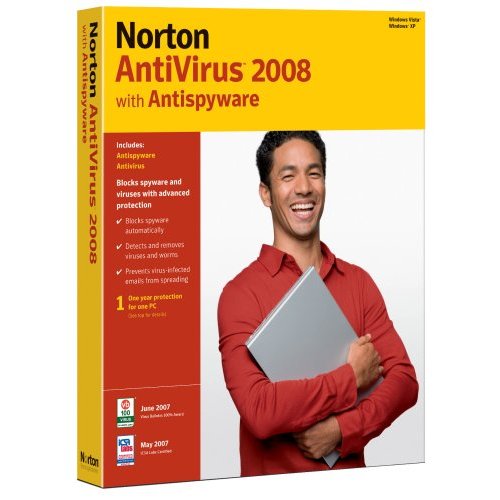
Norton
Antivirus with Spyware 2008
Product
summary
 Norton
AntiVirus
2008 provides solid antivirus protection. While the protection is
solid, the
user experience could be much, much better, and the product itself
could be
more streamlined. Also we can do without the addition of paid services
in the
technical support section. Norton
AntiVirus
2008 provides solid antivirus protection. While the protection is
solid, the
user experience could be much, much better, and the product itself
could be
more streamlined. Also we can do without the addition of paid services
in the
technical support section.
Specifications
License
qty: 1
user; License type: Complete package; Min Operating system: Microsoft
Windows
Vista Home Basic, Microsoft Windows XP Professional SP2, Microsoft
Windows XP
Media Center Edition SP2, Microsoft Windows Vista Home Premium,
Microsoft
Windows Vista Business, Microsoft Windows Vista Ultimate, Microsoft
Windows XP
Home Edition SP2.
Having
improved a lot last
year in Symantec's flagship antivirus product, it makes sense we'd see
more
modest enhancements for this year's Norton AntiVirus 2008. While Norton
AntiVirus 2008's antivirus test results compare favorably to our
Editors'
Choice winner Kaspersky Anti-Virus 7, it's the user experience that
suffers in
this release. The final size, a hefty 300MB, makes us wonder what's
taking up
all that extra space--Norton AntiVirus 2008 is roughly six times the
file size
as Kaspersky. Unlike Kaspersky, Norton AntiVirus 2008 is only available
in a
single-user license edition. Unlike Kaspersky, Symantec provides Norton
users
with little explanation of its features or settings, either in the
configuration settings or on its technical support section. Also we
don't like
Norton's dependency on Internet Explorer to explain Help items or
services
provided by Symantec (windows pop up in IE even when Firefox is your
default
browser), or that fee-based services have once again crept into the
technical
support section. All of these things distract the user and weigh the
product
down in our minds. Your computer is safe with Norton AntiVirus, it's
just, do
you really need all that extra stuff installed as well? For a look
inside
Norton, see our Norton AntiVirus 2008 slide show.
Setup
Norton AntiVirus costs $39.99 for a
single license. By comparison,
Panda
Antivirus offers its three-user license for the same price. While
Kaspersky is
slightly more expensive, selling its single-user license for $49.95, it
offers
a three-user license for just $10 more. There are no three-user
licenses
available for Norton AntiVirus 2008, so, if you have two more computers
in your
home network, you'll have to pay $40 for each computer.
Norton
AntiVirus 2008 runs on
Windows XP and Windows Vista, but not Windows 2000 or any earlier
version of
Windows. Norton AntiVirus 2008 requires at least 256MB of RAM and a
whopping
300MB hard drive (consuming roughly six times the space of most of its
2008
competitors). Symantec does offer a full function 15-day trial of
Norton
AntiVirus 2008.
LiveUpdate,
which used to be
a separate process, is now integrated into Norton AntiVirus 2008--and
about
time. Once the product is installed and you're asked to update,
everything--program files and signature files--arrive on your desktop
together,
making the experience smoother and easier. Symantec says this year's
LiveUpdate
packets are more compressed.
Should
you decide to
uninstall Norton AntiVirus 2008, there is an uninstall option on the
All
Programs listing. This, we discovered after contacting Symantec, does
little
more than what Windows Add/Remove will do for you. In other words, it
won't
necessarily remove all traces of Norton AntiVirus 2008 from your PC. To
do so,
you need to use the Norton Removal Tool. According to Symantec, this
Norton
Removal Tool "uninstalls all Norton 2008/2007/2006/2005/2004/2003
products
and Norton 360 from your computer." The difference, we were told, is
that
"the removal tool will remove shared components, like LiveUpdate, even
if
other Norton products that depend on the shared component are
installed."
Interface
If first impressions are everything,
Norton AntiVirus 2008 loses us at
"Hello." The new interface design is dark and garish, almost a
perverse joke on those seeking reassuring security for their desktop.
The use
of ominous thick black borders and orange graphics suggests Halloween,
a look
that could get old by March. Unlike Kaspersky and other antivirus
applications,
you can't change the look and feel of Norton AntiVirus 2008. The
unfriendly
look and feel is, perhaps, a deeper metaphor for the overall lack of
the
configuration settings within Norton AntiVirus 2008.
PRICE
: $ 70 US (FREE
Shipping within 24 hours)
Save
$86
(Retail
price : $ 156)
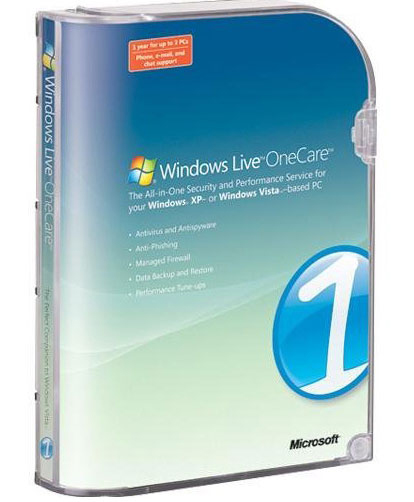
Windows
Live OneCare
Features
Windows Live OneCare contains a handful
of new security and performance
tools
for Windows XP users; the rest of the features within OneCare are free
within
any Windows XP system. Unique to Windows XP users are Microsoft's own
antivirus
engine, two-way firewall protection, and backup and recover. Within
Windows
Vista, only the antivirus engine is unique; the two-way firewall and
the backup
and restore are features built into Windows Vista.
The Microsoft
antivirus engine is based on GeCAD technology, a
Romanian security company that the software giant bought several years
ago.
Unlike the antivirus applicationss from McAfee and Symantec,
Microsoft's
antivirus protection is basic and only allows you to configure what
drives to
scan, how to scan them, and how to handle infections (if any). There
are no
options for heuristics, antirootkit protection, or any of the bells and
whistles we've come to expect from more mature antivirus products on
the market
today. For antispyware protection, Microsoft includes its Windows
Defender
technology, which anyone can download for free. For antiphishing,
antirootkit,
and behavior monitoring, OneCare uses Internet Explorer 7, which is
also
available for free.
Windows Live
OneCare brings two-way firewall protection to
Windows XP, however, we could find very little direct evidence. We
found no
specific configuration settings for inbound versus outbound filtering,
although
we did find a setting to configure individual program control for
Internet
browsers and other applications that need to connect to the Internet.
Windows Live
OneCare includes performance tools, however, these
are features already included within Windows XP. For example, OneCare
will
defragment your hard drive (see All Programs > Accessories >
SystemTools
> Defragment) and clean out temporary Internet files (see Internet
Explorer
> Tools > Internet Options > Browsing History) We do like the
fact
there's a one-button option to run these features automatically, but
that's
hardly enough to justify the cost of OneCare. The performance feature
is
nowhere near as thorough as that provided with McAfee Total Protection,
which
also includes a data file shredder to permanently remove deleted files.
Windows Live
OneCare includes a basic backup and recovery tool.
Like Norton and McAfee, OneCare allows you to back up onto your HD, CD,
DVD, or
USB drives. Unlike Norton, OneCare does not provide online storage.
Further,
when using a local device, Windows Live OneCare does not recommend
backing up
your data to a FAT32 device. Should you have a second partition that's
FAT32,
Windows Live OneCare provides instructions for converting your hard
drive from
a FAT32 system to an NTFS system, but this hardly a task that the
average
computer user will want to perform. We think Microsoft could have
created a
more user-friendly backup solution for OneCare.
Parental Controls
(included within Windows Vista) is provided
within an additional download of Windows Live OneCare Family Safety
(beta),
which is currently available for free.
What's missing
within Windows Live OneCare are many security and
performance features we hoped that an all-in-one security suite might
provide.
For example, there are no tools specifically targeted for wireless home
networks. Aside from help setting up wireless networks, we'd also like
to see
tools that help users encrypt the signals with WEP, WPA or WPA2, or at
least
monitor whether someone uninvited joins your home wireless network. Of
the
three super security suites, only McAfee Total Protection includes
wireless
security tools.
And Windows
Live
OneCare is only optimized for Internet
Explorer, not Firefox or Opera; same with Norton 360. Of the three
super suites
we reviewed, only McAfee supports IE and Firefox; none support Opera.
Performance
We experienced a few system lockups
after loading Windows Live OneCare.
One
lockup occured while attempting to backup our system, surprising given
that
Windows Live OneCare is supposed to be a desktop IT department for the
average
home user.
To
determine how
well a product will protect your PC, we defer
to test results from two leading independent antivirus testing
organizations.
The latest test results from AV-Comparatives.org show Windows Live
OneCare
catching on 82 percent of all viruses, placing it in last place behind
all the
other antivirus products tested. Windows Live OneCare has not yet been
tested
by CheckVir.com. One independent source not used by CNET, Virus
Bulletin,
recently denied its VB100% certification to Windows Live OneCare.
Support
Windows Live
OneCare offers technical support with a one-year
subscription. By
clicking either the Help icon in the upper-right corner or the Get Help
with
Windows Live OneCare option in the left-hand navigation area, you are
taken to
a Microsoft-maintained Web page. Launch Instant Support, a button
central on
the page, takes you to an FAQ page with the option to search for
additional
information. Along the left-hand navigation, the choices were less
specific.
Service Overview was basically an advertisement for OneCare, listing
its
features. Get It Now was an option to buy (given that we had a
purchased copy,
that made no sense). Help Center takes you back to
the Launch Instant
Support page. And Safety Scan takes you to the free online scan tools
provided
by Microsoft.
Using the
Instant Support option, we clicked through several
FAQs before declaring that none addressed our problem. We were then
taken to a
support page, which took us to another support page. Ultimately there
are
online forums, online chat, and live telephone support, but the effort
is
hardly satisfactory, and the experience will leave most users
frustrated and
angry. McAfee and Symantec both include detailed in-program help,
online chats,
free e-mail support, and an option to pay for telephone support, all
within a
few clicks.
PRICE
: $ 39.95 US (FREE
shipping within 24 hours)
Save
$10

|