Required Software/Programs:
-WinLPC - matrix bios flasher (windows based)
-EvoX D6 EjectFix BIOS or your choice - bios file=.bin file
|
Required Software/Programs:-WinLPC - matrix bios flasher (windows based) -EvoX D6 EjectFix BIOS or your choice - bios file=.bin file |
|
Flashing the Matrix Mod Chip -overview: the matrix mod chip is shipped unflashed. after you have found the evox d6 ejectfix bios, you'll need to flash it to your matrix mod chip with the flasher. Step 1. Connect the Matrix Mod Chip to the flasher. You never want to attach the mod chip to the flasher with it plugged into your computer, you can fry your mod chip. Then insert a new 9Volt battery into the flasher. Hook it up to your computer's LPT port. Be sure you have your LPT Port enabled in your computer's BIOS settings and it is setup. |
|
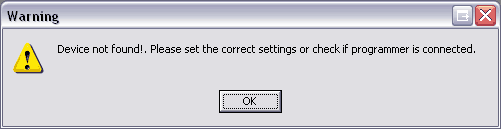
Step 2. With the Flasher attached to your computer, run WinLPC. If you get a message like this:
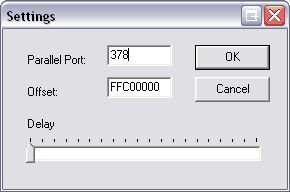
Hit Okay, then this message will popup (it means your LPT port is not enabled or you'll need to change the settings on this next screen (see below).
Set this according to your LPT port settings on your computer and then Hit OK. |
Some Tips on Flashing/Programming: -If you can't get it to flash after adjusting settings, try a different computer -As an alternative, there is a DOS based program that can flash the chip too, its called wmilk.exe -Also, if you have problems and are running windows xp, try downloading drivers for the programmer. Download "GiveIO Driver setup.exe" from http://www.roentdek.com/Software/SP-Main.htm |
Step 3. The winLPC main menu should popup next (see below).
Just click on Program and select your bios file (a .bin file) and hit OK. Let it do its thing, it should say DONE, then click OK again and exit winLPC. Your Matrix should now be flashed! |
||
Step 4. Now install the Matrix chip into your XBOX ( i am not going to give full details on this, check out the website i listed for more in-depth info on aligning the matrix). Once you get done with this, its all down hill! |
||
|
NAVIGATION
|