
Installing games and programs to the XBOX hard drive.
-Overview: The xbox has its own 8 to 10GB harddrive, who's ever going to use all that for game saves? Not I! Lets put our games on there and add some programs, the games will load faster and you can add a nice dvd player to watch dvds without the kit.
Software/Programs:
FlashFXP - used to connect to xbox with an FTP connection
xISO - makes xbox iso images
Nero Burn - Burns xbox iso images to cd-rw or dvd
Step 1. Setting up the XBOX's folders and the evox.ini file.
If you haven't replaced the hard drive, we will want to make two new folders in the E: folder on the xbox.
I added these folders:
apps
games
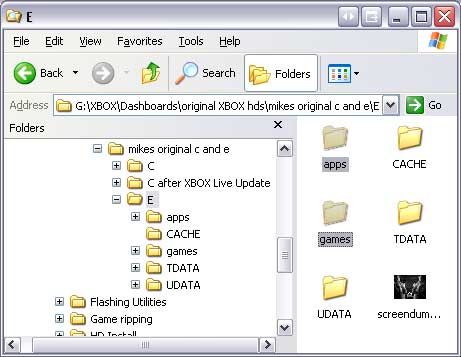
Step 2. Copying games to the xbox harddrive or two your pc's harddrive to later make backup copies.
Start up the xbox and put a game in, make sure your xbox stays at the main menu on the evolution x dashboard (change auto load games = no, in the evox.ini or in the settings menu)
Then FTP into your xbox, once connected go into the D: folder on the xbox, this will be the game in your xbox. We will want to copy that folder to your pc.
After it transfers, leave FlashFXP open and connected to the xbox.
Copy the D: folder on your pc back to your xbox's e:\games\ or e:\apps\ folder. Then once it transfers over, you can just rename the d folder to the game or program you want.
-Getting games and programs added to your menu automatically:-
Add this line in your evox.ini file, under [Menu]
Section "Launch Menu"
{
Section "Games"
{
Line "- Auto Items -",2
SortStart
AutoAddItem "e:\games\"
SortEnd
# SortAll
}
Section "Apps"
{
Line "- Auto Items -",2
SortStart
AutoAddItem "e:\apps\"
SortEnd
}
}
The red is where your games are saved. It will automatically add the new programs and games to your menu, under Launch Menu > Apps or Launch Menu> Games
Step 2a. Making a copy of a game and burning it to a blank dvd.
-This is very easy to do. Just copy the game to your pc's harddrive like we did from above.
Since XBOX games can't be read in a pc, we have to make an .ISO image file that it is in the xbox format. We will make an xISO image with xISO. We'll make it the same way as we did our boot cd. I would recommend using DVD rewritables for the first copy, to be sure it works. Then if it plays without studdering or freezing, burn it to a writable.
Now you can make backups of your investment ;-)