| Here is a tutorial on how to backup your CD-ROM based games, you cant make backups of DVD based games using this tutorial only CD-ROM games!! |
| The software I use to backup a PS2 game: � CDRWin � later versions are heavily protected and it is not wise to use a crack or serial you got from the Net. If you like the software then register your version. |
| Some last minute checks........... 1) Get the PC booted up and ensure that you have no screen savers or advanced power features turned on. What this ensures is that half way through a burn your flying windows screen saver is not going to start and ruin what was going to be a successful copy. 2) There are some other tweaks that you can do. You can decide which ones you want to implement. There is documentation on other tweaks you can do. Myself I don�t follow |
| Lets go........ |
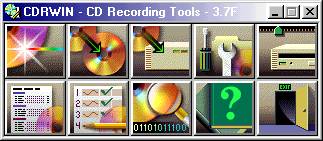 |
| � Open CDRWin |
| � Choose the 3rd icon from the left on the top row. |
 |
| This window will appear: |
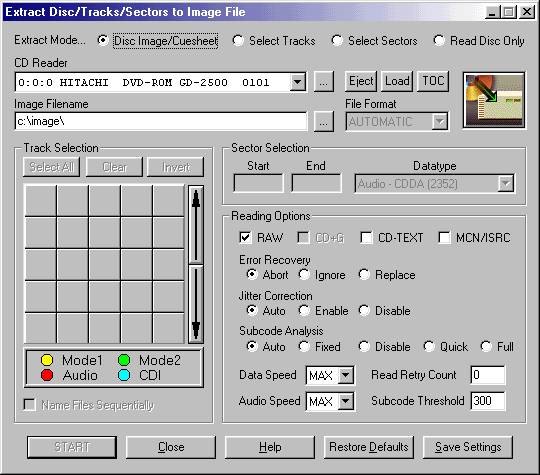 |
| � So ensure that the box underneath where is says CD Reader, states your CD-Writer. � Write the Drive, Directory, Image name in the Image Filename box. � Next Check that the Disc Image/Cuesheet is checked. � The last thing to do is to lessen the Data Speed and Audio Speed. Put these two to 2x. � All other settings can be kept the same. � Click Start and another window will appear, with a progress bar indicating how much of the process has been competed. Depending on the size of the game it could anything from 10 + mins. At the end of the process you will have an image on your hard drive of the game. This will consist of two files: 1. a Cuesheet 1kb in size 2. a .bin file which will be a few hundred Mgs |
| Once that is done you can burn the image to a CD-R. I would recommend the use of either a TDK branded CD-R or a Verbatim one. These are very good quality disks that can be bought at a reasonable price, from most computer shops. The burning process uses the first icon to the left, on the top row. Here is the icon: |
 |
 |