

|
|
|
|
ABOUT THE VIDEO ADAPTER OR VIDEO CARD
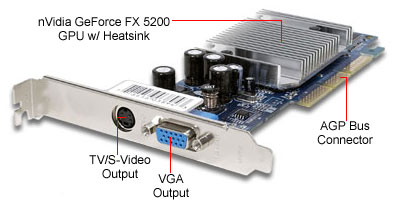
A video card or video adapter as you have seen is plunged into the expansion slots on either an AT or ATX motherboard. It is designed to give your CRT or LCD the capability to display various colors at both high and low resolutions. Note that some Video adapters will greatly enhance the the capabilities of your CPU while others may or may not. It all depends on what type of Video Adapter you have on your CPU. Remember when we talked about the three rows of holes in the video port Right? Well look at the picture of the Video card above? See the three rows? How many holes did we learn were present in a video port? Remember also the CRT's or LCD's display graphics with a lot more colors and detail at lower resolution settings. The Heatsink that you see on this particular video card prevents it from overheating by equally dispersing heat away from the adaptor. Modern video cards also have their own memory. Cool Right? So they don't use any of your memory from your RAM (Random Memory Access). RAM provides your CPU with storage space to save what ever actions that need to be saved. Any questions about the Video adaptor? WHAT IS TROUBLESHOOTING? To troubleshoot is to undergo a logical process of elimination in the searching, diagnosing, and solving of any particular problem. BASIC TROUBLESHOOTING FOR VIDEO CARD ISSUES Now the first thing that you need to know is what actually happens when your video card crashes or stalls in some way. Usually, your CRT or LCD which ever one you have shows no picture when you turn your CPU on. Some other symptoms are; scrambled or distorted image's, multiple instances of an image, Shrunken images, or an obvious high pitched whine from your monitor. Now if you catch these symptoms, you should deal with them right away. Here are your Troubleshooting options:
WOW, boy we learned a lot today. See that was not so bad! Now that I have taught you about peripherals, ports, connectors, pins, and video cards, you are ready for your quiz! But before that, I will need to give you an activity. There are two questions on your quiz that will require you to have really paid attention to get correct. So to test your devotion I want you to surf the web and find out whether or not a Video Card disperses heat on its own or does the cooling system utilized by the CPU do it for the entire system? REMEMBER I HAVE THE POWER OF THE FORCE AND YOU WILL NOT BE ABLE TO COMPLETE THE QUIZ WITHOUT THAT ANSWER!!! YOU CAN'T CHEAT MY YOUNG PADAWON!!!! "GOOD LUCK AND MAY THE FORCE BE WITH YOU!! ENJOY!
|
|
Send mail to
[email protected] with
questions or comments about this web site.
|