| Can This Photo Be Saved? —Noise Removal Revisited |
|
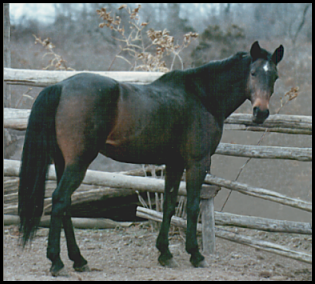
| Here is my mare Sprite more than 20 years ago, seriously afflicted with greenish noise. The grayness all around is Pennsylvania late winter (when I first moved there, from Idaho, I measured: everything was two f-stops darker!) This photograph was taken with a film camera and the 4" x 6" print was scanned into my computer; it can use all the help that PSP 10's Digital Camera Noise Removal can do; it has already used all that PSP5 could, several years ago. This photo, I thought, would be a challenge for the Digital Camera Noise Removal Tool. |
  |
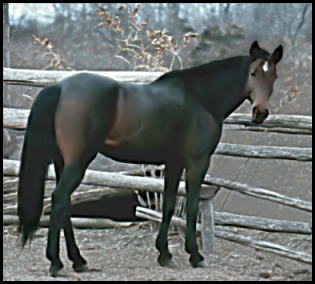 AFTER NOISE REMOVAL AND RETOUCHING |
Its complicated controls made possible the removal of the ugly noise from Sprite's body while leaving all the light-colored detail around her untouched (except by me). I changed the original sampling boxes from the light-medium-dark chosen by Noise Removal to light (the corner below her tail), medium (the brown tones on her rear leg), and dark (her neck) chosen by me. I did have to make and save a selection of her head to work on that separately... and repeatedly. And I made use of other tools and selections to get the effects I wanted: for instance, I blurred the too-sharp highlights in front of her hind leg; used the Hue Map to translate greens and purples and even blues on her face into browns; increased the contrast around the bottom of her tail to emphasize the hair-ness instead of the unkemptness; removed the highlight along the top of her mane (it had been exaggerated by sharpening); and manually smoothed the worst of the halo around her ears and face (sharpening side-effects again; you can see the remainder along the front line of her neck and leg). The Protect-Image tab of the Noise Removal tool, with those nodes that allow the protection of just some degrees of lightness, is really quite impressive. |
| And so is the One-Step Noise Remover. It couldn't fix the highlight along her mane and the strange, exaggerated topline near her head, but it did really well with the rest of her. The mutedness of the fence is interesting, but getting rid of "noise" in the background creates fog (a "fog filter" for not-noisy pictures?) that in turn makes the smoothing of Sprite's coat less noticeable and, I think, makes it look like the whole picture is fuzzy. While the removal of noise cleans up the foreground, it also blends away the outline of Sprite's hooves. And it does decrease contrast overall, not necessarily good. But if I had a bunch of pictures I wanted to make presentable (not one I've been working on for years), I think I could live with these effects. | 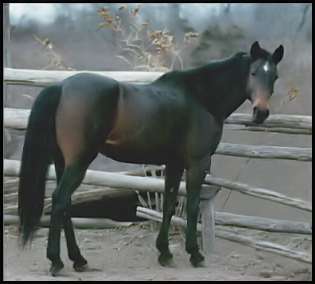 AFTER ONE-STEP NOISE REMOVAL ALONE |
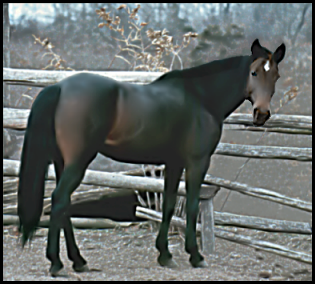 AFTER NOISE REMOVAL AND RETOUCHING AND... |
Tip on Equine Portraiture: Telephoto lenses only! —never use a lens of "normal" focal length because horses are so big that the difference in distance between you and the horse's ribs and you and the horse's neck will introduce noticeable distortion. And that's a best-case scenario; head-on pictures become caricatures. See, one thing bothering me subliminally throughout this work on Sprite's picture was that, even though I'd used a 200-mm lens, her head looked too small. She had a delicate face, true, and this picture shows nicely her Quarter-Horse behind, and her expression is wonderful (a typical-for-her look of "Yes? Whatcha doin'?"), but would you believe that in this version, her head is fully 5% larger than in the others? |
| PREVIOUS SLP PAGE | MY HOME PAGE | CONTINUE (SLP) |