Since the day I decided to come back to Indiana, I have planned to inter-connect the three farms here with wireless Ethernet. At first, it was a purely theoretical exercise. As I started using floppy disks to take stuff with me from the Internet computer to the workshop/ham shack, I discovered that:
a) floppy disks don't hold much
b) floppy disks are un-reliable
I find that even though I hauled about 10 carloads to the dump and another 10 to the salvation army before leaving Hawaii, I still have enough parts to build just about anything electronic. Thanks to the benevolence of my buddy Mr. Ozaki, I have an IBM Thinkpad 760C (pentium 120 Mhz) with a flaky hard-drive interface, but two working PCMCIA slots. Thanks to the benevolence of my glorious comrades at U. Hawaii, I have an Orinoco Residential Gateway (RG-1000) and 2 NICs, with a third and a PCI adapter for the PCCard that I bought on Ebay. I asked for Lucent to N antenna cables for Christmas, and got them, thanks to my brother-in-law John, who understands what I really want for Christmas.
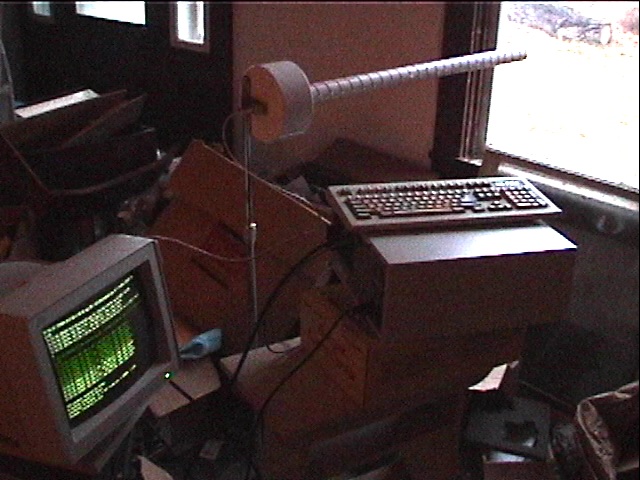
The first order of business was to build antennas, which I did from the instructions at Jason Hecker's page the fabulous part being the simple matching network, which I made out of brass shim. Since Jason specifies metric pipe sizes, I converted, and used 1.25" schedule 40 pipe where he specifies 40 mm, and 6" schedule 30 where he says 150 mm. I didn't use the helix templates, I just marked the pipe at the winding interval, and eyeballed it.
Initial tests with the first antenna I made showed pretty significant gain. First, with no external antenna, with one notebook in a window of the workshop, and the other on the dashboard of the car, I was able to get about 75 feet of range. Then, with the helical inside, pointing out the window, at the built-in antenna on the NIC in the notebook on the dashboard, I got 1800 feet of range, in the gain direction. Of course the card switches bit rates and coding as the S/N ratio falls, and the 1800 ft. was at 2 Mbps. Roughly, on a relatively clear day with light snow falling:
11 Mbps was good to about 350 Feet. (Got about 350 KBytes/sec with FTP)
5 Mbps was good to about 1000 Feet. (Got about 250 KBytes/sec with FTP)
2 Mbps was good to about 1800 Feet. (Got about 150 KBytes/sec with FTP)
Those first range tests were done with Linux on my working notebook, and a program called UBRIDGE on the Thinkpad, which was bridging to 10 Base-T/Ethernet on the other side, toward another Linux box that was the other end-point of the transfer. UBridge was a compromise, since I had to enter static ARP entries to get it to work. It was by far the most workable of the bridge programs that I tried.
The challenge was to make a single-floppy system which bridged (or routed) packets from one PCMCIA slot to the other. I took a good long look at Linux Router, and its derivative Coyote Linux, which are fine systems, and they don't include PCMCIA support. I spent a couple of days trying to shoehorn PCMCIA into Coyote, and had marginal success -- it's possible. By the time you recompile the pcmcia-cs and the kernel and the modules to get the version matching right, and strip the runtime libraries to be small enough to fit on the floppy, yet useful enough to support your new apps, you start to wonder why you're working so hard (not that a maintainable PCMCIA package for LRP wouldn't be useful).
"So what about the venerable Packet Drivers?" I asked myself, probably out loud. I went to the Lucent and Xircom (now Intel) sites and found the driver packages with ODI/NDIS/CRNWYR and set out to look for an app that would use DOS-based drivers. Both the Xircom Ethernet and the Lucent Wavelan/Orinoco Packet Drivers came with "point-enablers" to light up the PCMCIA without any card services, so it was relatively easy to get the devices up, and then I tried:
As I said, UBRIDGE, written by Bernhard Rath in Stuttgart, Germany, was the most workable of the bridge programs I tried, and for wahatever reason, it wanted to proxy ARP for machines that didn't need to be proxy ARPed, and had some interesting broadcast-forwarding behaviors. I think that UBRIDGE's heritage in the Ethernet-to-ISDN bridging function is what made it odd for this app. (Wait:I wonder what would happen if I made the owrking interfaces #3 and #4, instead of #1 and #2?) More comprehensive docs and maybe a view of the source code would have probably made UBRIDGE the app of choice.
PKTBRI
by Jon Beltran de Heredia, Bilbao, Spain
Since it comes with the source code, you could probably make PKTBRI behave as you like. I didn't spend a lot of time on it -- I loaded the drivers, loaded the program and observed that ARP broadcasts weren't getting across. Since the program is very simple and offers no user interface, I moved on. Jon says he used it for several years in his departmental LAN at University of the Basque Country, with good results.
Yet Another PCBRidge (YAPCBR)
by V. Srinivas and Nitin Kaulavkar
Indian Institute of Technology, Bombay, India
Honorable mention. More statistics than PKTBRI, less actual doing anything than UBRIDGE. I checked it only very briefly. GPL'd and source code included, done as a student project.
JNOS
Johan K. Reinalda, WG7J, building on Phil Karn's (KA9Q) networking package.
I was aware of KA9Q/JNOS, after all, I am a ham. I have looked at the config manual a number of times, and decided that I would need a really good reason to filter it down to what I needed. Luckily, there is a web page at http://lucilia.ebc.ee/~enok/radiolink/HTMLDocument.html which gives a brief config for JNOS to make a router based on packet drivers. I got the JNOS router set up in about 5 minutes, and it has now been working over night, having survived several 135 Mbyte FTP transfers and something like 60,000 ping iterations.
The Operational House-to-House Link
Let's face it, I'm a router-head anyways, so I didn't try very hard on the bridging stuff. For the opposite side of the link from the JNOS Thinkpad, I have a Pentium 100 desktop running Slackware Linux 7.1, kernel 2.4.5, I also turned on bridging there briefly, but ended up saying to heck with it and just routing. Thanks to RFC 1918, I've got several million addresses to work with, anyways.
|
|
|
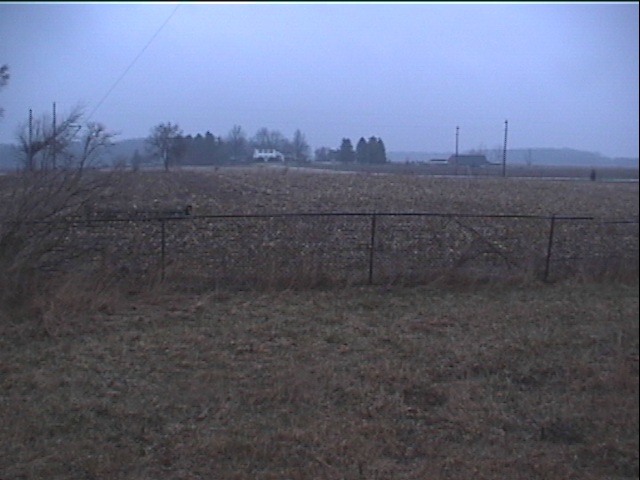
After I set the link up yesterday, a weather system has moved in, starting with very fine rain-mist, and progressing to snow. The fine rain-mist induced link-killing rain fade, yet the snow, including that which is caked onto the surface of the rubber ducky, doesn't seem to bother it. The temperature has fallen from the 40's (F) into the 20's, and the Linux box, which is in an unheated storage area, seems not to mind. It's probably good that it was running and warm before winter returned. Sucky weather for March 25th.
The ping stats just now on my Omnibook, which is pinging through the Thinkpad to the Linux box on the other side, is 63150 sent, 63068 replied, leaving 82 lost packets. That's going to have a minimal effect on TCP, an average of a lost packet every 13 minutes. Average RTT is 3ms. The stats would probably improve if I put the other helical in place of the rubber ducky, and the helical takes a little more planning to mount, especially since the coax for it is only 18" long.
Addendum, June 9, 2002:
After over two months of flawless service, the inter-farm link was retired when I moved back to Hawaii. JNOS was ultra-stable, and the notebook was an excellent platform, because battery power makes occasional power interuptions into non-issues. I shipped the helicals, so I may get some good range tests yet. I had several issues with the wired LAN over the two months, but absolutely no issues with the wireless. Kind of makes you think, huh?
What's Left To Try
The driver that's in use on the Linux box is the older "wvlan_cs" module, and although I have the wireless extensions on the machine, they only sort-of work. There are two newer, fancier drivers, the "orinoco_cs" from Jean Tourrilhes, and the "wavelan2_cs" from Agere (the name of the Lucent spin-off that now holds the Orinoco (formerly WaveLAN) product line). The orinoco_cs driver doc admits that the compile may not go right because of include file problems (which is exactly right!), and when I looked at the wavelan2_cs compile, only a day or two ago, I found that I would have to line up my kernel, card services, and modules versions to pull it off, and I didn't install the development tools on the wireless Linux router. I'll get to it...
Also, the helicals are great, and they are just overflowing with gain, and they're a pain-in-the-keester to mount. Maybe something from Martti Palomaki's page, probably antenna #1, would be a useful addition to the arsenal of aerials.
After making a single-floppy router, and also working with the PCMCIA-to-PCI adapter on the Linux box, I think that one could throw together an embedded-style appliance to do wireless routing pretty cheaply, with products like the AbiaTech FB 2310, an ISA adapter, an enclosure, power supply, some beer, chips and effort.
As I said, WEP encryption isn't really a viable security measure, even with the Agere corrections to RC4 key management. I don't really care about security for this application, since someone would have to either hide in the woods or sit in a car for 5 hours to collect enough traffic samples to break my WEP, and after their trouble, they'd be rewarded with nothing interesting in particular. Plus today, they'd freeze to death. To move toward a more viable security scheme for a point-to-point wireless link like this one, I would try to either place Linux on both ends, which would allow things like CIPE or IPSec or SSH Tunnels to be implemented, or perhaps port a CIPE-like service to DOS (ha! I like that). IPSec stands out a little, since it is extensible, to currently untried encryption schemes, and already offers several implementations of existing schemes.
Conclusions
You can easily, and cheaply do relatively long links over 802.11, and as soon as the weather warms up, I'll let you know what kind of range is available with both helicals. I suspect it's pretty good. There isn't any reason why you couldn't do a link with a managed-mode device, such as the Lucent(Agere) RG-1000 or the Apple Airport Base Station (See this). Your traffic patterns would figure into it, since Ad-Hoc mode stations are supposed to be able to talk among themselves freely, whereas the managed-mode wireless hub setup wants send everything through the hub device.
I will put more info here, if I do.
Alan