|
當你開始topaz chat 之後,會有以下畫面:
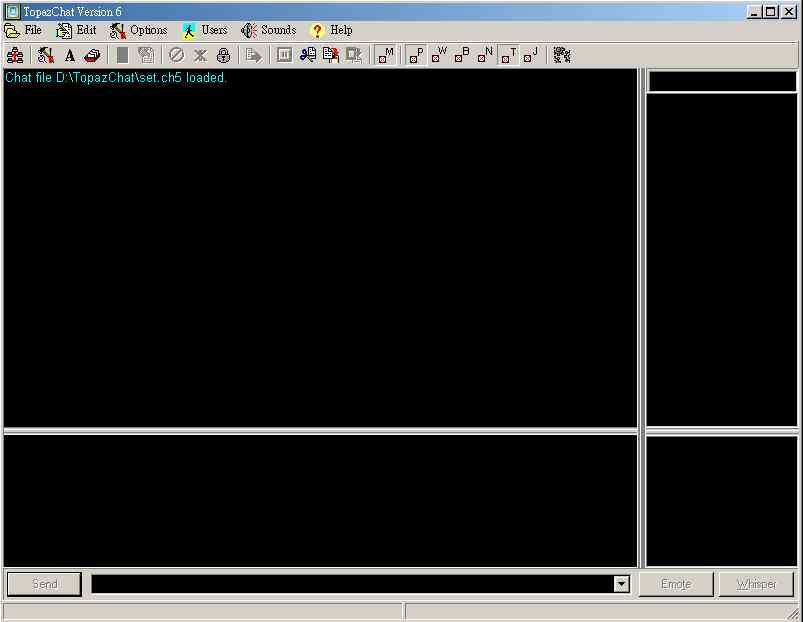
當中,左上方係普通chat 的 screen;左下方係whisper
的screen;右上方係user list (即係個channel 上的人);右下方係user name list
(即係你自己add 上去d 人,無論佢是否在channel)。第一件事,梗係去set up 個chat
先啦。去option ? setup (F6)你會見倒下面個screen。
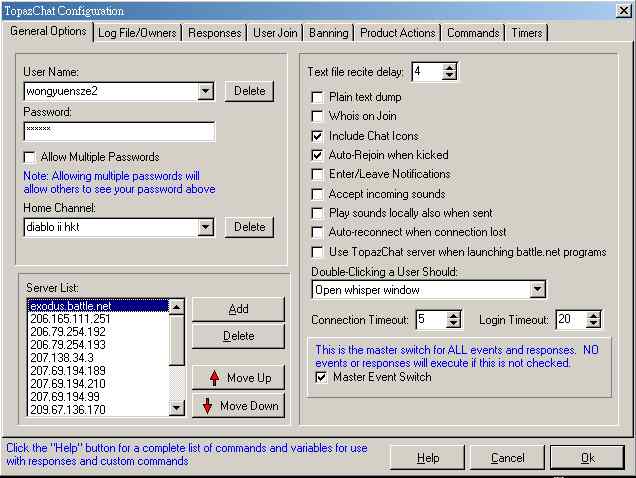
General option
首先,打番你個login id 同pw。(記住要用d2
在battle.net 開左個a/c 先,雖然可以用番你有character d a/c 做chat a/c,但係唔建議咁做)
跟住,set 番你個default channel
做 "diablo ii hkt"
之後,在server list 到將63.241.83.7(USWest)
or 63.240.202.138(USEast) 到第一位
到右手邊d options
Plain Text Dump
This is generally used for debugging
purposes. It displays raw data as it comes from battle.net along with the
colored and filtered version displayed by the normal chat. (冇用)
Whois on Join
When selected, TopazChat automatically
will send a "/whois" command when a user joins the channel. (冇用,whois
command 只係話俾你聽佢叫乜名同身在那個channel)
Include Chat Icons
When selected, icons for users
(such as StarCraft, Diablo, etc) appear next to their names on the User
List. (可有可無,但係可以分辨佢chat bot/ d2 player or starcraft player)
Auto-Rejoin when Kicked
Instructs TopazChat to automatically
attempt to rejoin a chat channel when a moderator has kicked you out. (
Enter/Leave Notifications
Displays a message whenever a user
joins or leaves the channel. (用左佢等於幫你洗畫面)
Accept Incoming Sounds
Plays sounds that other TopazChat
users have sent to you.(tick 左呢格人地播聲你先聽倒)
Play Sounds Locally when Sent
When you send a sound file, this
will also play the sound on your computer as well as the person you are
sending it to.(你都聽倒send 出去 d sound)
Double-Clicking a User Should:
當你double click 個user name 會……
Squelch User - Squelches a user
so you no longer receive text from them.
Copy Name to Entry - Old Diablo
style, copies the user's name to the Entry Line.
Kick User - Kicks the user out of
the channel if you are a moderator.
Ban User - Bans a user from a channel
if you are a moderator
Open Whisper Window - Opens a private
chat window to that user
Open Account Information - Opens
the account number database
Open User Information - Opens the
user information screen for that user
Connection Timeout
How long TopazChat will wait for
a connection to succeed before changing to another server. (set 10 秒己經ok)
Login Timeout
How long TopazChat will wait for
the login process after a successful connection before switching to another
server. (set 20秒已經ok)
Master event switch
一定要tick 呢個box,如果唔係所有之後介紹之whisper
功能都用唔倒。
Response
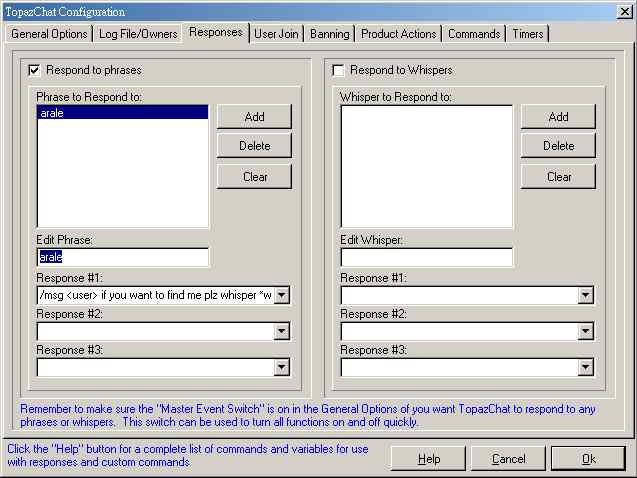
記住除左tick general option 中之
master event switch 之外,仲要tick 埋Response to phase 先至得。 (即係個chat
bot 見倒一d 字就自動whisper,d 字同whisper d 乜全部係你define)
以我個bot 做例,我add 左 "arale"
呢個字上去,所以每當有人在channel 講 arale 就會自動run 下面d actions,我就set
左做 whisper,句command 就係:
/msg <user> xxxxxxxxxxxxxxxxxx
/msg :whipser 的command ,用whisper
一定要加佢個名,但係因為為auto reply,所以你要用 <user> 呢個variable代表佢個名。(有陣時你可能想成個channel
都read 你d message ,咁你可以拎走 /w <user>)
xxxxxxx :你自己set 好左 d message
#1 #2 #3 的分別:佢會random 揀一個reply
(如果你set 左兩個或以上的answer 的話)
除左 <user> 外,你仲可以用以下的variables:
<random> This is replaced by
the name of a random person in the channel.
<channel> This is replaced by
the current channel that TopazChat is in
<server> This is replaced by
the server TopazChat is currently logged onto.
<time> This is replaced by the
current date and time on the local TopazChat computer.
<parameter> This is replaced
by all text appearing after a phrase or command
例子:
/msg <user> hi <user>, you
are now in <channel>, and the time is <time>, what’s matter for
calling me?
假如knight 無意中有句野有 "arale"
呢幾個字,個chat bot 就唔理三七二十一 whisper 佢:
hi knight, you are now in diablo
ii hkt, and the time is 14:06, what’s matter for calling me?
User join :
每當有人join 個channel 就執行你set
好左的action (通常係send message,而家我地話俾你知邊度有hk hell exp game
都係咁set)
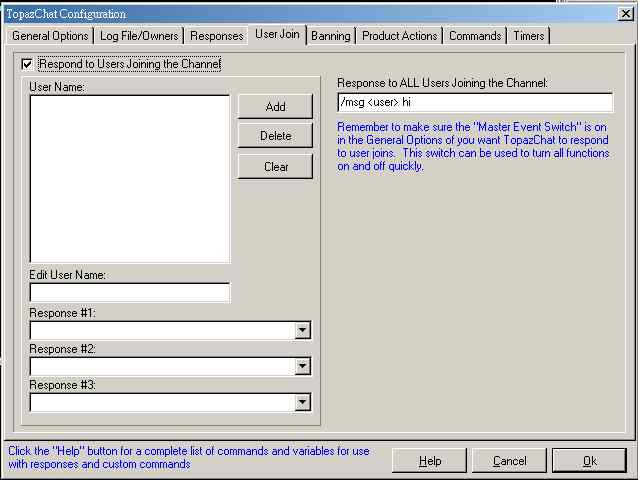
記住除左tick general option 中之
master event switch 之外,仲要tick 埋user join 入面個 response to users
joining the channel先至得。
左手邊係指定人仕先action,右手邊係所有人仕一進入channel
就action。
例字:
/msg <user> hk5/ new pw for
hell exp game
Timers
Chat bot 每隔一段時間(時間自已set)
就執行actions,通常用 /emote,或者用 /msg <random>
記住除左tick general option 中之
master event switch 之外,仲要tick 埋 response to time event 先得。
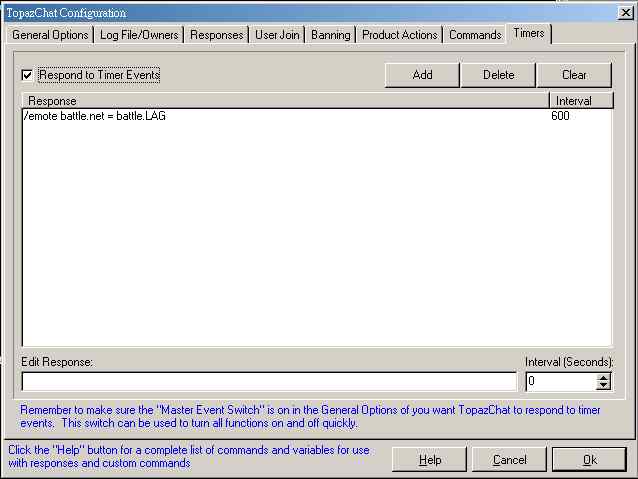
Interval (重覆該action 的時間,以秒做單位)
Response (你想佢做d action)
例子:
/emote battle.net = battle.LAG
(time intervals set 左600 sec)
咁每10分鐘佢就會彈一句 battle.net
= battle.LAG 在channel
|