
Stock Basics
Stock Strategies
Trading Demo
Research Options
Online Resources
Glossary
Opening an Account with Ameritrade
Opening an account
Opening an account with Ameritrade is relatively easy. But, this process is not instant.
Select your account type
You have many different types of accounts you can choose. Some of your choices include individual accounts, joint accounts, and IRA accounts.
Choose how you will fund your account
You can use Electronic Funds Transfer, transfer money from another Ameritrade account, or send a check in the mail.
Apply for an account
After you have gathered your personal information, you will need to send Ameritrade your application. You can download the application from the web-site, but you will have to mail it in. Many times, when a stock site advertises an online application, they mean that you can get the application online, but you have to send it via US Mail. There may be some sites that will allow you to apply online. If you wish to pay by check, you should send the check with your application.
Begin trading
Once your application has been approved, you may access your account. You may begin trades as soon as your account is active.
Making a Trade
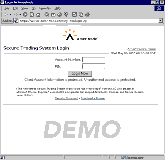 Login
Login
Logging in to your trading account is simple. You will just type in your account number and your PIN number. You can access your account from anywhere.
Trading Home Page
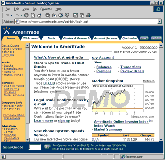 Your trading home page will allow you to access all of the features provided by Ameritrade. You can access headlines, trading pages, and research pages.
Trading
You can access different reports on this site. While you can make use of the reports on this site, it is always best to seek another opinion and research your companies as thoroughly as possible.
Trading
You have two options here. You can make a basic stock order or an advanced stock order.
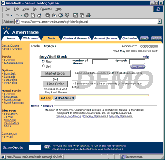 Basic Stock Order
- Determine whether you want to buy or sell stock then click the radio button that applies.
- Determine the number of shares you wish to buy or sell.
- Type in the trading symbol that corresponds to the company you want. If you do not know the trading symbol, you can find out by clicking the "Find Symbol" button. This button will take you to the main database.
- Select Market or Limit order. A market order will make the transaction at the best price possible. A limit order will make the transaction only if the price you specify is met or if there is an even better price.
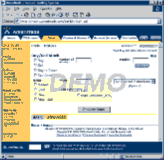 Advanced Stock Order
With an advanced stock order, you can make more refined orders. You can even set the order to expire by the end of the day.
Stock Order Readback
Once you have made the trade, you will be provided a readback report. This report will allow you to review your order and correct any mistakes. Once you confirm the order, your order will be executed. Then you will receive a confirmation that your stock order has been sent.
Extended Hours
There is a special trade process for extended hours. This function has all of the options of the basic stock order, but it lacks all of the features provided by the advanced stock order.