|
|
|
|
|
|
|
|
|
|
|
|
|
|
|
|
|
|
|
|
|
|
|
|
|
|
|
|
|
|
 |
|
|
|
Relatively Easy and Cheap Home Automation
-- How I Automated Our House (07/2001)-- |
|
|
|
|
PAGE #2 |
|
|
|
|
|
|
|
 |
|
|
The Sony Protocol for Talking to Equipment: |
|
|
|
|
|
|
The Sony control-A1 protocol allows the PC to talk to the audio products to determine what CD is playing, what the volume level is, what audio sources are on, etc. It is the key requirement to allow looking up of CD information on the internet to determine artist, song titles, lyrics, and album art. CDJ scans each CD in the Sony player, then goes out to the internet and downloads all the information about it from "public" databases. Be aware that some Sony products, like the DVD jukeboxes, use a protocol called Control-S which allows only a one-way interface, which is basically a wired remote control. It does not allow the component to talk back, making determination of the current CD playing impossible as well as simply whether the component is even on. Other brands are controlled by Infared (IR) and are one-way. Other protocols like Compu-Link are not supported by any automation software I have seen. |
|
|
|
What to look for in Audio/Visual Equipment: |
|
|
|
When looking for audio/visual equipment to automate it is best to go with Sony components with the Control A1 protocol. The protocol allows two way communication between the component and the PC. I would STRONGLY recommend only Sony brand CD jukeboxes be used, the cheapest models fit most needs. Other brand components can be used with some success using IR only. As you see I have many non-Sony components in my setup, but I only control the Pioneer receiver from the PC, and am limited to IR controlable features. When using non-Sony components look for discrete remote control buttons for all modes.
For instance, if the same remote control button is used to toggle between different Dolby Surround Sound modes you will not be able to automate that feature. The reason is that the PC has no way to determine what the current mode is, so it doesn't know how many times to simulate a remote control button being pressed. If the current mode is 1 and you want to get to 3 the remote control button would be pressed twice, if it was on 2 the remote control button would need to be pressed only once. That is impossible to automate without knowing the current mode. A simpler instance would be if the TV only had channel up and down buttons. Without looking at the TV, how would you go to channel 12? You couldn't because you would have no idea what channel you were currently on so you wouldn't know how many times to press the button. Of course, most TV remotes allow typing in the channel number but hopefully I got across the limitation of IR when compared to Control A1. By the way, some products do have discrete codes even though the remote control that comes with it does not. This is usually the case for power on/off. Be sure to check for speaker A/B codes if you are planning a multi-room audio system. For Sony product compatibilities see the Nirvis site. To determine how to control other brands you'll have to download CDJ and see what is available or consult RemoteCentral. |
|
|
|
Where to start: |
|
|
|
My advice would be to get an X10 ActiveHome package from www.x10.com. That is the easiest, and least expensive at about $50, place to start. If you can get the modules configured, the remote control configured to control your TV and lights, and the PC software loaded and working then you should have the ability to go further. If you get too aggravated with the distance limitations of X10, or the quirkiness of which outlets work and don't work based on the electrical phase of the outlet, or the configuration of the software, then you should not proceed with automation. Do-it-yourself automation is a two-steps forward, one-step back process. No matter what any web site or marketer says, all this stuff needs to be hacked together in order to work. There is a reason people get paid thousands of dollars to automate new houses. The layout of your home will also determine how much you can do. There is some amazing stuff that can be done if you have the time, patience, technical abilities, people connections, and money to do it. |
|
|
|
 |
|
|
|
|
|
|
|
|
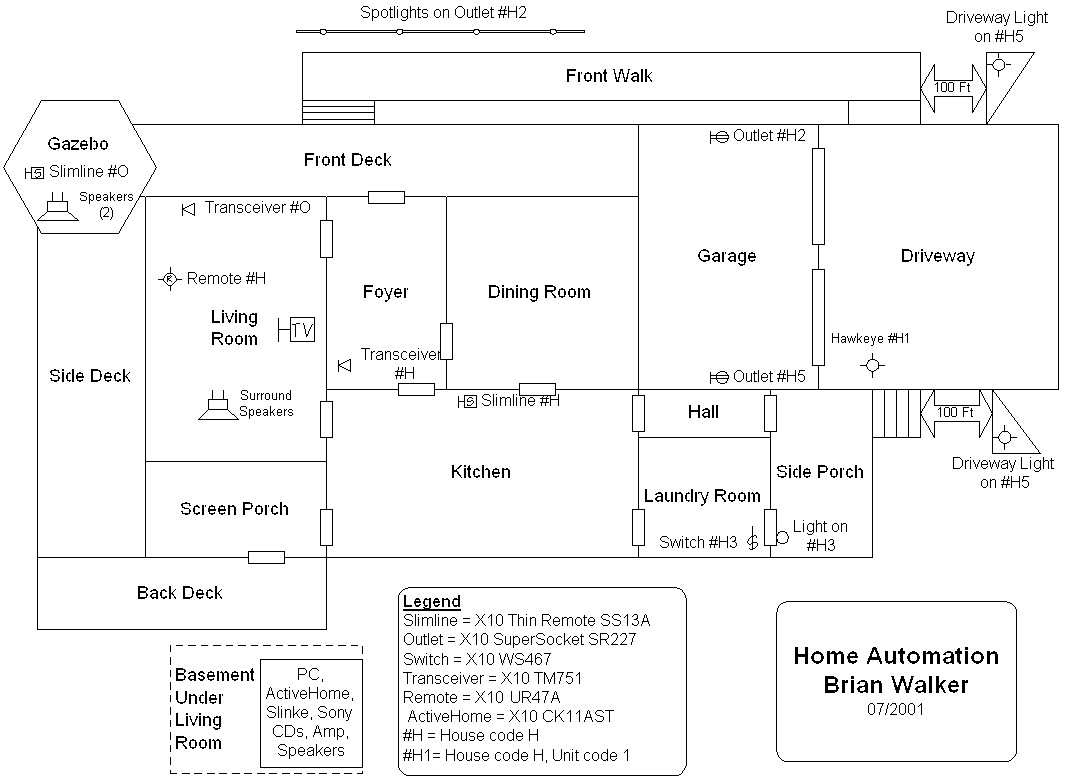
Diagram |
|
|
|
|
|
|
|
|
 |
|
|
|
|
|