|
|
|
|
|
|
|
|
|
|
|
|
|
|
|
|
|
|
|
|
|
|
|
|
|
|
|
|
|
|
|
|
|
 |
|
|
|
Relatively Easy and Cheap Home Automation
-- How I Automated Our House (07/2001)-- |
|
|
|
|
PAGE #1 |
|
|
|
|
|
|
|
|
 |
|
|
 |
|
|
|
Hardware: |
|
|
|
|
|
|
|
PC - Used Pentium II 233, 64MB RAM, Matrox 450 Video Adapter w/TV out ($400)
Pioneer VSX-9300 Receiver ($500 in 1989)
Nirvis Slink-e v2.3 Automation Interface ($249)
Sony CDP-CX200 CD Jukebox ($200)
Sony CDP-CX400 CD Jukebox ($279)
X10 modules that use power lines to control lights (about $100)
Very old Sony 19" TV (to be replaced soon) |
|
|
|
Software: |
|
|
|
Microsoft Windows 98
Nirvis CDJ - free audio jukebox and home automation software
Matrox Video Clone Software - for TV display of PC screen
IBM Home Director (Same as X10 ActiveHome) - free X10 module scheduler to turn on/off lights at certain times
Microsoft Visual Basic LE
PartyGUI - customized free software for TV display that shows what music is playing, any cover art, and the lyrics (soon). Also allows remote control access to select specific music from living room (soon). |
|
|
|
Wiring: |
|
|
|
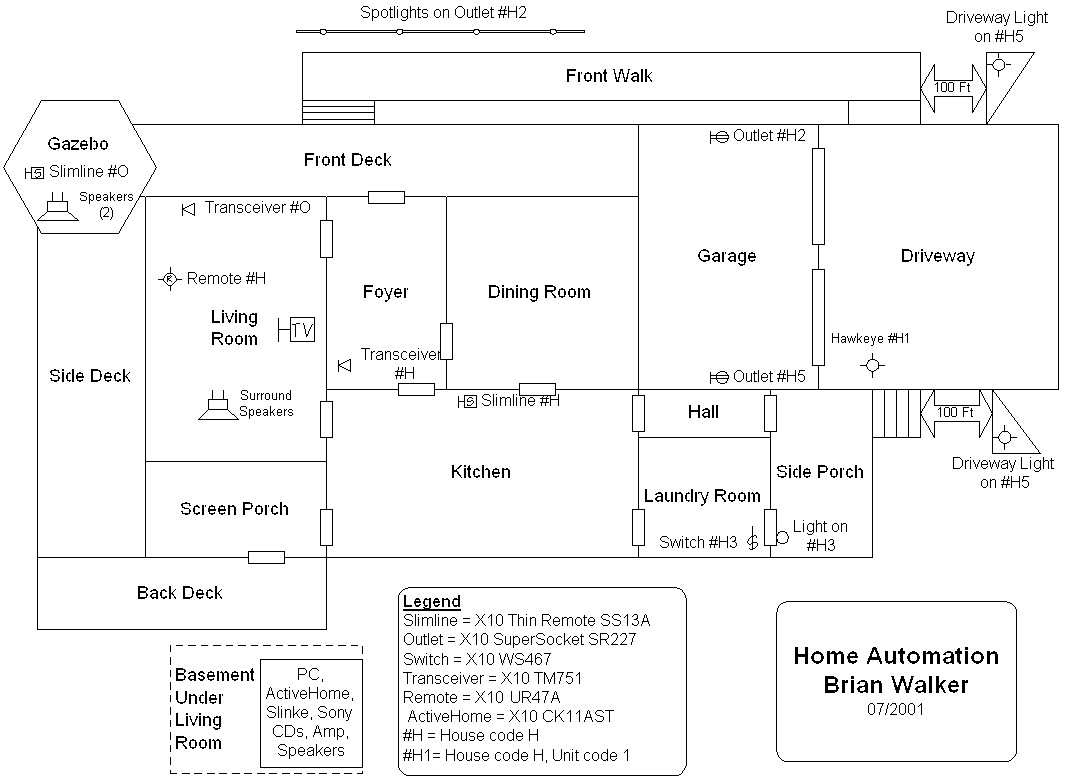
Diagram |
|
|
|
|
|
Speaker wire from basement to living room (4 speakers)
Speaker wire from basement to gazebo (2 speakers)
Video wire (RCA, soon to be S-Video) from PC in basement to TV in living room
Audio wire (RCA) from TV in living room to audio receiver in basement
Wireless X10 RF (radio frequency) remotes for music and light control
X10 Receivers for sending commands from X10 RF remotes to X10 modules and Slink-e
Slink-e IR transmitter from Slink-e in basement to front of Pioneer receiver in basement |
|
|
|
The Nirvis Slink-e: |
|
|
|
The Nirvis Slink-e is a little box that attaches to a serial port on the PC. It controls most Sony audio products via Sony's built-in Slinke two-way interface, a protocol called Control-A1 or A2. If you have an X10 automation module connected to another PC serial port on the PC, it can receive and send X10 commands from the power lines of your home. The Nirvis Slink-e also controls other equipment, such as TVs and non-Sony products, via standard IR (infrared red). It can both receive IR commands -- say from a remote control, and send IR commands -- say to a receiver to turn the volume up just as if its remote control button was pressed. This is accomplished by placing IR transmitters in sight of the equipment to be controlled, and IR receivers wherever you want to use a remote control. The IR transmitters and receivers must be physically wired to the Slink-e. Just released is a Xantech connector for the Slink-e, it allows advanced home automation such as keypads for the modern "automated" house. Unfortunately, it replaced a very simple and cheap Slink-e specific IR home automation expansion module that many people used. If you buy a Slink-e today, you'll get the ?Xantech interface, which I don't have any experience with. |
|
|
|
|
|
 |
|
|
|
 |
|
|
|
|
|