Particle System
Because this website is not a text book so I won't go through the whole detail about this function, nevertheless I will provid some knowledge as far as I know from my research.
Particle system has a major role in creating the special effect within the 3D movie as it has the ability to produce fireball, water splash, laser beam or any other effect that capable of doing something that ordinay polygon can not do. There are 5 major components within the particle system:
HV Emitter:
The invisible null object that can be visible only by adding with Hypervoxel. Hypervoxel is the plug in that work in conjunction with volumetric allowing any texture to be included in the process of making the rendered effect particle. This usually involves in making the smoke effect or other can create the nurb object out of the unseen null by simply selecting "surface" out of the object type option, otherwise the "volume" is effective for making the smoke while "Sprite" take up a slice of the Volume and thus allowing the rendering process becoming more quicker.
Polygon emitter:
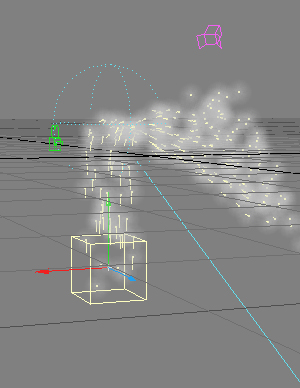
A self generated polygon as the surface editing can be applied. They are visible through * Open GL viewport. This emitter can be used for creating spark or firework effect, otherwise can be work in conjunction with hypervoxel like HV emitter.
(Open GL Viewport is an option that allow you to view outcome of the effect through the camera view without having to go to viper or render but result will be not be as clear as the actual outcome result. Nevertheless this will give you the idea of how your object is going to look like in the final result.)
Both of HV and Polygon emitter are controlled by the same property that dominate their motion, gravity, number of emitter birth and the frame where they will be born or die out.
The other 3 elements are the controller that dominate HV and Polygon Emitter.
Wind controller:
Effecting both emitters to be flow away in the direction that we assign through to the wind controller itself as well as making the emitter to rotate.
Gravity:
As the name of this controller already said, it creating the gravity effect to both emitter. However, there's already the gravity option within the property of HV and Polygon Emitter and therefore gravity option is considered the extra option for making the gravity effect.
Gravity is making a crucial part in the process of making the building collapse by using Kaboom plug in.
Collision:
This make the effect of emitter colliding against any objects that parenting the collision controller. Collision will bounce, stick, erase or attract or whever you choose through the mode within the property option for this control.
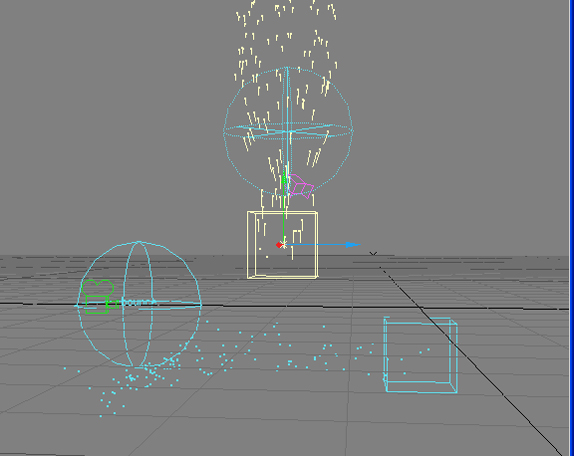
The diagram demonstrate the function of the particle as the 2 particle at the horizontal position is the HV emitter(the rectangle box) and the collision (the sphere) will bounce off the particle.
The 2 particle at the verticle direction, the HV emitter( the rectangle box) and the Wind particle (the sphere) will effect the particle to be moving in rotated direction or any other direction depend upon the mode that has been set up in in blend option within its property.
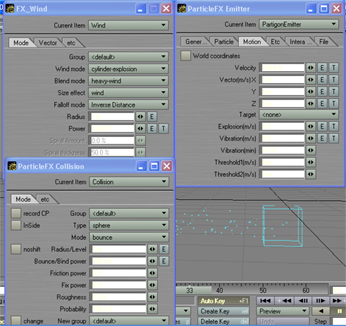
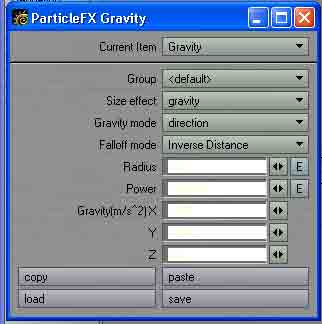
The look of the property for each particle:
(Top left) Wind property
(Top right) Partigon Emitter
property
(Bottom left) Collision property.
(The right position of the page)
Gravity property.