Character Animation
The main important of all the 3D animation movie as it applies to the 3D characters who every action is influence by the bone structure or even some 3D objects that have been influence by parent and child relation (parent and child relation is when an object, which has been assign as the child object, will follow another object, which has been assign as the parent object).
Within this page we will be concentrating on charater animation, which manipulate by the bone. As the bone set up has been mention from page 2 of the document journal, the heirachy of the bone structure will begin from first spine up till the hand (either left or right because we can do the reflection later). Then finish by constructing the legs. The first spine or also known as "root spine" will make a major role in manipulate the position of the character and it is really essential to have it along with the skeleton structure.
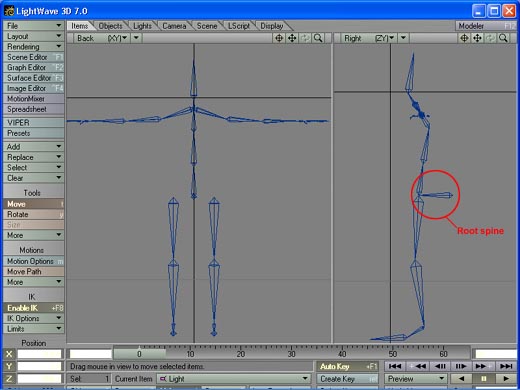
According to the diagram above, it displays the root spine within the circle outline as it is meant to be the begining of the process in creating the bone. Then continue by constructing the spinal part for the body and the arms (create one side and then reflect to the other side by using mirror tool) and then finishing with constructing the neack and the head. Then continue constructing the leg, begining from thing down to the toes.
Both thing needed to be parented with the root spine so that it will go wherever the spine go. This process can be done by go to motion option and select root spine as the parent object for the thing. However, before you making parent and child relation, you have to turn on "parent in place", which is located in Scene>Global>and then thick "parent in place" on.
Forward kinematic and Inverse kinematic
2 of the most common techniques in 3D character animation.
Similar to the process of Stop Motion Animation, forward kinematic is the animating process that involve moving every single joins of the bone in order to create the animation effect. For example, to move a character arm, I would start with moving around the shoulder bone followed by bicep and then finish with forearm. Although this method is pretty easy (for me) however it is still quite a time consuming.
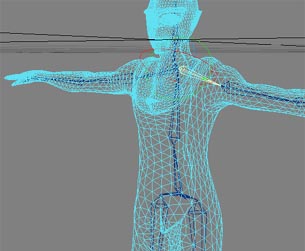
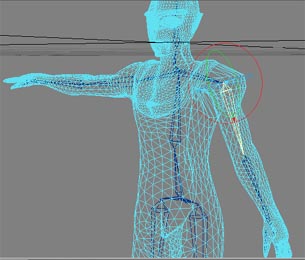
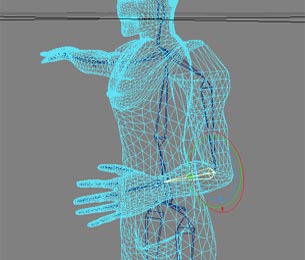
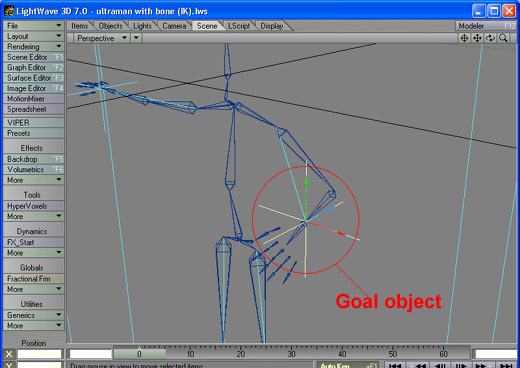
Meanwhile, with the Inverse kinematic, it provides a second obtion of moving the entire arm by using single null object (but within the lightwave, null object is called as "goal"). As the diagram demonstrates below, null object effect the arm to bend rotate according to the position of where the goal object is going.
This method may make the animation become less time consuming however there is the restriction of the direction where the goal object can go or otherwise distortion will occur to the part of the charater.