

Developing Software Solutions
Programming in Code
READ THE
PROBLEM
DEFINE THE
PROBLEM
DEVELOP
ALGORITHM IN FLOWCHART
"CODE"
INSTRUCTIONS FOR A CALCULATOR
TASK 1.1 (example)
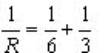
Solve the equation
Step 1
Ø
Recognise
reciprocals
Ø
Work
out reciprocals 1/6 and 1/3
Ø
Add
reciprocals
Ø
Get
reciprocal
Step 2
see
flowchart
Step 3
THE CODE (INSTRUCTIONS)

Step 4
TEST (AND DEBUG)
Press buttons on
calculator....do you get answer "2"
Step 5
DOCUMENT
"The
solution to  can be worked out on a calculator by
pressing the following keys."
can be worked out on a calculator by
pressing the following keys."
Task 1.1 Flowchart

TASK 1.2 (exercise)
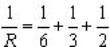
Solve the equation
Step
1
Step
2
see
flowchart
Step
3
Step
4
Step
5
Task 1.2 Flowchart

TASK 1.3 (exercise)
Solve the equation for R
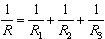 when given values R1, R2,
R3
when given values R1, R2,
R3
Step
1
Recognise
that values need to be entered.
Step
2
see
flowchart
Step
3
Step
4
Test
with values 6, 3 and 2.
Step
5
Task 1.3 Flowchart


TASK 1.4 (exercise)
Solve the equation for R
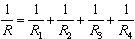 when given values R1,
R2, R3,R4
when given values R1,
R2, R3,R4
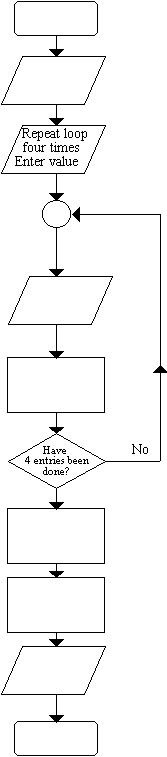
Step
1
Recognise
that values need to be entered.
Recognise
that some processes are repeated.
Step
2
see
flowchart
Step
3
Step
4
Step
5
Task 1.4 Flowchart
TASK 1.5(exercise)
Solve the equation for R
 when given values R1,
R2, R3,R4.....RN
when given values R1,
R2, R3,R4.....RN
Step
1
Recognise
that the number of values must be entered
Recognise
that values need to be entered.
Recognise
that some processes are repeated.
Step
2
see
flowchart
Step
3
Step
4
Step
5
Task 1.5 Flowchart
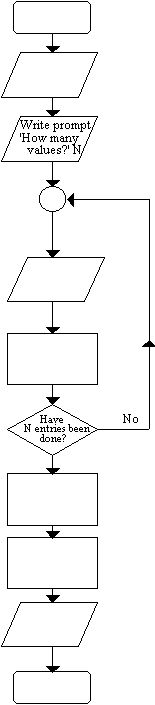
Modify
this flowchart to include a test for a zero entry.
A
zero entry can be used to end the program.
Modify
the flowchart so that the algorithm automatically counts the number of values.
Simple Pascal Programs
These
Pascal programs relate to Task 1.1
PROGRAM
TASK_1 ;
CONST
R1=6.0;
R2=3.0;
VAR
S,S1,S2,R:real;
BEGIN
S1:=1/R1;
S2:=1/R2;
S:=S1+S2;
R:=1/ST;
Writeln(R:3);
END.
This is not the only program that will do the
task.
PROGRAM
TASK_1a;
CONST
R1=6.0;
R2=3.0;
VAR
R:real;
BEGIN
R:=1/(1/R1+1/R2);
Writeln(R:3);
END.
Exercise 1.6
Write
a Pascal Program for Task 1.2. It is to be handwritten on A4 paper.
This is due on 14th February