


17.3 Bitmapped
graphics
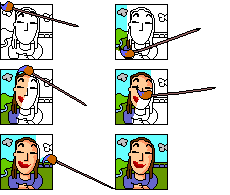
A bitmapped graphic
treats every pixel on the screen individually and represents this by bits in
memory. When you enlarge a bitmapped graphic you enlarge each pixel and create
a staircase pattern called aliasing. File storage formats are bitmap(.bmp), PC
paintbrush(.pcx) anf Tagged Image File(.tif).
Write
out the sentence and fill in the missing word
|
A picture such as
a drawing, painting, diagram, photograph or chart is a ????? |
|
The smallest part
of the screen that can be controlled by the computer is a ?????. |
|
A program that
creates a graphic by telling the computer how to display each pixel is a ????? program. |
|
A program that
creates a graphic by dividing the picture into a number of objects such
as straight line, curve or shape is
a ?????
program. |
|
Modifies a graphic
by hiding the parts of a picture you do not want to see is called ?????. |
|
Modifies a graphic
by changing the appearance and balance of a graphic is called ?????. |
|
A graphic
interpreted as a collection of dots is
?????. |
|
A graphic that
divides the picture into an number of objects is called a ????? graphic. |
|
The smallest unit
for storing data and is either 0 or 1 is a
????? |
|
The staircase
pattern created when you enlarge the bit-mapped graphic is called ????? |