|
|
|
|
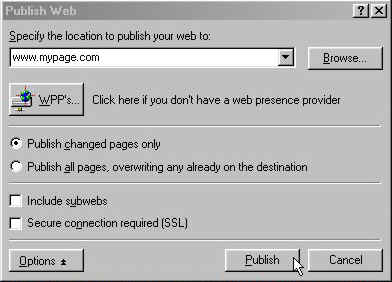
Publishing your new web is very easy. First you need a WPP (Web Presence Provider) to upload your new site to. There are many WPP's out there, some free, some not. Remember, just because they say its free, its NOT! All ISP's (Internet Service Providers) that offer "free" web space put ads on your pages. Just like this one. But, it's still cheaper than not free. www.geocities.com is one of the many ISP's that offer free web presence (NO LONGER WITH FRONTPAGE SUPPORT). If you want to find a different one, just go to a search engine and search free web space, the choice is yours. Once you have decided on a WPP and signed up for your new account, open up your front page web and from the toolbar click on "File" and then "Publish Web." Again, a box will open with many options. Enter the location to publish your web, something like www.geocities.com/skydive182, and simply click on "Publish." Another box will open wanting your sign in name and a password, the WPP will give you that when you sign up.
FrontPage will then scan the files on your C:/ drive and then the files on the destination drive and publish any changed pages. It's just that easy! UPDATE!!! GEOCITIES IS NO LONGER FREE WITH FRONTPAGE SUPPORT.
|
| ||||||||