|
|
|
|
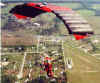
Lets add some DHTML or Dynamic HyperText Markup Language to your Page. First, what can DHTML do? It can do things like this with ease. Move your mouse over the picture below.
This is called a roll over. First, insert you picture where you want it. Then, from the toolbar, pick "Format" and then Dynamic HTML Effects. a new toolbar will appear that will let you choose from several effects.
From the box marked "On" choose under what conditions your effect will take place. From the box marked "Apply" choose the effect you want. From the box marked "Effect" choose the final effect you want. Try this useless but fun one, Click on the picture below.
Experiment with text and pictures. There are a lot of choices and if you don't like what you have created, click on the effect and choose remove effect in the DHTML toolbar. Most of these effects will work only in Internet Explorer but, Netscape is getting better at handling DHTML. If you want something for all browsers, try JAVA Script. It's a little harder to work with but creates better and more universally handled effects.
|
| ||||||||