
|
| HOME | INTRODUCTION | INSTRUCTION | SOURCE CODE | PROGRAM DEMO |
This section is teach you how to make a program by using C++ computer programmig language. The example of some program is in source code section. We are going to make a simple program. This program run on DOS mode. This program, yo can write on microsoft visual c++ or Borland c++. However, i used Borland version 3.0 which is very old and new version of microsoft visual c++. I was trying to compile the program which is written on Borland C++ version5, butit is not succes.
1 . In the beginning of the program we should write a description. THe mark "//' is used when you wrtie the description for the program.
| //This is a simple program. This program will output the word "HELLO" on the screen. |
2. start with the type of command that the program will use. Normally, the command which we usually use is
#include<iostream.h>
#include<conio.h>
. The first one is used for control output and input between us and a computer. The second one, i do not know, but i know that every program written in C++ language have to have this command.
3. We are getting start with the main program. The main program is start with the command named " int main() "
| //This is a simple program. This program will output the word "HELLO" on the screen. |
|
#include<iostream.h> |
| #include<conio.h> |
| int main() |
4. We have to put put this "{" mark and this "}" for open and close the segment of program or function.
5. When we want something to disappear on the screen, we use the command " cout<<".
6. Finally you have to write the final command to return.
getch ();
return 0;
7.the overall will like below,
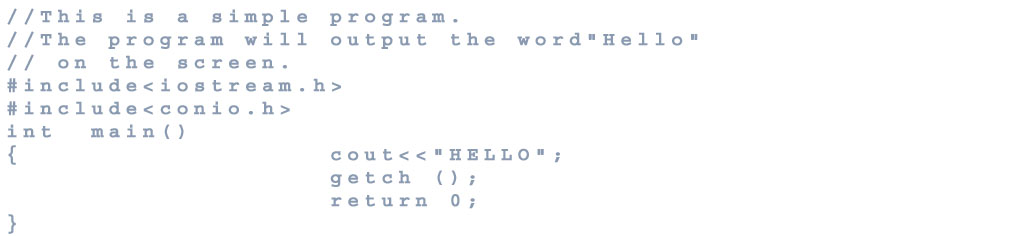
8. you compile it, by go command compile in the program such as Borland c++ or Microsoft visual c++. The new version of microsoft visual c++ you have to save it first.
9. The result of compile may error, if you write a program incorrect. You need to check back, did you write it rigt, or not.
10. run it, by use command run in the program.