 |
| lol |
 |
| Getting Started with Shaper |
| 1. Find your Worlds.ini file You can do this one of two ways, one by doing a file search on your C drive for Worlds.ini Second, by opening: A. Program files B. WorldsPlayer C. Scroll until you find the Worlds doc. |
 |
| Open your worlds doc with notepad. |
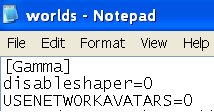
| 2. After you have opened the doc, insert the following line just beneath the line that reads "Gamma" Now that you have that done, close out your ini file and SAVE changes. You're ready to restart worlds!! Go on, do it now! BTW ~ that's a zero in the shaper line, not an "O" as in 'ohhhhhhhh' lol |
| Enter the text: disableshaper=0 |
| Make a back up of your Worlds.ini file before making ANY changes!!! |
 |
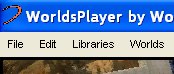
| 3. OK, now that you've restarted worlds you should see a few changes. At the top of your viewer you should see the tabs "File" "Edit" "Libraries" "Worlds" ... If for some reason you don't see this.. then start again.. and I hope you saved your original ini file to restore.. lol |
 |
| I take NO responsiblity for any Shaper mis-haps! |
| 4. You'll notice that your friends list is now GONE!!! Eeeeeeeeeek don't panic! Copy & paste from your original ini file that you made a back up of before attempting this l'ill adventure into your new ini file. Just be sure that you put it into the right place. Find the line in your NEW ini file that looks like [test.3dcd.com:6650] .. ( or something similar) .. with nothing below it. Then [www.3dcd.com:6650] .. ( or something similar) .. with a list of friends and mutes below it. Copy and paste everything between [test.3dcd.com:6650] & [www.3dcd.com:6650] under [www.3dcd.com:6650]. Restart worlds and voila! You should have your friends list back!! |
| A Newbie's Guide to Shaper |
| Now you have it, what do you do with it?? |
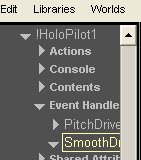
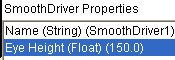
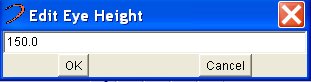
| It's an entirely new "Worlds" with shaper in your tool box! Some basics are: Floating 1. Click on the "File" tab at the top of your screen. 2. Go to "Pilot Properties" Click to open. 3. Choose "Holo Pilot1" ( It will be highlighted ) Double click it 4. Look for "Event Handlers" Click to open. 5. From the l'ill drop down menu choose "Smooth Driver1" Click it to open. 6. In the white box beneath the chat box, look for "Eye Height" Double click it to open a new box that will allow you to adjust the height. 7. Once you've chosen you're height, click "OK" The standard height is 150. 250 Will put on the bar at AH (Animal House) etc etc.. play with it and have fun! Just remember that as soon as you change your av that you will come crashing back down to 150 lol Play smart and choose a soft landing ;-) |
 |
 |
 |
 |
 |
| Return to Cosmic's Realm |
| Page 2 - Shaper |
 |
| Return to Sinz |