 |
| Taking An Avatar Code |
| So someone made you a great av, or helped you to modify the one you already have but you don't know what to do with the code, or how to take it. (Please remember to use a little consideration and ask before taking a anyone's code. ;-) Follow these easy steps and get ready for a new you! |
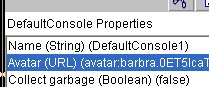
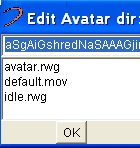
| 1. Open shaper by choosing "File" from the menu at the top of your Worlds viewer 2. Choose "Console Properties" Click to open 3. In the white box that opens up beneath the chat box, look for the line that begins with: Avatar (URL) (rel:avatar:dude.rwg) You'll see a code similar to this if you're using one of Worlds generic avatars. If you've already got a custom av you'll see something like this instead: Avatar (URL) (avatar:dude.0ET5lca ... etc) 4. Double click the avatar line you just found, a new window will pop up. 5. Your av code is already highlighted in the Edit window. Right click to copy the code. 6. If you have a code from someone that you want to put in. First delete your own code in the Edit box. Copy & Paste the new code into the same box, then choose "OK" Find yourself a mirror and admire your new self! lol |
| A Newbie's Guide to Shaper |
 |
 |
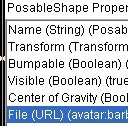
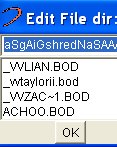
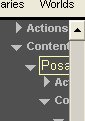
| 1. Right click on the person's avatar you want to take. Choose "Edit Properties" Shaper will open. On the left tool bar you may have to scroll a l'ill to find what you need next. It will look something like this ~~> 2. Click the "Posable Shaper" line, it will highlight. 3. In the white box beneath the chat box, you see posable shaper properties has opened. Look for the line that begins with File (URL) (avatar:barbra.0ET5lca .. etc) 4. Double click the line to open those properties. A new window will pop up. with the avatar code already highlighted. 5. Right Click on the highlighted avatar code, and Copy to your clipboard. NOW you have to find YOUR avatar code in shaper and put the new code that you just copied in it. And how do I expect you to know how to do that?? |
 |
 |
| Finding YOUR Avatar Code |
| Read on Grasshopper... lol |
 |
 |
| Flip Back to Page1 - Shaper Help |
 |
| More To Come.. |
| Worldsmarks |
| There are a ton of amazing custom made worlds out there, most now are streaming which means no down load is necessary. Just copy & paste the URL for the world into your Worldsmark. On the right menu of Worlds, go to Worldsmarks. Click it open then choose Change Location. In the box that pops up delete what's already in it, and paste the new URL, then hit OK. And you're off!!! See, that was totally painless. ;-) Have fun exploring! |
 |