"Flatting" means laying down the flat, nondetailed colors which will be selected and rendered later. The key is to separate objects from one another using areas of flat color. The more thorough the flats are, the easier it is to render them later. It is wise to lay "clean" areas of color, meaning tight separation between colors with minimal gaps of color between.
"Rendering" means to add the various colored details and effects (such as glows, transparentcies, etc.) that you see in today's comics using Photoshop tools such as Burn, Dodge, and Airbrush.
Below you will see examples of both. Hopefully this basic information will help you in understanding the meaning of both.
(NOTE: This information was taken from the tpb "How to Color for Comics" by Antarctic Press.)
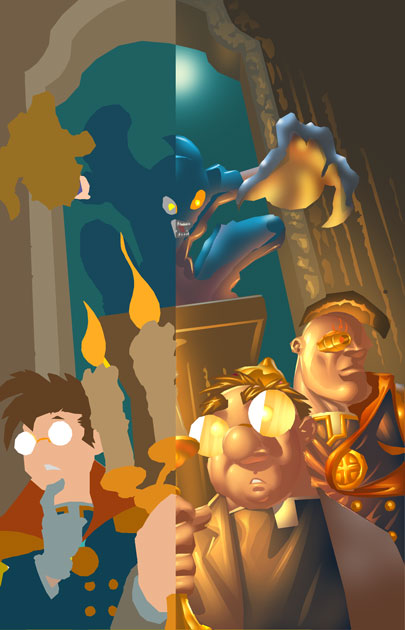
out the inks) flatted. As you can
see the drawing is, while colored very well, dull and not very interesting. It needs more detail and a sense of form, which is where the rendering comes in....
rendering makes a drawing more dynamic and exciting in appearance. Also, the rendering
colorist gives the figures a more 3 diminsional look by adding highlights to the skin and clothes.