 |
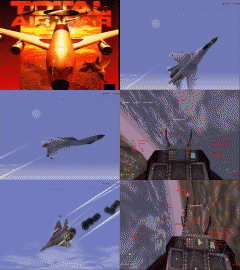
TAW ©
Features:
- Dynamic nonlinear real-time campaign
- 10 open-ended scenarios leading to over thousands of possible permutations
- You can assume the role of base commander and plan your operations
- Comprehensive mission planner and custom air-to-air mission planner
- Enhanced network options including connections to online gaming services
All F22 D.I.D. patches (glide and direct 3d for all versions)
Music Fix doc for f22 adf and TAW by Piper |
|
|
 |
 |
 |
 |
 |
|
|
|
 |
|
|
|
|
|
|
|
|
Check ReadMe for details and installation instructions.
|
|
|
|
|
I have modified
this file for you for increasing ground and air graphics details
and adapting the game to the PATCH : simply unzip it
in the "Program" folder.
Note: to use some
training missions... open with Note Pad the game.cfg file
and put to "0" instead "1" the
following string "LAND_TO_ANY_BASE=0 this way.
|
|
|
|
|
 |
| --Read more about TAW-- |
Patches are also
avaiable on: http://www.uk.infogrames.com/
home site and at...
Games Domain download section and
from...
U.S.A.
Infogrames developer
|
|
Dowload patches from
"Games Domain" download section directly
Total Air War 1.1 (for Direct3D)
Total Air
War 1.1 (for Direct3D)
Total Air
War 1.1 (new for Voodoo)
Total Air
War 1.1 (new for Voodoo) |
Total
Air War Patch 1.195 Readme.txt 
Please read carefully before installing the patch.
To install the Patch:
Go to the folder where you have installed Total Air War, open the program folder and
copy the supplied f22.dat into it. You will be asked if you wish to replace the
existing file, click on yes. The changes will take effect next time you start
Total Air War.
The following are the changes that the Total Air War Patch will make to the release
version:
Bug fixes:
- Fixed the problem of taxiing not working later in a campaign.
- Fixed AWACS skip-it bug.
- Fixed engine spool up sounds.
- You cannot now say "yes" or "no" in EMCON 1.
- Fixed wingmen range to fire bug.
- Fixed autopilot no fuel bug.
Patch additions:
- Added Support for Union Reality hardware.
- Added help message when trying to send messages in EMCON 1.
- Can now skip (SHIFT+S) while under threat on the ground.
- Can now drop tanks in EMCON 1.
- Chaff and flare now enabled in EMCON 1.
Removed from this version of total air war:
- The "Go to Noise con 5 message' when getting ready to taxi.
- The "Push one" message in relation to wingmen taxiing
- Player escort supply helicopter missions.
In addition we have added new options for the game.cfg file. To use these, simply go to
the
directory in which you have installed Total Air War, open the program directory and edit
the game.cfg file within it. Add one or all of the lines below to bottom of the file.
After each line is a short description of it's function. DO NOT add this to the game.cfg,
only add the lines in upper case.
START_ON_RUNWAY=1
This will put the player's flight on the runway at the start of any campaign mission
(Just like a scramble mission). The player can then just takeoff and start the mission.
You don't need to wait for any messages from the tower.
OTHER_FLIGHTS_IN_AIR=1
This will put you in the world when the other flights in your mission have taken off.
If you set the above flag also you will be able to get your mission underway very quickly.
REARM_WINGMEN=1
This means that when you land and rearm your wingmen will also be rearmed. This will
happen
even if your wingmen are in the air.
LAND_AT_ANY_BASE=1
This means that you will get a mission success for landing at any allied airbase.
The completion events will still state your real home base however.
MORE_CANNON_ON_HARD=1
Gives you 1750 cannon rounds on hard difficulty.
NO_COLLISION_ON_GROUND=1
Disables plane to plane collisions on the ground. |
 |
