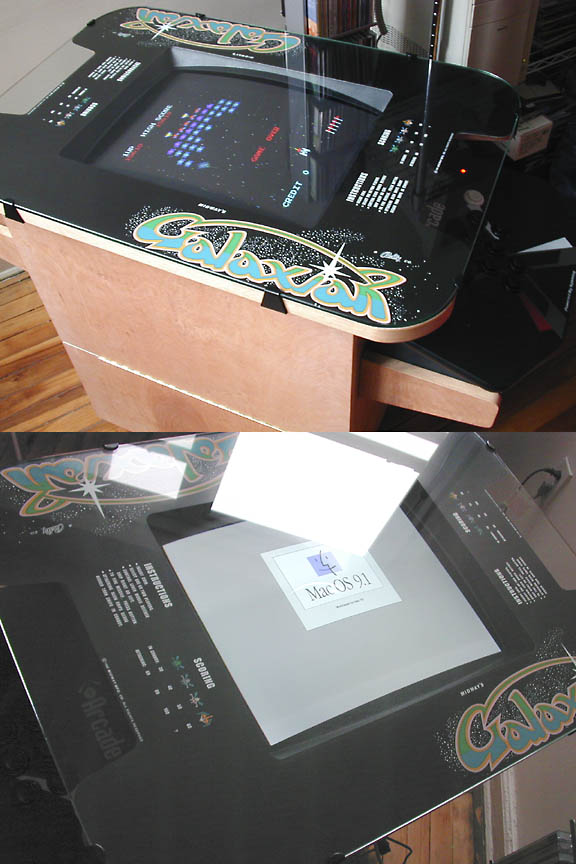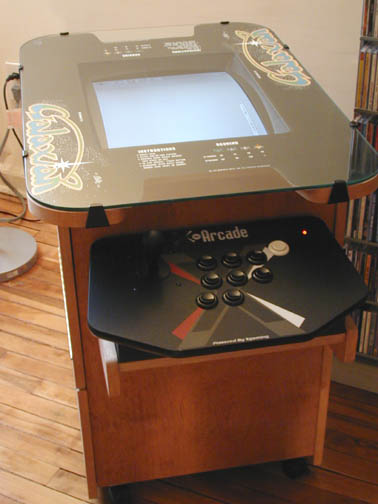
Like everyone that grew up with Space Invaders and Galaxian as a kid, discovering MAME as an adult is a dream come true. But we soon realized that playing it on a computer with a keyboard is just not the same. After seeing some really awesome home built cabinets on the web, particularly the ones on Build Your Own Arcade Controls site, I became obsessed about having/building/buying/getting my very own arcade machine at home. But being I live in an apartment with minimal tools and the inability to cut a straight line with a saw--it was just smarter and cheaper to buy as much pre-built stuff as possible to assemble my very own Macintosh based MAME arcade cabinet. I'm glad I talked myself out of converting an upright cabinet--it would have been really impractical/expensive and difficult to move around in my current surroundings. [I did call around locally for used broken cocktail tables but they wanted about $300 for one! I know, I know--there are cheaper ones out there but this is New York!] So here in these pictures, you see the final result of putting together things that I purchased off the Internet and what I already had. The computer that drives this thing is an old PowerMac 8500 with 300mhz G3 upgrade card that I happened to rescue from the trash heap[lucky me!]. After replacing the internal cd-rom drive and hard drive and doing a fresh install of the Mac OS, I installed a USB card in it along with a firewire card. The thing also had an ATI Xclaim GA video card in it.[This card is really nothing much, but for the classic games I want to run--it is fine.] It is running Mac OS 9.2.1 courtesy of OS 9 forever. The controller is an X-Arcade Solo ($99 + $19.95 for the USB adapter). Read notes and issues about this controller. The cabinet itself was purchased as a kit from Scott at Arcade Depot. Cocktail arcade cabinet kits start at $185. This is an excellent option for people like myself who has zero carpentry skills. Scott is a really nice guy and he modified the standard Ms. Pac Man cabinet for me to accomodate the X-Arcade[And he did it without ever seeing the X-arcade in person!] The cabinet arrived nicely packed and it was fairly easy to assemble over a weekend with minimal tools. The biggest challenge is mounting the monitor. Since I am not using a real arcade monitor--I had to fashion a shelf so that the monitor sits in there correctly.[And I do mean sit.] I also installed some wheels on the cabinet so I can roll this thing around if need be. To complete the illusion, I purchased the
Galaxian cocktail underlay for $40 and plastic monitor bezel
($25) from Arcade Amusements. The cocktail glass top, I found on eBay for $75 and the glass clips I got from Scott . The monitor is an old fixed frequency 19" Sun workstation trinitron GDM-1962 which I removed from its case. [Luckily--it has a flat bottom and is strong enough to rest on its "back" see photos.]I used a VGA extension cable since I decided not to put the Macintosh inside the thing because the Mac also serves duty as a iTunes/MP3 jukebox. This is a much more elegant setup for me since I also have a second monitor[an LCD], connected the internal video which is "mirrored" to the main screen--so I can select games without having to twist my neck to read the screen in the cabinet. One of the neater features of MacMame is that the second monitor is automatically blanked when MAME is running. I'm really not that much of video game junkie[honest!]--but this thing is like a piece of sculpture and watching the "attract" mode--where the game beckons you to insert coins is quite hypnotic. And it will definitely be fun to have friends and family over to play. And because of that--it's worth every penny. |