Main Features
- Automatically maintain an active display of Celebrities and Portfolio data in the background
- Manage any number of Portfolios
- Displays all Celebrity details in a single table to help with purchase decisions
- View detailed forecast of Celebrity share price
- See a detailed break down of Portfolios
- Create What If scenarios for any Portfolio
- Monitor the background interactions with the Celebdaq server
Automatic Updating of Data
All data displayed in the tool is held internally within a cache which is automatically refreshed periodically via the HTML pages of the Celebdaq web server.
No special protocols or accounts are required. The tool parses the web pages generated by the main web site and caches the data in memory.
Manage Multiple Portfolios
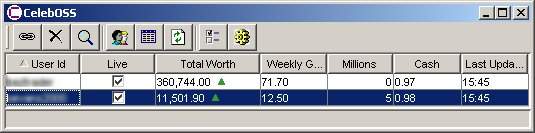
The tool allows you to manage multiple accounts from one tool. For each portfolio a brief summary is displayed on the main window. The window displays the Total Worth and Cash, as well as other simple properties. Each portfolio will be updated account to the existing CelebDaq account details.
Any existing Celebdaq portfolio can be registered with CelebOSS. At least one portfolio is required for the tool to maintain a cache of Celebrity values.
All the other CelebOSS window can be launched from here.
Celebrities Table
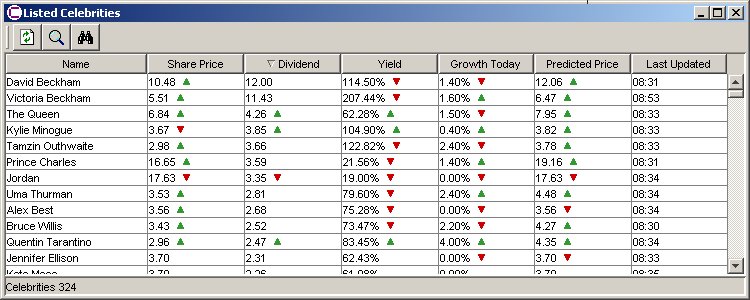
The table window displays the summary value for all celebrities in Celebdaq. Each column is sorted by clicking on the column heading; also a description of the each column contains is available as a tool tip.
The changing values are tagged with up or down arrows according to the current value change. The tool tip for any of these cells will display the old value and the time it changed.
Celebrity Display
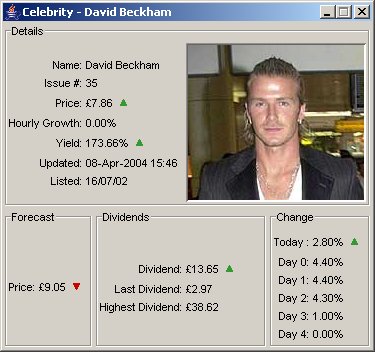
Any celebrity in the tool can be displayed in a more detailed view. This reflects the main elements of the data displayed in the web server. Certain changeable values like Price are shown with a up or down arrow indicating the current change in the value. The tool tip for these values contain old, new value and time of change.
The Yield percentage is the potential dividend divided by the current share price. It gives a reasonable measure of whether these share will provide a good return on investment. Sections showing the Dividend summary and percentage change are also present.
The share price forecast assumed the current daily growth is maintained from the current date to the Monday. This give a reasonable estimate of the share price.
Portfolio Window
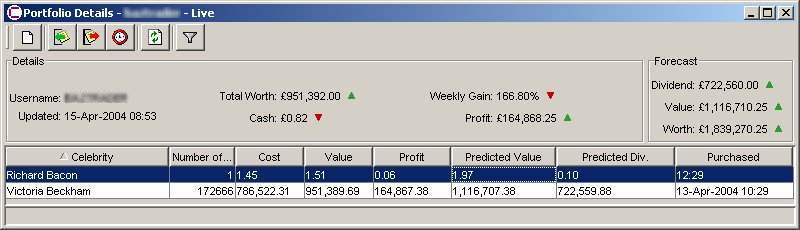
Each registered portfolio can be displayed in a more detailed view. The detailed view presents a summary of the main values and all the owned shares.
This window also displays a forecast of the total dividend for the coming Friday of the week. This is calculated according to Potential Dividend of the Celebrity, the Number of Shares and the date the shares were purchased. The total forecasted dividends uses a pro-rata calculation as defined in the Celebdaq FAQ. The purchase date and time can be adjusted for each share block; this is because the actual purchase date is not available via the Web interface.
The forecasted total worth on the next Monday is also displayed. This again helps make down trading decisions. The forecast worth is based on the forecasted dividend and the forecasted share price of the owned celebrities.
Any number of local Portfolio copies can be created from a single live one. These portfolios can be used to see the impact of buying and selling shares without effecting the live Portfolio.
Portfolio based plug ins can be launched from this window. These plug-ins may be automated trading tools.
Monitor Window
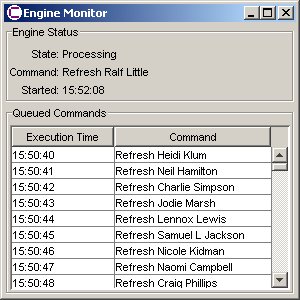
This window can be used to show the queued pending requests going to the Celebdaq server.
Settings Window
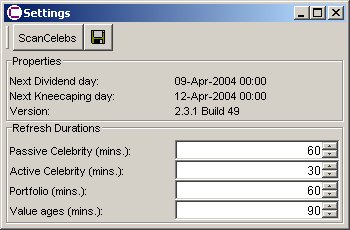
This window allows the refresh periods to be configured to suit the bandwidth of the internet connection being used.
System Tray
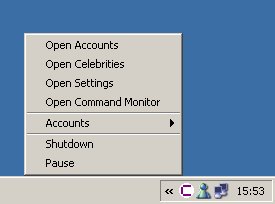
When running on a windows platform CelebOSS sits in the system tray and provide a short cut menu to any of the window. This mode also provides a notification capability where Balloon Boxes are displayed whenever a Portfolio worth changes.