| MilliKeys |
Graffiti Replacement
for Palm
handhelds |
Readme File |
 |
Installation 1-2-3:
If you just want to use the built-in layout, it should
be easy to set up:
- Install the program components: X-Master
(X-Master enables other programs, like MilliKeys, to modify system functions),
MilliKeys.prc and MKeyHack.prc.
- Somehow, get a stamp on your screen. It looks like there is
now enough demand for stamps that I could have them manufactured; however, I
don't have a supplier as of yet.
- Run MilliKeys. In the "Manage" screen, check the box
labelled "Enable hack (i.e. keyboard)", and click "Calibrate" to tell
MilliKeys the exact size and position of your stamp.
- MilliKeys lacks native support for PalmOS version 5;
see here.
If you want to use a layout you downloaded from
somewhere, it's more work. Typically the layout is provided in plain text
format (as a memo which starts with the words "MilliKeys Layout:"), in which
case, you need to:
- As per the instructions above, install MilliKeys and
get a stamp.
- Start Palm Desktop on your PC and click the "Memo"
button to reach the memo editor.
- Click "New" to make a new memo. Copy and paste
the text of the layout into the new memo.
- HotSync to get the memo onto your Palm device.
- Start MilliKeys, open the menu, and choose "Import from Memo".
If you copied the layout correctly, you should be asked whether you want to
import the layout. Choose "Yes, yes, a thousand times
yes!"
- In the "Manage" screen, select your new layout from
the list. Check the box labelled "Enable hack (i.e. keyboard)", and
click "Calibrate".
Release
Notes
Beta: Version 1.0.2
- All help buttons now helpful (help added for
"Stroke Detection" and "Big Strokes/Macros")
- Resource code reorganized to support proposed French translation
Request for help
- Do you like
MilliKeys? Are you using it in some novel
way? Then drop me a line, I'd like to hear about it. And I'd like
to get some of those "actual user quotes" on my web page, you know, the ones
with such realistic gushings as "Best software for any purpose on any platform I've
ever seen! «««««! I use MilliKeys for everything
from doing my taxes to teaching my kids to write! I'm never without it,
now I write novels while scuba diving!"
- If someone could draft a manual for me, I would
appreciate it. HTML would be the best medium.
- Marketing seems to be a problem! Downloads of
MilliKeys have dropped to abysmal levels! If you have some guru
marketing advice I'd love to hear it!
- Translations wanted! Can you speak English and another
language?
- Would someone who uses a lot of input hacks tell me how well MilliKeys
interacts with other input software? I think it will depend on the order of
the hacks; if MilliKeys is enabled last (i.e. is first in the call chain) it
will probably work best, but whaddo I know...
- Could someone create equivalent MilliKeys layouts based
on the layouts of QuickType and/or SilkyBoard? This would be make MilliKeys
useful for QuickType and (possibly) SilkyBoard users. QuickType users
can use wider versions of their favorite QuickType stamps and take advantage
of MilliKeys' more flexible calibration; I'm not sure what's in it for
SilkyBoard users, but maybe a SilkyBoard user can suggest some use for a
MilliKeys version of the layout :)
Known Issues & Bugs
- ShortCuts do not work. I do not know how to make them work--can a
developer help?
- When you are editing the active layout with the hack enabled,
changes do not take effect in the graffiti area until you
quit the program, switch layouts, or perform certain other actions.
- Help is incomplete.
- Sometimes, the popup trigger beside "Editing" shows a truncated or even
incorrect label, especially after doing certain manipulations on the "Master
Control" screen.
- Bug
tracker page
Beta: Version 1.0.0
Important note for upgrading users: You must disable the hack before HotSyncing. Be sure
to install both PRC files. Finally, before using the hack, run the
application once from the application launcher in order to upgrade the setup
database.
- Key Clicks added: you can have MilliKeys
make a click sound under conditions of your choice.
- Tap & Hold added under Stroke
Detection [this goes out to Kyocera 7135
users, two of whom have donated a total of $35, more than half my total income
from the MilliKeys project!
Hint
hint!]: Now, MilliKeys can do one of 6 things when you tap & hold
a key:
- Pass your stroke through to graffiti
- Cancel the key or stroke you were making
- Simulate Shift key press
- Simulate stroke toward the nearest edge (up, down,
left or right). For example, if you tap & hold spacebar, a stroke
downward from spacebar is simulated.
- Simulate stroke in a specific direction (up, down,
down-left, etc.)
- Use key from "Extra" layout
- Greatly improved smart passthrough
makes it more likely your graffiti strokes won't be stolen by MilliKeys.
- Stroke Detection and Options screens redesigned; the "Steal"
options have been renamed "Allow" options (but they still have the same
effect.)
- New color icon, readme file
- Hideous/pretty blue line added to separate the
"Editing" popup list from everything else on the screen.
Beta: Version 0.9.9[b]
- User
interface changed in order to
support the new features in this version. They simply wouldn't fit on
five screens! Now you switch screens with the popup list in the
top-right corner.
- "Help"
button added to every screen
except Test. Most of the help is written.
- You can now (formally) select the active
(graffiti-area) layout separately from the layout you're editing.
- Customizable Shift
Map added. Now
you can change the way "Shift" and "Caps Lock" keys work.
- Added special keys
\] and \[,
which switch to the next and previous layouts, respectively. These keys
are useful for creating "multi-language" layouts and provide an alternative
strategy for implementing "Num Lock".
- New 'Welcome' screen appears the first time you start
MilliKeys.
- Source code: Visual C++ .NET project and source
notes added (VC++ 6 project will no longer be maintained.)
- 0.9.9a: fixed two bugs.
- 0.9.9b: fixed a serious bug in the layout
editor
Beta: Version 0.9.7[a]
Important note for upgrading users: You must disable the hack before HotSyncing. Also, be
sure to install both PRC files.
- The Sort
button is now implemented. You can
sort your list of layouts now. No one ever complained that it didn't work, but
now it does!
- Bug fix: Well, it seems whenever I add a new feature,
there's a bug in it! The list of programs under "Run a Program" had a
difficult-to-describe problem when exiting the Calibration dialog. While this
problem has no visible effects, it is possible that it modified memory it
shouldn't have, possibly leading to decreased system stability. Incidently,
given that every new feature has a bug in it, maybe everyone should be wary of
the Sort button ;^)
- Removed all gcc optimization in 0.9.7 as it was
causing a mysterious crash, leading to a 70K PRC; restored it in 0.9.7a after
implementing a workaround. PRC back down to 52K.
- Note: The hack is unchanged from 0.9.6.
Beta: Version 0.9.6
At long last I've finished the new version. I quit
working on MilliKeys four months ago due to excessive work load and imperfect
health. Both of these will probably return as the new semester progresses, but
here's a new version before things get heavy. I know there's a couple of bugs
left, but I've decided to upgrade the program to 'beta' status.
- Added "Run
Program " macro
functionality: MilliKeys strokes can now be used to start programs.
- Fixed bug: Shift key didn't work for punctuation.
- Fixed bug: on-screen keyboard didn't work if Steal
Left/Right was unchecked
Alpha: Version 0.9.4
- Separated the meaning of \G from \! .
- If assigned to a tap key,
- \G means immediate passthrough--MilliKeys will not
recognize any strokes, not even big strokes.
- \! means deferred passthrough--MilliKeys will
pass the tap or stroke through if the user does not make a small or big
stroke.
- If assigned to a short stroke (up, left, etc.),
- \G means passthrough. (Of course, passthrough
cannot be immediate because that would imply passthrough already occurred
before the user made the short stroke.)
- \! means to defer to the nearest direction. For
example, if \! is assigned to up-right, and you stroke up and right (but a
little more right than up), MilliKeys will use the right stroke key in its
place. If that key is also \!, then the stroke is passed to Graffiti.
- Fixed "Hack.cpp Line 249: Assertion Failed"
An oversight in the Makefile prevented the "Release"
build flags from being used on the hack. As a result, at least one user had
this assertion failure (the assertion in question did not indicate a bug in
MilliKeys; you see, I was wondering whether SysCurAppDatabase always returned
'appl' as the type of the running program, so I had an assertion to check it.
The failure indicates that for this particular user, an app he was running was
not of type 'appl'. This would not have been a problem had I been using the
correct build flags.) To my surprise, once the correct flags were in place,
the hack dropped to less than half its original size. It now sits at 9
KB.
Alpha: Version 0.9.3
- Fixed an error in the special key list.
- Fixed interpretation of \x and \u with prefixes (;,
', ", ~) and output of \u.
- Decreased PRC size by 3KB by linking with -lnfm (this
causes New Float Manager, which is built into PalmOS, to override GCC's float
stuff). The hack does not use floating point, but this flag should make it
safe to do so in the future.
Alpha: Version 0.9.2
- Whoops, sorry everybody! I had the feeling there was
something 'off' about the calibration, and indeed there was! I was using the
wrong coordinates for calibration; specifically, the calibration window is
three pixels down from the top-left corner of the screen, so the coordinates
used for calibration were off by three pixels. I have now compensated for this
fact and all is well. Until someone finds another bug...
Alpha: Version 0.9.1
- Two small changes allow MilliKeys to run on OS 2.0 (e.g. Palm Pilot Personal) machines. It probably doesn't
work on OS 1.0 machines (though I haven't tried it), so the program refuses to
run on those. I pity the foo with a Pilot 1000!
Alpha: Version 0.9.0
Important note for upgrading users: The database format has changed, and the new version
cannot read the database from the old version; furthermore, there is a bug
which causes it to crash on exit if an old database is present. Therefore,
before installing the vew version you MUST delete the old version, which
causes the database to be deleted. If you have created a layout you want to
keep, export it to a memo before deleting MilliKeys.
Luckily, there are only about three users (yeah,
including me) so far, so this problem is not what I would call a big deal.
Also, when upgrading, remember to disable the hack
before HotSyncing, and be sure to install both PRC files.
Changes
- CALIBRATION! This sucker took the good
part of ten hours, partly because my it's been a year since I did serious
algebra. Since I couldn't use trig (the Palm lacks math functions) I used a
six-parameter calibration system: origin(x,y), size(x,y), and
skew(vertical@right, horizontal@bottom). Transforming points from pixel space
to keyboard space was easy enough, but going the other way required me to
"reverse" my equations, solving four of the six parameters in four
simultaneous equations...
- Rotated & skewed
layouts : you don't
have to put the stamp on squarely, thanks to the calibration's skew
parameters. If you wanted, you could even create a small square stamp and then
rotate it into a diamond and glue it on your Palm, then calibrate to that....
as I expected, the calibration equations tend toward infinity around 90 degree
rotation, so I added a "SwapXY" feature which sort of uses (Y,X) for
calibration instead of (X,Y) when the parameters are near infinity, thus
allowing layouts to be rotated 90 degrees.
- MilliKeys will complain that "the point you entered
seems incorrect", but don't be fooled; it can handle just about any
combination of calibration points.
- Keyboard toggle
feature : you can now
disable the keyboard with a stroke from the bottom of the screen to the very
top and back down again. You can re-enable the keyboard with the same stroke,
or by running the config program. Necessity is the mother of invention: I was
compelled to add this feature after a miscalibration put the "Applications"
button off the screen.
- Next/previous
layout : while I was doing
the toggle feature, I thought I'd add this too. To switch to the next layout,
stroke from the bottom-left to the top of the screen and down to the bottom
right. To switch to the previous layout, do the same thing in reverse. The
name of the new layout appears momentarily at the bottom of the screen.
- Added "smart" and "dumb"
graffiti passthrough modes. With both of these enabled you should be
able to use Graffiti or MilliKeys as you please, without disabling/enabling
the keyboard.
- "Dumb" passthrough passes a stroke to graffiti if you
move the pen a certain distance you specify from the starting point. With dumb
passthrough enabled, you can enter any graffiti stroke (except a dot, of
course) as long as your strokes are large enough.
- "Smart" passthrough basically passes a stroke to
graffiti if, after starting the stroke, you change its direction. Actually
what it does is watch the angle between the starting point and the current
point. If, after stroking out 10 pixels, you change the angle by 34±11 degrees
(it's approximate because of the lack of trig), the stroke is passed to
graffiti.
- "Fit layout into remaining space" and "compatibility
passthrough" removed; semantics of "steal left/right" have changed. Now, if
steal left/right is disabled, strokes on the left/right are immediately passed
through. This means that big strokes no longer work if the starting point is
the left/right side, unless you are "stealing" that side.
- If your stamp is small and the left and/or right side
is left uncovered, you do not need to uncheck the "steal" option(s). Instead,
just use the calibration feature to tell MilliKeys where the stamp is located.
It may complain that the stamp is in the wrong place, but you can always
override its warning. If you tap a location that is not part of your stamp,
the tap is automatically passed through, regardless of whether you've
unchecked the "steal" option. Effectively, what was "compatibility
passthrough" in previous versions is now always on, and takes effect when not
stealing the area tapped.
- Ability to disable/enable hack within the app itself.
For now, you should always keep "Disable hack in these screens" checked,
otherwise you will become confused when the hack does not respond to
configuration settings: changes to the layout do not take effect until you
quit the app or switch to another layout.
- App is bloated to 53K (86K debug); added a new code
section for the calibration dialog. It's just bursting with features!
Alpha: Version 0.8.6
Important unimlemented features
- A calibration option is not yet implemented. As a
workaround, tweak the sizes of the keys in the "Edit" screen until things seem
right.
- Ability to disable/enable hack within the app
(X-Master users only)
- Smart graffiti passthrough--without this feature,
MilliKeys can't be used as a graffiti supplement like QuickType.
Changes
- Added export/import
to/from memo
function. This can be used as a workaround for the fact that your layouts are
not beamed when you beam MilliKeys: export them to memos, and beam the memos
instead. Also, as I plan to make a change to the database format soon, it will
be useful to have the exported memos which, unlike the database, will be
importable into the future version.
- Fixed UI issues on pre-OS 3.5 machines (e.g. Palm
III). Now the list on the "Manage" screen should not interfere with other
screens.
- Changed optimization from -O3 to -O2, to fix a
mysterious crash. The crash was rather difficult to investigate, for putting a
TRACE or TRACEMARKER in the problem area caused the problem to disappear! So
bye bye optimization.
- Now includes GCCFilter and NoStdErr in the source
code archive.
GCCFilter & NoStdErr - Visual C++ users only
These programs help Visual C++ interpret the output of
GCC in its "Output" window. GCCFilter translates error messages to a format VC++
understands (so you can press F4 to step through the errors), while NoStdErr is
needed for Win9X users to redirect stderr to stdout. Without NoStdErr, GCCFilter
does not receive the output of stderr. But of course, stderr is precicely what
GCCFilter is supposed to process (i.e. error messages), hence the need for
NoStdErr. On the command line, run GCCFilter -? and NoStdErr (no arguments) for
more information. To use them with VC++, put both of these programs in your path
for executable files (Tools | Options | Directories | (for) Executable Files). I
personally put them in my Cygwin/bin directory.
Alpha: Version 0.8
I had a heck of a time trying to make MilliKeys into a
hack.
To make a long story shorter ( skip the story):
To begin with, I don't know how to put the application
part of MilliKeys--the part you run from the launcher--into the same PRC file as
the hack part of MilliKeys.
I have been trying instead to get the hack to coexist
with the application in a different database, MKeyHack.prc. I couldn't get them
both on the emulator with the same creator ID (loading one would cause deletion
of the other, or so it seemed), so I tried giving them different IDs. While that
turned out to be difficult in itself (because they share the same makefile and
source code), once I had done it (hack ID=MKHk), it still didn't work. I was
puzzled, but then figured out that the program title had to be different too.
Anyway, with both the creator ID and the titles different, the hack wouldn't
activate in X-Master... I determined that it was missing its TRAP resource for
some reason, even though it was specified in the resource file AND the source
file.
Now at that point I was compiling the resources for both
the app and the hack in the source code folder. This was wasteful because the
hack inherited the resources (*.bin) left over from the app's compilation, but I
didn't mind an increased PRC size when I was merely trying to get it to work.
Well, it seems that somehow, resources of other types from the app were
preventing the TRAP resource from getting in the PRC. I found that if I deleted
tAIB03e8.bin (app icon resource, ID 1000), just before calling build-prc, then
the trap resource (also ID 1000) was then put in the prc, and the hack could be
activated in X-Master. I didn't think resources of different types could
conflict, but since it appears they can, I wonder what possessed the guy who
wrote HackMaster to require a trap ID of 1000, when 1000 was already taken by
the app icon resource? I mean, I know hacks weren't intended to show up in the
launcher when HackMaster first came out, but it isn't too hard to see that
someone, someday, might want to.
Anyway, then it occurred to me that maybe the titles
conflicting was the only real problem, but having the same
creator ID was actually okay. So I changed the creator ID of the
hack back to that of the app (MKey) and the apps still coexisted!
This is good news for two reasons:
1. I don't need to juggle two IDs... for example the hack doesn't
have to keep track of the app's ID in order to access its
database.
2. In the 'Delete' dialog on the palm, both the hack and
the app are grouped together into one entry so you can delete them together.
Interestingly, the delete box chooses to label them collectively "MilliKeys" and
not "MilliKeys Hack", indicating it prefers to use the name of the app over the
hack. This makes sense, though, since the OS recognizes the app as an app, and
doesn't understand what a "HACK" is.
It makes me wonder why Palm bothers to have a creator ID
registry, when they lack a database name registry. As far as I can tell, if two
databases have the same name, they can't coexist on the same machine. Meanwhile,
at least if two databases have the same creator ID, they can still coexist if
their types are different. Seems much more likely to me that any two given
developers might be uneducated enough to put their settings in a database called
"Setup", than that they would choose the same creator ID....
The bottom
line
MilliKeys comes in two parts:
- MilliKeys.prc - the setup application which is run
from the launcher
- MKeyHack.prc - the hack, which actually takes over
the graffiti area
Normally you install both of them on the handheld. If
you don't install MKeyHack.prc, you won't be able to use the hack functionality
(so you're limited to using it in the Test screen). If you don't install
MilliKeys.prc, you can't configure the hack. That's okay, though, if you have a
.pdb file with the configuration you want stored in it. Just install that pdb
and you'll be able to use MKeyHack.prc without MilliKeys.prc, but of course you
won't be able to change the setup.
If you do not install a MilliKeys pdb file explicitly,
then you must run the MilliKeys setup program at least once before you can use
the hack.
If you disable the keyboard with the "\Z" key, you
should have \Z assigned to a big stroke so that you can re-enable the keyboard.
If you disable the keyboard without a big stroke to re-enable it, you can still
get it back by switching applications: the hack responds to appStopEvent by
re-enabling the keyboard and clearing all shift states.
Known Issues & Bugs
- Problem with lists on Pre-OS 3.5 machines: My code seems
unable to set the usable state of lists and gadgets
programmatically; the usable bit in the resource file applies for
the duration of the program. The only reason I can show/hide
popup lists is because I'm using LstPopupList which does its own
thing... However, the keyboard gadget does not display at the
wrong time because I put in some special code prohibiting the
displaying of the gadget except on page [4].
- Hack and database are not beamed
with the config app. As a workaround for the hack, at least for X-Master users,
you can beam it using X-Master's beam function (other hack managers probably
have a beam function too).
Changes
- 0.8.1: Removed the fatal exception in the about box,
which was caused by a DbgBreak() I don't even remember putting in there.
- 0.8.1: Caused the data database to be backed up onto
the PC
- 0.8.1: Binary release includes incomplete versions of
2 interesting layouts
- Created the
hack part of MilliKeys!
- Putting "0" as a key width should no longer cause a
fatal (divide by 0, I presume) exception. A blank field counts as zero, so I
discovered this one when I backspaced away an old width so I could enter a new
one.
Pre-Alpha: Version 0.7
This is the initial public release. Here's the
description I gave with my SourceForge application:
This project will implement a virtual keyboard on the
silkscreen area of a PalmOS device. This requires that the program be a 'Hack',
in order to intercept system calls, but as I'm having difficulty figuring out
how to make it a hack, at the moment it is merely a standalone application,
pre-alpha stage.
Anyway, its basic function works. You can input a layout
in the Edit screen, then render it and use it on the Test screen. You can have
multiple layouts; layouts can be duplicated, erased, and switched between. It
has a "macro" feature; each macro can either input a series of keys or run a
program, although the latter is not yet implemented.
A layout consists of up to five rows of keys; each row
can have a different setting for height, key width, and alignment (width of the
leftmost key).
Mind you, there's already a little program for getting
keys on your silkscreen area, and it's called DotHack. [it's based on a previous
GPL program, but for some reason source is not available...oh well] So why make
another program? As well as being able to use the entire silkscreen area, not
just the graffiti area--thus allowing an entire Qwerty keyboard to
fit--MilliKeys supports "short strokes". A short stroke (as opposed to "big
strokes", which I'll get to later) is a stroke where you press the pen down on a
key, then move it in one of eight directions (up, right, up-right, etc.) and let
go. This feature alone allows up to nine characters or actions to be represented
by a single key. Additionally, when the program is finished it will support a
shift and a caps lock, providing access to a predefined set of capital letter
mappings, and a user-defined "extra" layout, which is kind of a user-defined
shift/caps lock.
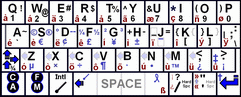
In the built-in layout the user can tap for lowercase
keys; stroke up for uppercase; stroke down on the top row for numbers; stroke
horizontally on the top row for punctuation (!@#$ instead of 1234); stroke down,
left, or right on the second row for much more punctuation including extended
characters; and stroke left anywhere on the bottom two rows for backspace.
Finally, the "extra" layout contains accented characters. I have created a
bitmap depicting this layout, which users can print out and tape on their
PalmPilots.
It supports "big strokes"--strokes from the lower left
or lower right to some other corner of the screen. The capability of a big
stroke is the same as a macro.
Eventually I plan to implement a smart Graffiti
passthrough feature where the program will detect irregular strokes and let
Graffiti handle it.
Source
Code Notes
Compiling MilliKeys
To compile MilliKeys under Windows, you need:
- PRC-Tools, the open source GCC variant for compiling
PalmOS programs
- Cygwin, the UNIX emulation layer required to run
PRC-Tools
- PilRC, the resource compiler normally used with
PRC-Tools, but which is technically not part of PRC-Tools.
- The PalmOS SDK, which is not part of PRC-Tools
because the two are maintained by independent groups. The only part
of the SDK you really need is the header files. Note: MilliKeys expects
SDK version 4; other versions are not tested.
Instructions for installing and setting up the above
software can be found here. After setting it all up according to the
instructions on the aforementioned page, you should be able to compile MilliKeys
by
- Putting the MilliKeys sources in /PalmDev/MilliKeys
- Opening the cygwin bash shell
- Inputting the following commands:
- cd /PalmDev/MilliKeys
- make
- You can make MilliKeys from an ordinary Windows
command line as long as your cygwin/bin (e.g. C:\Cygwin\bin) folder is in
the PATH environment variable. How you set up the path depends on your
version of Windows.
- in Windows 2000, go to the Control Panel and open "System", then select
the "Advanced" tab and click "Environment Variables". Under "System
variables", double-click "Path". Beside "Variable value",
append
(do not delete the existing paths) the string ";C:\Cygwin\bin", or
whatever your Cygwin/bin directory is named. Then click OK, OK,
OK. At this point it might not work yet; if not, restart your
computer.
- Commands for building from the ordinary Windows
command line:
- cd C:\PalmDev\MilliKeys
- make
- To make a debug build, use
- MilliKeys includes project files for Visual C++ 6 and
Visual C++.NET. For instructions on building MilliKeys in these
environments, look in Makefile.
Source Code Overview
This code is somewhat of a mess, using too many globals
(variables and functions) placed too randomly. But here's an
overview.
| Project
Files |
| |
Keyboard.dsw |
Visual C++ 6 Workspace File (needed only for VC++
6 users) |
|
Keyboard.dsp |
Visual C++ 6 Project File (needed only for VC++ 6
users) |
|
MilliKeys.sln |
Visual Studio.NET Solution file (needed only for
VC++.NET users) |
|
MilliKeys.vcproj |
Visual C++.NET Project file (needed only for
VC++.NET users) |
| Resource
files
(used to declare forms, alerts, strings, icons, and other resources) |
|
Resource.rcp
Resource.h |
Resource file for MilliKeys application;
Resource.h contains #define directives for the identifiers used by
Resource.rcp (PilRC has absolutely no capacity to understand C except for
integer #define directives) |
|
Hack.rcp |
Resource file for MilliKeys hack |
|
C++ Source/header files |
|
Note: MilliKeys.prc is compiled from
all of these source files, but MKeyHack
is compiled only from Utils.cpp and Hack.cpp (and the
header files included thereby.) |
|
Keyboard.cpp/h |
Various globals; memo import/export; shift map
reset; CallXMaster; startup/shutdown code; PilotMain; main event
loop. |
|
StringConvert.cpp/h
|
Code to convert between the key strings you see
on-screen and in memos, and the binary key/layout format MilliKeys uses
internally. |
|
Hack.cpp/h |
Code for the hack part of MilliKeys. Most
of the code in the hack is in Hack.cpp. The app contains an on-screen test
keyboard that behaves like the standalone hack; Hack.cpp is compiled into
the app for this purpose. Declarations needed by both the app and
hack are placed in Hack.h. |
|
Utils.cpp/h |
Utility code not specific to MilliKeys:
- Assertion and debug tracing support
- Enum value mapper
- Database functions and classes
- StringTable & StringList
- Miscellaneous functions
|
|
BaseUI.cpp/h |
UI code made for MilliKeys, but independent from
it (re-usable). See the large block comment in BaseUI.h for more
information. |
|
UI.cpp/h |
UI code for the main (non-modal) part of the
MilliKeys app; built on top of BaseUI.cpp. |
|
Calibrate.cpp/h |
UI code for the calibration dialog; code for
calculating the 6 calibration parameters based on the 2 or 3 user input
points. |
|
ConstTables.cpp |
Various global arrays of structures: the built-in
Qwerty layout (gBuiltinQwerty, gBuiltinQwertySizes), the special key table
(gVKeyTable), and the UI tables (gRadioTable, gPropPages, gPopupTable, and
most importantly, gStateVarMap.) |
|
Layout.h |
Key layout structure and substructures;
Calibration structure; enums used in key layouts. |
|
Standalone.h |
I can no longer remember what this is for!
It has something to do with the hack... |
| Other files |
|
Makefile |
Make file for gnu 'make': rules for
building MilliKeys; see the block comment at the top of the file for more
information. |
|
Sections.def |
Segment definition file compiled by m68k-palmos-multigen.
Without 'segments', 68k-based PalmOS programs have a limit of between
32K-64K of code. PRC-Tools requires that the programmer manually
break up larger programs into named 'segments' by declaring each function
with __attribute__ ((section ("name"))). This file is required to tell
PRC-Tools what segments are in the program; should you fail to compile
and link this file, PRC-Tools stupidly omits your multi-segment code
from the final executable, resulting in a PRC which doesn't work. |
|
Hack.def |
The hack is only one section, and I forgot why I
made this file. But I keep it lest its removal should break
something. |
| |
[ Home Page @ SourceForge /
Geocities |
SourceForge Summary | Qwertie's
Page | Code Notes | Manual ]