FORWARDING EMAIL MESSAGES
There are two ways to forward a message:
- Forward a copy of a message you have received to another recipient.
- Forward messages sent to you to another mailbox eg your home email account.
To Forward a Message To Another Recipient
- Open the message you wish to forward, it will usually be one you have received from someone else.
- Go up to Message on the menu bar and click on Forward
- A new message window will open containing the message to forward.
- Type in the name of the recipient and send as usual.
To Forward A Message To Another Mailbox
- In First Class, go to Edit on the menu bar.
- Scoll down to Preferneces.
- Choose the Mail Rules tab (see below):
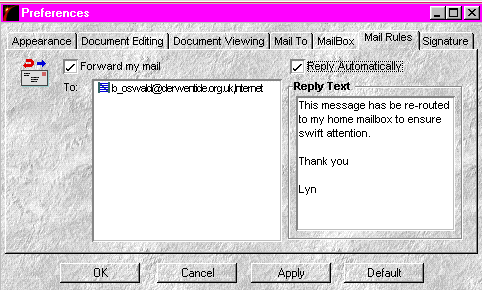
- Fill in the details of where the messages is to be re-routed to
- Fill in the reply text.
- Click the Apply button then the OK button.
Go to: Adding a Signature