Bookmarks
To edit, delete or group related bookmarks in Netscape:
Creating New Folders
- Go to Bookmarks, Go To Bookmarks
- You should see the following window:
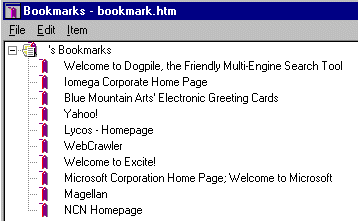
- Go to Item on the menu bar
- Down to Insert Folder
- Name the new folder
Moving Saved Bookmarks
- Go to Bookmarks, Go To Bookmarks
- Drag the highlighted bookmark up to the folder
- Drop into folder and bookmark will automaticall stay there
Deleting Bookmarks
- Go to Bookmarks, Go To Bookmarks
- Highlight the bookmar to be deleted
- Click the Delete key on your keyboard
Editing Bookmark URLs
- Go to Bookmarks, Go To Bookmarks
- Right click on the bookmark to be edited
- Scroll down to Properties
- In the Name box you can delete the title of the bookmark and substitute a new name
- In the Location (URL) box you can change or update the url
Go to next practice files FTP