Anonymous FTP is a method whereby FTP servers allow the general public to access files. Someone connecting to an FTP site via anonymous FTP does not need an account on that system, a special password, or any other specific permissions. You simply log in with the username anonymous and give your email address in place of a password. You can then download files from the FTP site to your own computer. When a public FTP site has lots of traffic, the administrators may make the same resources available on a mirror site.
The most common use of FTP is to use anonymous FTP to download files from a public server. However FTP also works in the other direction, you can upload files from your computer onto a FTP server. In order to do this you must have the appropriate permissions on the remote system. In many cases this means having a private user account with your own login name and password. If you have a home page with one of the large free providers such as Geocities, you can use FTP to transfer your files to your area much faster than uploading in the usual manner.
Click here to see a list of common file types and their transfer modes.
To connect to a FTP site using a browser the URL form is :
ftp://ftp.server/pathname/
for example Microsoft is : ftp://ftp.microsoft.com/
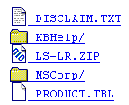
When using a web browser to connect to an FTP server the site looks like a table of contents in which each file is represented as a page icon and folder is represented by an folder icon (see below):
You can click on a folder or name to open a directory etc. When you click on a filename or page icon, if the browser can handle the file type, the file will be displayed in the browser window. You can then use your browsers save file command to download a copy to your computer. If your browser doesn't understand the file type, it should ask you if you want to save the file directly to your disk.
Although this is a perfectly acceptable way to download files of the HTML or ACII type as well as graphics or sound files it is not a practical way to download binary files particularly large ones on a regular basis. If you need to grab a lot of files you should get a program intended for that purpose, and this is just what we are going to do.
http://www.ipswitch.com/downloads/ws_ftp_LE.html
Go there now and download this program into your user area.
The version you will download already has a number of sites built into the program and you should visit some of these sites and practice downloading files into your area. Once you have completed a couple of file tranfers then you should attempt the live assignments which will be used as evidence in your portfolio.
Go to Element 1.2 Locate Information on the Internet