Bookmarks
To edit, delete or group related bookmarks in Explorer: Click the Favourites button on the toolbar. The following window should appear:
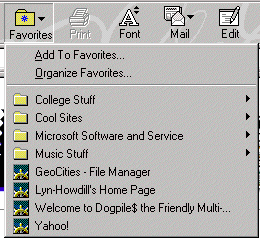
Here you can:
- Create new folders in which to categorize your bookmarks
- Delete unwanted or outdated bookmarks
- Edit the URLs
Creating New Folders
- Go to Favourite
- Down to Organize Favourites(see below)
- Click the New Folder button:

- Name the new folder
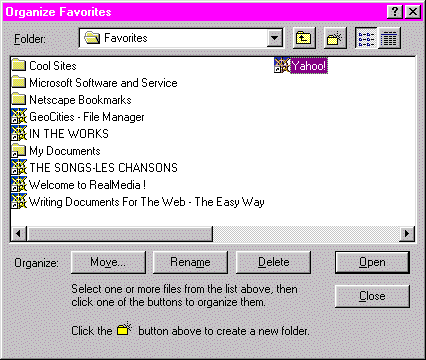
Moving Saved Bookmarks
- Go to Organize Favourites
- Either drag a bookmark into a folder
- Or click the bookmark and click the Move button
- Specify which folder it is to be moved to
Deleting Bookmarks
- Go to Favourites, Organize Favourites
- Click once on the bookmark name
- Click the Delete button
Editing Bookmark URLs
- Go to Favourites, Organize Favourites
- Use your right mouse button to click once on the bookmark name
- Scroll down to Properties
- Click the Internet Shortcut tab
- Alter the Target URL address to the updated one
- Click Apply and then OK
Go to next practice files FTP