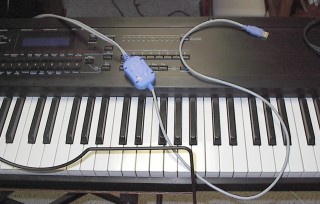
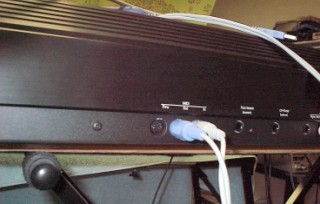
The MIDI Tips PageMusical Instrument Digital Interface, or MIDI for short, has been around since 1982 when it was first called UMI for Universal Musical Interface, the original proposal from some digital music pioneers of some synthesizer manufacturers. In 1983, Sequential Circuits of the US, and Roland of Japan rolled out the first keyboards euipped with the new MIDI. In 3 years, almost all the digital musical instruments manufacturers had MIDI in their products and the revolution was on. Musicians could now greatly expand their performance and recording capabilities which could make Liszt and Gershwin drool in envy! Today's digital musician and composer can use MIDI to connect their PC to a keyboard, MIDI-fied banjo, guitar, etc. to play or record MIDI files. One can play the keyboard while the computer takes down every note plus the exact information on how that note was played, such as volume, duration, sustain and velocity. If the composer likes what he did, a MIDI editor program can convert the MIDI file into a printed sheet for further use. No more pen and paper! Famous groups such as Mannheim Steamroller, the Christmas music group, use a great of MIDI to enhance their performance. 3 or 4 musicians can use MIDI to control some of their keyboards to sound as if there were many more musicians. Complicated drum, bass, percussion backgrounds can be constructed and played via MIDI files that really make your performance sparkle! I've used a Dell laptop hooked up to a keyboard to play certain instruments while playing organ or piano on top. With MIDI, I can become a literal one-man band! Most of the audience may not even catch on to what is going on. They'll think you are one hot musician! The quality of the musical sounds from sound cards in typical computers, especially laptops, can be rather cruddy due to small speakers and low cost sound cards. The MIDI "engine" of many sound cards are low quality relatively speaking and just can't really deliver good music, period. The wave samples contained in the MIDI part of the cards have greatly increased in quality. The first ones were horrible in quality using a type of frequency synthesis generator. These stunk and were doomed. These have been totally replaced with MIDI engines using sound samples or wave samples which were digitally recorded from actual music instruments and sound vastly superior. The better the sounds, the larger the wave file, so the larger the memory required to store them. So, the better the MIDI part of a sound card, the more expensive it will be, although good sound cards in the mid-2000s can be had for around $50 at CompUSA, Circuit City or even some Walmarts. Good quality cards used to cost over a hundred dollars, so things are better! But very very few sound cards can match the sound quality of a professional type musical keyboard, because guess why, the MIDI sound engine in these instruments are anywhere from $200 to $3000 worth of equipment. The sound files in them were recorded with great care and expense. The MIDI sound engine in my Ensoniq keyboard cost about $1600 by itself. But it's quality over some large amps is amazing. Bluegrass MIDI files sound extremely realistic played through it. I would really recommend going to the expense of buying new or used a good keyboard plus the MIDI hookup cable and a nice music amplifier. It may cost a bit at first, but if you've only heard MIDI type music through a computer soundcard and speakers, you will be in for a pleasant surprise. The increase in quality will be on the order of a full magnitude or better! Hooking Up a Keyboard to a ComputerHooking the MIDI ports of a musical keyboard to a computer used to be a challenge except for engineers. Musicians anxious to try out MIDI programming were often confused by the instructions. No more. Modern MIDI kits use USB to MIDI adapter cables and have software for Windows to output or input MIDI files to a keyboard. The USB cable is inserted into any USB port of a computer including laptops, the MIDI Out plug is inserted in the MIDI In port of the keyboard and the software should automatically detect the setup and run. I use the Turtle software bundled with the Turtle Beach MIDI Interface kit available at CompUSA for a very reasonable price.
|
|
|
Once the keyboard is hooked up and turned on, activate
the MIDI feature on it. Consult the manual for information if you don't
see a MIDI button right away. My Ensoniq keyboard has a MIDI button
right on top making it pretty easy to activate. There's good MIDI editing software available on the Internet; I use Cakewalk Express which was free with certain Soundblaster sound cards. It's good enough for most MIDI work and can be learned with it's built-in tutorials and some experimenting. There are no known printed or .pdf manuals for it. It might be available at times on certain peer-to-peer file sharing networks. If there was enough room on this Geocities site, I would offer a zipped version of it for downloading. A well known MIDI editing program is Magix which has been sold for about $20 at CompUSA. I don't use it as much, but it's fairly inexpensive and not bad to use. Noteworthy is another good MIDI editor and a trial version version of it can be downloaded free from www.cnet.com, the downloads section. It's free to use for 45 days and is cheap to activate. Cakewalk has offered really good professional music/MIDI software, but these packages have been rather pricey, but they do offer a lot of features for the truly serious artist. One thing that can be done with MIDI is that if you want to record your own instrumental mp3 files to burn to CD or DVD, you can use any Pentium III or IV computer to simultaneously output MIDI to a keyboard which is feeding audio to the soundcard of the computer, perferably through a quality mixer, to record the music. Inexpensive audio processing/editing software can put the finishing touches on the recording for final burning or sharing on the Internet. Sony puts out the Sonic Foundry program which is pretty darn good at this, and it's price is far cheaper than what it used to be, well under $100. More MIDI tricksOne of the really neat things about making/recording MIDI files is that you can recording one stave of music at a time. Why? Let's say you want to play a melody to a really cool bass, left hand, drum backup, whatever. For instance, you want to do some really complicated boogie-woogie left hand accompaniment with another melody. Pretty tough to do unless you're a pro. With MIDI, it becomes vastly easier. You can use both hands to do the boogie-woogie bass stave(s) first, then while playing it back, play the melody with your right hand while the computer records your second work. You can then play all that back while doing some drums, typically on track 10 by the way. If you make a slight mistake, you can correct the wrong note with the software, or if it's way off, replay the whole thing. I usually do a drum track first to keep the beat correct through the recording session, then bass, then the melody. It takes some practice for a few weeks to get really good at this, but you will get good with time! With the Cakewalk Express, I can also do cut and paste type MIDI work. Let's say I find this really complicated but really cool boogie-woogie bass. I can highlight the left-hand stave in Cakewalk, copy it, then paste it in another document, just like in a word processor! I can copy as many measures as needed, changing the notes as needed. Then while playing back those notes, I also record the right hand at the same time! Neat huh! Many MIDI artists do that, they just won't tell you that! Very complicated arpeggios, chord runs and other fancy ornamental pieces of music can also be pasted in as wanted to really make a great sounding file. Again, many MIDI artists do this, but won't say a word about this! I must stress that you probably won't learn to do this really well overnight. If you can, you're something else. But the sky's the limit. This page will be greatly expanded within a short time to include pictures, graphics and music examples! |
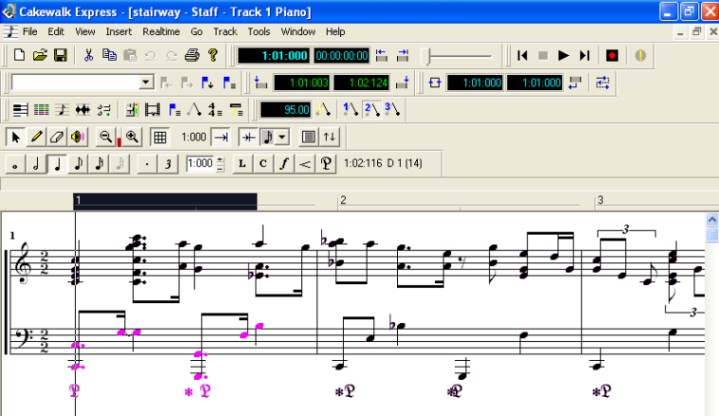
The above screen shot is from the Cakewalk Express software
set up to show the actual music. The cursor can be used to What is neat is that if you want, you can play back a section like this while playing additional notes in whatever instrument and the software will add the new notes automatically. If you don't like what results, just do it again until it sounds right. Missed a note? No sweat! Just slide the note up or down on the staff to the right place! It's corrected that easily and quickly! Soon to come: Boogie-woogie left hand, bass MIDI files to help create your own boogie-woogie compositions! By the way, Cakewalk Express is a free MIDI program that may be dated, but it's pretty good for public domain. It's too large for me to include on this site even as a Zipped file, but if you search for it online, you may be able to find it. If you can't find it and you want a copy, send me an e-mail and we'll see what we can do! E-mail at : [email protected] |