


Fog
Atmospheric effects like fog describe what happens to a ray when it travels between surfaces. In a perfect vacuum, a ray travels without being reduced, and no light is scattered along the path of the ray from the light sources. This is typically the case in most computer graphics images. A clear, hard-edged look results. However, in real life, dust or smoke particles float in the air; they obscure distant objects and scatter light to produce a mist color.
The appearance of the atmospheric effects depends on several factors.
One factor is the distribution of particles in the atmosphere. A column of smoke has an evident concentration of particles in particular locations. Distinct puffs are visible. This type of atmospheric effect can be emulated by using the sCloud procedural texture. See the section on sCloud in this chapter for further information on using this procedure.
Alias has three different types of fog:
Constant density fog equal densities of particles at all locations: distant objects fade equally in all directions. View in any direction blends to a constant color if there are no obstructing surfaces.
Max/Min fog This is the same as Constant density fog except that the max and min distances are used to `clip' the fog. That is, the fog particles only exist between the max and min distances from the camera.
Layered fog fog density varies with altitude.
In the fog procedure, the color for infinite distances is defined by selecting a Fog color. The relative scattering of light is controlled using the Fog Depth slider. Optical depth, roughly speaking, is the distance away that a surface must before it has half its light is scattered by the intervening air. For an outdoor scene during the day, the fog color should be white. For smog, try using a high layered fog and a brownish color.
To create a scene with the impression of great distances, give distant objects a blue tint by using a light fog colored blue.
Layered Fog
In a mountain scene viewed from above, the valleys may be filled with fog while the peaks are crystal clear. In fact, there may be several layers of fog with clear air between them (see the following illustration).
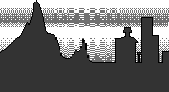
The ALIAS system lets you create a one-dimensional table of values to use for layered fog by using a column of data from a pix or mask file.
If you don't specify a file, a smooth ramp is used to create the fog. If you specify a file, you may also specify a column, which indicates the horizontal position for the column. By animating the column position between 0 and 1 (the left and right sides of the texture file), you can vary the layers of fog over the duration of a scene. Use a file or ramp that has some variation across the file. By taking advantage of the variations, fog layers can appear to move or be made to appear and disappear. The height of the column corresponds to values between AltitudeMin and AltitudeMax, the lower and upper boundaries of the fog. Outside of this range, fog is assumed to be absent.
|
Argument Name
|
Absolute Range
|
Useful Range
|
Default
|
Description
|
|
amult
|
-infinity, infinity
|
-1, 1
|
1
|
Scaling factor for layered fog density
|
|
aoffset
|
-infinity, infinity
|
-1, 1
|
0
|
Offset factor for layered fog density
|
|
depth (triple)
|
0, infinity
|
0, 100
|
10, 10, 10
|
Decay constants for the air
|
|
fog_color (triple)
|
0, infinity
|
0, 255
|
255, 255,255
|
Colour constants for the air
|
|
min_altitude
|
-infinity, infinity
|
-10, 10
|
0
|
Bottom of the fog layer
|
|
max_altitude
|
-infinity, ·
|
-10, 10
|
1
|
Top of the fog layer
|
|
column
|
0, 1.0
|
0, 1
|
0.5
|
Animation key to fog data
|
|
density_file
|
|
|
no default
|
Mask file name for 8-bit density image
|
|
fogtype =
|
|
|
0
1
2
other
|
no fog
constant fog
layered fog
no fog
|
Bulge
The Bulge texture procedure was inspired by looking at windows on a skyscraper. If a building was pumped full of air, the glass would bulge outwards in the center while the edges would be constrained by the frame. The frame of the window is exactly the same as a grid that is apparent when using the bulge texture.
The Bulge texture procedure is most commonly applied as a bump map to create a bulge effect on a surface. However, it can also be applied to a transparency map to simulate windows that are dirty or opaque around the edges but transparent in the middle area. When applied to a color map, there is no apparent bulge, but this application can be used to simulate tile effects, for example.
|
Argument Name
|
Absolute Range
|
Useful Range
|
Default
|
Description
|
|
uwidth
|
0.0, 1.0
|
0, 1
|
0.1
|
Width in u dir. of constant stripe
|
|
vwidth
|
0.0, 1.0
|
0, 1
|
0.1
|
Width in v dir. of constant stripe
|
|
urepeat
|
-infinity, infinity
|
-10.0, 10.0
|
1.0
|
# of copies in u dir. within coverage area.
|
|
vrepeat
|
-infinity, infinity
|
-10.0, 10.0
|
1.0
|
# of copies in v dir. within coverage area.
|
|
uoffset
|
-infinity, infinity
|
-1.0, 1.0
|
0.0
|
U offset repeat withincoverage area
|
|
voffset
|
-infinity, infinity
|
-1.0, 1.0
|
0.0
|
V offset repeat withincoverage area
|
|
ucoverage
|
-infinity, infinity
|
0.0, 1.0
|
1.0
|
amount of U surface to be textured
|
|
vcoverage
|
-infinity, infinity
|
0.0, 1.0
|
1.0
|
amount of V surface to be textured
|
|
utranslate
|
-infinity, infinity
|
-1.0, 1.0
|
0.0
|
amount of U coverage area to be moved.
|
|
vtranslate
|
-infinity, infinity
|
-1.0, 1.0
|
0.0
|
amount of V coverage area to be moved.
|
|
uwrap
|
TRUE FALSE
|
|
TRUE
|
flag to wrap texture around U boundaries of coverage area.
|
|
vwrap
|
TRUE FALSE
|
|
TRUE
|
flag to wrap texture around U boundaries of coverage area.
|
|
worldspace
|
TRUE FALSE
|
|
FALSE
|
flag to use world space texture mapping
|
|
rotate
|
-infinity, infinity
|
-360.0, 360.0
|
0.0
|
angle coverage area to be rotated
|
|
mirror
|
TRUE FALSE
|
|
FALSE
|
flag to match edges of texture
|
"Bulge" is a parametric texture.
Checker
The Checker texture procedure applies a colored checkerboard pattern to the shader.
|
Argument Name
|
Absolute Range
|
Useful Range
|
Default
|
Description
|
|
contrast
|
-1.0, 1.0
|
-1.0, 1.0
|
1.0
|
Contrast for the checker pattern
|
|
color1 (triple)
|
0, infinity
|
0.0, 255.0
|
0,0,0
|
Color of one set of checker squares.
|
|
color2 (triple)
|
0, infinity
|
0.0, 255.0
|
0.0
|
Color of other set of checker squares.
|
|
urepeat
|
-infinity, infinity
|
-10.0, 10.0
|
1.0
|
# of copies in u direction within coverage area.
|
|
vrepeat
|
-infinity, infinity
|
-10.0, 10.0
|
1.0
|
# of copies in v direction within coverage area.
|
|
uoffset
|
-infinity, infinity
|
-1.0, 1.0
|
0.0
|
U offset repeat withincoverage area
|
|
voffset
|
-infinity, infinity
|
-1.0, 1.0
|
0.0
|
V offset repeat withincoverage area
|
|
ucoverage
|
-infinity, infinity
|
0.0, 1.0
|
1.0
|
amount of U surface to be textured
|
|
vcoverage
|
-infinity, infinity
|
0.0, 1.0
|
1.0
|
amount of V surface to be textured
|
|
utranslate
|
-infinity, infinity
|
-1.0, 1.0
|
0.0
|
amount of U coverage area to be moved.
|
|
vtranslate
|
-infinity, infinity
|
-1.0, 1.0
|
0.0
|
amount of V coverage area to be moved.
|
|
uwrap
|
TRUE FALSE
|
|
TRUE
|
flag to wrap texture around U boundaries of coverage area.
|
|
vwrap
|
TRUE FALSE
|
|
TRUE
|
flag to wrap texture around U boundaries of coverage area.
|
|
worldspace
|
TRUE FALSE
|
|
FALSE
|
flag to use world space texture mapping
|
|
rotate
|
-infinity, infinity
|
-360.0, 360.0
|
0.0
|
angle coverage area to be rotated
|
|
mirror
|
TRUE FALSE
|
|
FALSE
|
flag to match edges of texture
|
"Checker" is a parametric texture.
Cloth
The Cloth texture procedure is ideal for creating fabric-like textures and a variety of other woven effects. In addition to being used as a simple two-dimensional texture, the Cloth procedure is also effective with bump mapping.
For very fine weaves, aliasing may be a problem, particularly when the cloth is viewed from a distance. In this case, the cloth can be turned into a pix file image by using the cloth texture as a Background Environment rather than applying it to a shader. Once the background has been rendered, the resulting pix file can then be applied to the shader as a file texture.
When applied to a bump map, the cloth texture generally produces better effects when both thread colors are white and the gap color is black. The Color Balance options are replaced by the Intensity options, Amult and Aoffset. These options enable you to control the degree of the bump effect. Decreasing the Blurmult value provides greater definition in the bump effect. Generally, both the Amult and Blurmult values should be quite low, that is less than 0.1.
|
Argument Name
|
Absolute Range
|
Useful Range
|
Default
|
Description
|
|
u_thread_color
|
-infinity, infinity
|
0, 255
|
255.0, 255.0, 255.0
|
RGB value assigned to warp of fabric
|
|
v_thread_color
|
-infinity, infinity
|
0, 255
|
255.0, 0.0, 0.0
|
RGB value assigned to weft of fabric
|
|
gap_color
|
-infinity, infinity
|
0, 255
|
0.0, 0.0, 0.0
|
RGB value assigned to area between threads
|
|
u_thread_width
|
0, 1
|
0, 1
|
0.75
|
Width of warp threads
|
|
v_thread_width
|
0, 1
|
0, 1
|
0.75
|
Width of weft threads
|
|
u_wave
|
-infinity, infinity
|
-0.5, 0.5
|
0.0
|
Wave pattern of warp
|
|
v_wave
|
-infinity, infinity
|
-0.5, 0.5
|
0.0
|
Wave pattern of weft
|
|
randomness
|
0, infinity
|
0, 1
|
0.0
|
Smears texture in u,v.
|
|
width_spread
|
0, 1
|
0, 1
|
0.0
|
Subtracts a random amount off the width of individual threads
|
|
brightness_spread
|
0, 1
|
0, 1
|
0.0
|
Subtracts a random amount off the brightness level of the threads.
|
|
urepeat
|
-infinity, infinity
|
-10.0, 10.0
|
1.0
|
# of copies in u direction within coverage area.
|
|
vrepeat
|
-infinity, infinity
|
-10.0, 10.0
|
1.0
|
# of copies in v direction within coverage area.
|
|
uoffset
|
-infinity, infinity
|
-1.0, 1.0
|
0.0
|
U offset repeat withincoverage area
|
|
voffset
|
-infinity, infinity
|
-1.0, 1.0
|
0.0
|
V offset repeat withincoverage area
|
|
ucoverage
|
-infinity, infinity
|
0.0, 1.0
|
1.0
|
amount of U surface to be textured
|
|
vcoverage
|
-infinity, infinity
|
0.0, 1.0
|
1.0
|
amount of V surface to be textured
|
|
utranslate
|
-infinity, infinity
|
-1.0, 1.0
|
0.0
|
amount of U coverage area to be moved.
|
|
vtranslate
|
-infinity, infinity
|
-1.0, 1.0
|
0.0
|
amount of V coverage area to be moved.
|
|
uwrap
|
TRUE FALSE
|
|
TRUE
|
flag to wrap texture around U boundaries of coverage area.
|
|
vwrap
|
TRUE FALSE
|
|
TRUE
|
flag to wrap texture around U boundaries of coverage area.
|
|
worldspace
|
TRUE FALSE
|
|
FALSE
|
flag to use world space texture mapping
|
|
rotate
|
-infinity, infinity
|
-360.0, 360.0
|
0.0
|
angle coverage area to be rotated
|
|
mirror
|
TRUE FALSE
|
|
FALSE
|
flag to match edges of texture
|
File
The File texture procedure lets you use a pix file as a parametric texture on a shader. Pix files are typically files created in ALIAS paint or some other compatible paint package, scanned images or previously rendered images.
The main new feature in v7 is the concept of a "super-texture". This allows a single File Texture to refer to a number of image files and the objects that use those files. This is ideal for convert-solid-to-texture, where instead of creating many shaders and textures, only one is created, but the texture points back to the many different pix images. The parameters relevant to "super-texture" are "object" and "object_image".
The other important new feature is the "filter" option. This allows you many ways to deal with the filtering/anti-aliasing of textures. A setting of 0 means no filtering at all - this allows for exactly pixel-to-pixel match, less memory used, faster rendering, but also may fall into danger of aliasing artifacts. A setting of 1 results in exactlythe same rendering as in version 6. For better quality renderings, set the value to be > 1. As the value increases, the more complicated the filter shape and thus the more expensive the rendering. The optimal quality and speed combination would be to choose the quadratic filter (3).
|
Argument Name
|
Absolute Range
|
Useful Range
|
Default
|
Description
|
|
filter
|
0-5
|
|
1
|
0 indicates no filtering; 1 indicates blend-filter (only choice in v6); 2 indicates box-filter; 3 indicates quadratic filter; 4 indicates quartic filter; 5 indicates guassian filter.
|
|
filter_width
|
|
|
0.707
|
Filter width that applies only when "filter" > 1. The larger the filter width, the more expensive the rendering.
|
|
image
|
string
|
|
|
Name of pix or mask file to be used for parametric texturing.
|
|
object
|
string
|
|
|
Name of object that the super-texture applies to.
|
|
object_image
|
string
|
|
|
Name of pix image that the object`s super-texture applies to.
|
|
urepeat
|
-infinity, infinity
|
-10.0, 10.0
|
1.0
|
# of copies in u direction within coverage area.
|
|
vrepeat
|
-infinity, infinity
|
-10.0, 10.0
|
1.0
|
# of copies in v direction within coverage area.
|
|
uoffset
|
-infinity, infinity
|
-1.0, 1.0
|
0.0
|
U offset repeat withincoverage area
|
|
voffset
|
-infinity, infinity
|
-1.0, 1.0
|
0.0
|
V offset repeat withincoverage area
|
|
ucoverage
|
-infinity, infinity
|
0.0, 1.0
|
1.0
|
amount of U surface to be textured
|
|
vcoverage
|
-infinity, infinity
|
0.0, 1.0
|
1.0
|
amount of V surface to be textured
|
|
utranslate
|
-infinity, infinity
|
-1.0, 1.0
|
0.0
|
amount of U coverage area to be moved.
|
|
vtranslate
|
-infinity, infinity
|
-1.0, 1.0
|
0.0
|
amount of V coverage area to be moved.
|
|
uwrap
|
TRUE FALSE
|
|
TRUE
|
flag to wrap texture around U boundaries of coverage area.
|
|
vwrap
|
TRUE FALSE
|
|
TRUE
|
flag to wrap texture around U boundaries of coverage area.
|
|
worldspace
|
TRUE FALSE
|
|
FALSE
|
flag to use world space texture mapping
|
|
rotate
|
-infinity, infinity
|
-360.0, 360.0
|
0.0
|
angle coverage area to be rotated
|
|
mirror
|
TRUE FALSE
|
|
FALSE
|
flag to match edges of texture
|
Grid
GridRGB generates a color grid pattern based on the surface u, v parameters. The default case is white lines on a black background (filler). The "contrast" variable controls the relative contrast of the line color to the filler color. A "contrast" of 0.0 will set the color to the average of the line color and the filler color. A "contrast" of -1.0 will swap the line color and the filler color.
|
Argument Name
|
Absolute Range
|
Useful Range
|
Default
|
Description
|
|
contrast
|
-1.0, 1.0
|
-1, 1
|
1.0
|
Relative contrast of the colors
|
|
uwidth
|
0, 0.5
|
0, 0.5
|
0.1
|
Width of lines in the u direction
|
|
vwidth
|
0, 0.5
|
0, 0.5
|
0.1
|
Width of lines in the v direction
|
|
line_color (triple)
|
0, infinity
|
0, 255
|
255.0
|
Line color
|
|
filler_color (triple)
|
0, infinity
|
0, 255
|
0.0
|
Area between lines color
|
|
urepeat
|
-infinity, infinity
|
-10.0, 10.0
|
1.0
|
# of copies in u direction within coverage area.
|
|
vrepeat
|
-infinity, infinity
|
-10.0, 10.0
|
1.0
|
# of copies in v direction within coverage area.
|
|
uoffset
|
-infinity, infinity
|
-1.0, 1.0
|
0.0
|
U offset repeat withincoverage area
|
|
voffset
|
-infinity, infinity
|
-1.0, 1.0
|
0.0
|
V offset repeat withincoverage area
|
|
ucoverage
|
-infinity, infinity
|
0.0, 1.0
|
1.0
|
amount of U surface to be textured
|
|
vcoverage
|
-infinity, infinity
|
0.0, 1.0
|
1.0
|
amount of V surface to be textured
|
|
utranslate
|
-infinity, infinity
|
-1.0, 1.0
|
0.0
|
amount of U coverage area to be moved.
|
|
vtranslate
|
-infinity, infinity
|
-1.0, 1.0
|
0.0
|
amount of V coverage area to be moved.
|
|
uwrap
|
TRUE FALSE
|
|
TRUE
|
flag to wrap texture around U boundaries of coverage area.
|
|
vwrap
|
TRUE FALSE
|
|
TRUE
|
flag to wrap texture around U boundaries of coverage area.
|
|
worldspace
|
TRUE FALSE
|
|
FALSE
|
flag to use world space texture mapping
|
|
rotate
|
-infinity, infinity
|
-360.0, 360.0
|
0.0
|
angle coverage area to be rotated
|
|
mirror
|
TRUE FALSE
|
|
FALSE
|
flag to match edges of texture
|
"Grid" is a parametric texture.
Fractal
The Fractal texture is a surface texture based on U, V parameter values and is a random function that has a particular frequency distribution.
Fractals can be used for many different effects. A patch that is displacement mapped with a fractal will resemble a piece of rock or a mountain. A surface transparency mapped with a fractal will look like a piece of cloud or flame. Fractals are often used as part of more complex textures to create special effects such as marble and wood.
|
Argument Name
|
Absolute Range
|
Useful Range
|
Default
|
Description
|
|
animated
|
TRUE FALSE
|
|
FALSE
|
Flag to use 3D texture with u, v, time rather than 2D texture with just u, v
|
|
level_min
|
0, infinity
|
0, 20
|
0.0
|
Minimum level of iteration
|
|
level_max
|
0, infinity
|
0, 20
|
9.0
|
Maximum level of iteration allowed
|
|
*time
|
0, infinity
|
0, 1
|
0.0
|
Time dimension for animated texture, wraps for range 0, 1
|
|
ratio
|
0, 1.0
|
0, 1
|
0.707
|
Fractal ratio
|
|
amplitude
|
0, infinity
|
0, 1
|
1.0
|
Amplitude of fractal
|
|
threshold
|
0, 1
|
0, 1
|
0.0
|
Threshold for fractal
|
|
urepeat
|
-infinity, infinity
|
-10.0, 10.0
|
1.0
|
# of copies in u direction within coverage area.
|
|
vrepeat
|
-infinity, infinity
|
-10.0, 10.0
|
1.0
|
# of copies in v direction within coverage area.
|
|
uoffset
|
-infinity, infinity
|
-1.0, 1.0
|
0.0
|
U offset repeat withincoverage area
|
|
voffset
|
-infinity, infinity
|
-1.0, 1.0
|
0.0
|
V offset repeat withincoverage area
|
|
ucoverage
|
-infinity, infinity
|
0.0, 1.0
|
1.0
|
amount of U surface to be textured
|
|
vcoverage
|
-infinity, infinity
|
0.0, 1.0
|
1.0
|
amount of V surface to be textured
|
|
utranslate
|
-infinity, infinity
|
-1.0, 1.0
|
0.0
|
amount of U coverage area to be moved.
|
|
vtranslate
|
-infinity, infinity
|
-1.0, 1.0
|
0.0
|
amount of V coverage area to be moved.
|
|
uwrap
|
TRUE FALSE
|
|
TRUE
|
flag to wrap texture around U boundaries of coverage area.
|
|
vwrap
|
TRUE FALSE
|
|
TRUE
|
flag to wrap texture around U boundaries of coverage area.
|
|
worldspace
|
TRUE FALSE
|
|
FALSE
|
flag to use world space texture mapping
|
|
rotate
|
-infinity, infinity
|
-360.0, 360.0
|
0.0
|
angle coverage area to be rotated
|
|
mirror
|
TRUE FALSE
|
|
FALSE
|
flag to match edges of texture
|
*The fractal will cycle as a function of time with period 1.
Note: For textures that use Fractal, sFractal, sCloud, sMarble and sFile - if both the min and max iteration values are very high (greater than 100), a render can take a very long time. You cannot enter values over 100. Generally, if a finer grained texture is desired, you may prefer to lower the blur, rather than increasing the iteration count.
"Fractal" is a parametric texture.
Mountain
The Mountain texture procedure is used for rendering terrain. The Mountain texture should first be applied to the shader as a Color Map, and then applied again as a Displacement Map. The Color options have no effect on the displacement map and relate only to the color map portion of the procedure. All non-color related options are ignored for the color mapping when the displacement map is applied. The color mapping automatically matches the displacement mapping. The basis of the terrain model is a two-dimensional fractal.
|
Argument Name
|
Absolute Range
|
Useful Range
|
Default
|
Description
|
|
amplitude
|
0, infinity
|
0, 1
|
1.0
|
Amplitude of fractal
|
|
rock_roughness
|
0, 1
|
0, 1
|
0.707
|
Fractal ratio for the rock
|
|
level_max
|
0, infinity
|
0, 40
|
20.0
|
Maximum allowed interation level
|
|
snow_altitude
|
-infinity, infinity
|
-1, 1
|
0.5
|
Altitude for snow
|
|
snow_dropoff
|
0, infinity
|
0, 10
|
2.0
|
Rate of dropoff of snow with altitude
|
|
snow_max_slope
|
0, infinity
|
0, 3
|
0.8
|
Slope above which snow does not stick
|
|
snow_roughness
|
0, 1
|
0, 1
|
0.4
|
Roughness of snow
|
|
boundary_roughness
|
0, 1
|
0, 1
|
0.6
|
Raggedness of edge of rock/snow border
|
|
snow_color (triple)
|
0, infinity
|
0, 255
|
255,255,255
|
Color of snow
|
|
rock_color (triple)
|
0, infinity
|
0, 255
|
90, 110, 120
|
Color of rock
|
|
urepeat
|
-infinity, infinity
|
-10.0, 10.0
|
1.0
|
# of copies in u direction within coverage area.
|
|
vrepeat
|
-infinity, infinity
|
-10.0, 10.0
|
1.0
|
# of copies in v direction within coverage area.
|
|
uoffset
|
-infinity, infinity
|
-1.0, 1.0
|
0.0
|
U offset repeat withincoverage area
|
|
voffset
|
-infinity, infinity
|
-1.0, 1.0
|
0.0
|
V offset repeat withincoverage area
|
|
ucoverage
|
-infinity, infinity
|
0.0, 1.0
|
1.0
|
amount of U surface to be textured
|
|
vcoverage
|
-infinity, infinity
|
0.0, 1.0
|
1.0
|
amount of V surface to be textured
|
|
utranslate
|
-infinity, infinity
|
-1.0, 1.0
|
0.0
|
amount of U coverage area to be moved.
|
|
vtranslate
|
-infinity, infinity
|
-1.0, 1.0
|
0.0
|
amount of V coverage area to be moved.
|
|
uwrap
|
TRUE FALSE
|
|
TRUE
|
flag to wrap texture around U boundaries of coverage area.
|
|
vwrap
|
TRUE FALSE
|
|
TRUE
|
flag to wrap texture around U boundaries of coverage area.
|
|
worldspace
|
TRUE FALSE
|
|
FALSE
|
flag to use world space texture mapping
|
|
rotate
|
-infinity, infinity
|
-360.0, 360.0
|
0.0
|
angle coverage area to be rotated
|
|
mirror
|
TRUE FALSE
|
|
FALSE
|
flag to match edges of texture
|
"Mountain" is a parametric texture.
Noise
|
Argument Name
|
Absolute Range
|
Useful Range
|
Default
|
Description
|
|
animated
|
TRUE FALSE
|
|
FALSE
|
Flag to use 3D texture with u, v, time rather than 2D texture with just u, v
|
|
*time
|
-infinity, infinity
|
0, 1
|
0.0
|
Third dimension for animated texture, wraps for range 0, 1
|
|
amplitude
|
-infinity, infinity
|
0, 1
|
1.0
|
Amplitude of noise
|
|
threshold
|
0, infinity
|
0, 1
|
0.0
|
Additive value, clips to 1.0
|
|
urepeat
|
-infinity, infinity
|
-10.0, 10.0
|
1.0
|
# of copies in u direction within coverage area.
|
|
vrepeat
|
-infinity, infinity
|
-10.0, 10.0
|
1.0
|
# of copies in v direction within coverage area.
|
|
uoffset
|
-infinity, infinity
|
-1.0, 1.0
|
0.0
|
U offset repeat withincoverage area
|
|
voffset
|
-infinity, infinity
|
-1.0, 1.0
|
0.0
|
V offset repeat withincoverage area
|
|
ucoverage
|
-infinity, infinity
|
0.0, 1.0
|
1.0
|
amount of U surface to be textured
|
|
vcoverage
|
-infinity, infinity
|
0.0, 1.0
|
1.0
|
amount of V surface to be textured
|
|
utranslate
|
-infinity, infinity
|
-1.0, 1.0
|
0.0
|
amount of U coverage area to be moved.
|
|
vtranslate
|
-infinity, infinity
|
-1.0, 1.0
|
0.0
|
amount of V coverage area to be moved.
|
|
uwrap
|
TRUE FALSE
|
|
TRUE
|
flag to wrap texture around U boundaries of coverage area.
|
|
vwrap
|
TRUE FALSE
|
|
TRUE
|
flag to wrap texture around U boundaries of coverage area.
|
|
worldspace
|
TRUE FALSE
|
|
FALSE
|
flag to use world space texture mapping
|
|
rotate
|
-infinity, infinity
|
-360.0, 360.0
|
0.0
|
angle coverage area to be rotated
|
|
mirror
|
TRUE FALSE
|
|
FALSE
|
flag to match edges of texture
|
*The noise function repeats cyclically as a function of time with period 1.0."Noise" is a parametric texture.
Ramp
The Ramp texture procedure is used to create a texture map that graduates from one color to another or through a series of colors. Effects ranging from simple stripes to geometric patterns and mottled surfaces are easily created by the choice of Ramp and Interpolation types. By default, the Ramp texture graduates from black to red to blue in a linear, horizontal (V ramp) fashion. When applied to a Bump map however, the colors in the ramp are represented as a gray scale.
The Ramp texture is commonly used as a two-dimensional Environment background, but can also be used with other map types such as the transparency map for special effects. When used as the source file for an Environmental Sphere texture, you can create very natural-looking sky and horizon effects. When used as the source file for a sFile texture, you can create very natural woodgrain, marble and rock effects.
|
Argument Name
|
Absolute Range
|
Useful Range
|
Default
|
Description
|
|
ramp_type
|
not applicable.
|
V_RAMP
U_RAMP
DIAGONAL
RADIAL
CIRCULAR
BOX
UV_RAMP
TARTAN
FOUR CORNER
|
V_RAMP
|
There are nine different ramp types to choose from.
|
|
interpolation
|
not applicable
|
NONE
LINEAR_RAMP
RAMP_UP
RAMP_DOWN
SMOOTH
BUMP_OUT
BUMP_IN
|
LINEAR_RAMP
|
Affects the way colors in the ramp are interpolated. There are seven interpolation types to choose from, including a selection for no interpolation, which causes each color to be displayed as a solid band.
|
|
ramp_color
|
-infinity, infinity
|
0, 256
|
0.0, 0.0, 0.0
|
Determines the RGB value of the ramp at its given position
|
|
position
|
0, 1
|
0, 1
|
0.0
|
Gives the placement of a given ramp color.
|
|
u_wave
|
-infinity, infinity
|
-0.5, 0.5
|
0.0
|
Controls the amplitude of a sine wave offset of the texture in the U direction.
|
|
v_wave
|
-infinity, infinity
|
-0.5, 0.5
|
0.0
|
Controls the amplitude of a sine wave offset of the texture in the V direction.
|
|
noise
|
-infinity, infinity
|
0, 1
|
0.0
|
Affects the amount that the texture is offset in the U and V direction by two-dimensional noise.
|
|
noise_frequency
|
-infinity, infinity
|
0, 1
|
0.5
|
Controls how fine-grained the noise is. However, if the U and V repeat values of the texture area are greater than 1, then noise does not cause a repeat of the pattern.
|
|
hue_noise
|
-infinity, infinity
|
0, 1
|
0.0
|
Offsets the hue value (mottles the color).
|
|
sat_noise
|
-infinity, infinity
|
0, 1
|
0.0
|
Offsets the "whiteness" (creates a weathered look).
|
|
val_noise
|
-infinity, infinity
|
0, 1
|
0.0
|
Offsets the "blackness."
|
|
hue_noise_frequency
|
-infinity, infinity
|
0, 1
|
0.5
|
Controls how fine-grained the hue noise will be.
|
|
sat_noise_frequency
|
-infinity, infinity
|
0, 1
|
0.5
|
Controls how fine-grained the saturation noise will be.
|
|
val_noise_frequency
|
-infinity, infinity
|
0, 1
|
0.5
|
Controls how fine-grained the value noise will be.
|
|
urepeat
|
-infinity, infinity
|
-10.0, 10.0
|
1.0
|
# of copies in u direction within coverage area.
|
|
vrepeat
|
-infinity, infinity
|
-10.0, 10.0
|
1.0
|
# of copies in v direction within coverage area.
|
|
uoffset
|
-infinity, infinity
|
-1.0, 1.0
|
0.0
|
U offset repeat withincoverage area
|
|
voffset
|
-infinity, infinity
|
-1.0, 1.0
|
0.0
|
V offset repeat withincoverage area
|
|
ucoverage
|
-infinity, infinity
|
0.0, 1.0
|
1.0
|
amount of U surface to be textured
|
|
vcoverage
|
-infinity, infinity
|
0.0, 1.0
|
1.0
|
amount of V surface to be textured
|
|
utranslate
|
-infinity, infinity
|
-1.0, 1.0
|
0.0
|
amount of U coverage area to be moved.
|
|
vtranslate
|
-infinity, infinity
|
-1.0, 1.0
|
0.0
|
amount of V coverage area to be moved.
|
|
uwrap
|
TRUE FALSE
|
|
TRUE
|
flag to wrap texture around U boundaries of coverage area.
|
|
vwrap
|
TRUE FALSE
|
|
TRUE
|
flag to wrap texture around U boundaries of coverage area.
|
|
worldspace
|
TRUE FALSE
|
|
FALSE
|
flag to use world space texture mapping
|
|
rotate
|
-infinity, infinity
|
-360.0, 360.0
|
0.0
|
angle coverage area to be rotated
|
|
mirror
|
TRUE FALSE
|
|
FALSE
|
flag to match edges of texture
|
"Ramp" is a parametric texture.
Stencil
The Stencil texture procedure is used mainly for label mapping purposes. Label mapping is a two-dimensional texture that is usually applied as a Color map onto a surface and often includes a transparency component to mask certain parts of the two-dimensional texture. An example of label mapping is consumer packaging items such as a shampoo bottle with a label. The labels often hold opaque colors combined with transparent areas. The Stencil texture procedure enables you to easily place the two-dimensional label map and create the necessary transparency mask.
|
Argument Name
|
Absolute Range
|
Useful Range
|
Default
|
Description
|
|
image_file
|
(string)
|
|
|
name of the pix file to be used as a label map
|
|
edge_blend
|
0, infinity
|
0, 1
|
0.0
|
Softens the edges of the texture coverage area. This is useful for hiding the texture boundary when the mask is not perfect.
|
|
mask_file
|
(string)
|
|
|
name of the mask file to be used as a label map
|
|
mask_level
|
-infinity, infinity
|
-1, 1
|
1.0
|
Varies the degree of transparency of the color areas. At a value of 1 (the default), all white areas of the mask are totally transparent and all black areas are totally opaque. As you decrease the value towards 0.00, the black areas become more transparent. By the time you reach 0.00, no image transparency masking occurs. If you decrease the mask_level to -1.00, the mask is inverted, where the black areas become transparent and the white areas are opaque.
|
|
mask_blur
|
0, infinity
|
0, 0.25
|
0.0
|
Affects the edges of the mask. At a value of 0.00, there is no mask blurring. As you increase the blur value, the edges of the mask are blurred to produce soft edge transparency effects.
|
|
key_masking
|
ON, OFF
|
|
OFF
|
Toggle of color key masking (mask derived from a color). Key masking can be used in combination with a mask file.
|
|
positive_key
|
ON, OFF
|
|
OFF
|
When ON, color determines the visible portion of the texture. When OFF, determines the hidden portions.
|
|
color_key
|
-infinity, infinity
|
0, 255
|
0.0, 0.0, 0.0
|
Color center to key to.
|
|
hue_range
|
0, infinity
|
0, 1
|
0.5
|
Spread of hue value from central color key.
|
|
sat_range
|
0, infinity
|
0, 1
|
0.5
|
Spread of saturation value from central color key.
|
|
val_range
|
0, infinity
|
0, 1
|
0.5
|
Spread of brightness value from central color key.
|
|
threshold
|
0, infinity
|
0, 1
|
0.5
|
Determines sharpness of mask boundary. At 0.0, all values within the HSV spread ranges from the color key are fully masked. At 1, the level of the mask falls only at the color key, and drops off to zero at the HSV spread limits.
|
|
urepeat
|
-infinity, infinity
|
-10.0, 10.0
|
1.0
|
# of copies in u direction within coverage area.
|
|
vrepeat
|
-infinity, infinity
|
-10.0, 10.0
|
1.0
|
# of copies in v direction within coverage area.
|
|
uoffset
|
-infinity, infinity
|
-1.0, 1.0
|
0.0
|
U offset repeat withincoverage area
|
|
voffset
|
-infinity, infinity
|
-1.0, 1.0
|
0.0
|
V offset repeat withincoverage area
|
|
ucoverage
|
-infinity, infinity
|
0.0, 1.0
|
1.0
|
amount of U surface to be textured
|
|
vcoverage
|
-infinity, infinity
|
0.0, 1.0
|
1.0
|
amount of V surface to be textured
|
|
utranslate
|
-infinity, infinity
|
-1.0, 1.0
|
0.0
|
amount of U coverage area to be moved.
|
|
vtranslate
|
-infinity, infinity
|
-1.0, 1.0
|
0.0
|
amount of V coverage area to be moved.
|
|
uwrap
|
TRUE FALSE
|
|
TRUE
|
flag to wrap texture around U boundaries of coverage area.
|
|
vwrap
|
TRUE FALSE
|
|
TRUE
|
flag to wrap texture around U boundaries of coverage area.
|
|
worldspace
|
TRUE FALSE
|
|
FALSE
|
flag to use world space texture mapping
|
|
rotate
|
-infinity, infinity
|
-360.0, 360.0
|
0.0
|
angle coverage area to be rotated
|
|
mirror
|
TRUE FALSE
|
|
FALSE
|
flag to match edges of texture
|
"Stencil" is a parametric texture.
Water
The Water texture procedure is a parametric texture used to produce water effects. If used as a Bump or Displacement map, the result resembles water waves or ripples. Water waves consist of linear sine waves, whereas water ripples correspond to concentric rings originating from a drop.
|
Argument Name
|
Absolute Range
|
Useful Range
|
Default
|
Description
|
|
reflection_boundary
|
TRUE FALSE
|
|
FALSE
|
Flag to reflect ripples at reflection boundary
|
|
umin
|
-infinity, infinity
|
-5, 5
|
0.0
|
Extent of reflection boundary
|
|
umax
|
-infinity, infinity
|
-5, 5
|
1.0
|
" " "
|
|
vmin
|
-infinity, infinity
|
-5, 5
|
0.0
|
" " "
|
|
vmax
|
-infinity, infinity
|
-5, 5
|
1.0
|
" " "
|
|
ripple_drop_size
|
0, infinity
|
0, 1
|
0.3
|
Width before drop off of envelope amplitude
|
|
ripple_frequency
|
0, infinity
|
0, 50
|
25.0
|
Number of wavelengths of modulated sinewave per unit length
|
|
ripple_phase_velocity
|
0, infinity
|
0, 10
|
2.5
|
Velocity of modulated sinewave
|
|
ripple_group_velocity
|
0, infinity
|
0, 10
|
1.0
|
Envelope velocity
|
|
ripple_spread_start
|
0, infinity
|
0, 1
|
0.005
|
Spread of envelope at ripple_time zero
|
|
ripple_spread_rate
|
0, infinity
|
0, 1
|
0.3
|
Rate of spread increase with time
|
|
ripple_amplitude
|
-infinity, infinity
|
-1, 1
|
0.05
|
Amplitude scaling factor of ripple
|
|
ripple_u_origin
|
-infinity, infinity
|
0, 1
|
0.5
|
Start point position
|
|
ripple_v_origin
|
-infinity, infinity
|
0, 1
|
0.5
|
" " "
|
|
ripple_time
|
-infinity, infinity
|
0, 100
|
0.0
|
Time variable for concentric waves
|
|
numwaves
|
0, infinity
|
0, 64
|
8
|
Number of linear waves
|
|
sub_frequency
|
0, infinity
|
0, 1
|
0.125
|
Frequency increment for successive waves
|
|
wind_u
|
-infinity, infinity
|
-5, 5
|
1.0
|
Wind direction vector
|
|
wind_v
|
-infinity, infinity
|
-5, 5
|
0.0
|
" " "
|
|
frequency
|
0, infinity
|
0, 20
|
4.0
|
Wavenumber of fundamental frequency
|
|
wave_velocity
|
0, infinity
|
0, 5
|
1.0
|
Velocity of fundamental frequency
|
|
wave_amplitude
|
-infinity, infinity
|
0, 1
|
0.05
|
Scaling factor for wave amplitudes
|
|
smoothness
|
;0, infinity
|
0, 5
|
2.0
|
Rate of dropoff of amplitude with frequency
|
|
wave_time
|
-infinity, infinity
|
0, 10
|
0.0
|
Time variable for linear waves
|
|
urepeat
|
-infinity, infinity
|
-10.0, 10.0
|
1.0
|
# of copies in u direction within coverage area.
|
|
vrepeat
|
-infinity, infinity
|
-10.0, 10.0
|
1.0
|
# of copies in v direction within coverage area.
|
|
uoffset
|
-infinity, infinity
|
-1.0, 1.0
|
0.0
|
U offset repeat withincoverage area
|
|
voffset
|
-infinity, infinity
|
-1.0, 1.0
|
0.0
|
V offset repeat withincoverage area
|
|
ucoverage
|
-infinity, infinity
|
0.0, 1.0
|
1.0
|
amount of U surface to be textured
|
|
vcoverage
|
-infinity, infinity
|
0.0, 1.0
|
1.0
|
amount of V surface to be textured
|
|
utranslate
|
-infinity, infinity
|
-1.0, 1.0
|
0.0
|
amount of U coverage area to be moved.
|
|
vtranslate
|
-infinity, infinity
|
-1.0, 1.0
|
0.0
|
amount of V coverage area to be moved.
|
|
uwrap
|
TRUE FALSE
|
|
TRUE
|
flag to wrap texture around U boundaries of coverage area.
|
|
vwrap
|
TRUE FALSE
|
|
TRUE
|
flag to wrap texture around U boundaries of coverage area.
|
|
worldspace
|
TRUE FALSE
|
|
FALSE
|
flag to use world space texture mapping
|
|
rotate
|
-infinity, infinity
|
-360.0, 360.0
|
0.0
|
angle coverage area to be rotated
|
|
mirror
|
TRUE FALSE
|
|
FALSE
|
flag to match edges of texture
|
"Water" is a parametric texture.
Solid Textures and Transformations
Solid textures use the surface (x, y, z) point to reference into a three dimensional space of texture values. However, the (x, y, z) point is not passed directly to the table. It is first multiplied by a texture transformation matrix. The default case is no specified texture transformation. In that case, the world space surface point is used directly. If an object moves in world space it will move through its solid texture. A wooden object would move through the wood grain. While this may be desirable in certain animations, it is better to have control over solid texture transformations.
If a transformation is to be used, it must be specified using the following syntax.
In the DEFINITION section, the transformation must be declared using
transformation example;
Similarly, the transformation name must be included in the DEFINITION of the texture being used. For example,
	color=texture (procedure=Smarble,
	transformation_name=example);
In the MODEL section, use
example = current_transformation( );
The assignment statement actually saves the current transformation in the hierarchy. This means that if it is placed immediately before the piece of geometry to be textured, the texture will stick to the geometry independent of the transformation applied to the geometry. It is possible to transform the texture in an arbitrary way by bracketing the assignment statement with its own transformations, e.g.:
	{
		rotate (xaxis,25);
		translate (10,5,2);
		example = current_transformation ( );
	}
NOTE:
1) The definition of the transformation must be BEFORE the definition of the texture.
2) The assignment can be anywhere in the model section, either before or after the patch.
Also note that there is a similar function, current_position, which returns a "triple" - very handy for fancy camera/spotlight motions.
sFile
The sFile procedure can be thought of as the solid equivalent of a two-dimensional texture.
A solid file texture can be extremely beneficial as it is not affected by the parameterization of a surface. Therefore, a solid file texture is not prone to the same distortion that can occur when mapping a surface texture to a surface with uneven parameterization.
The sFile procedure requires the input of a source texture (see How to Use). Environment textures are not recommended as source textures for the sFile procedure. Although the system will allow you to use Environment textures, the results are likely to be unpredictable.
If the input source texture is a file, it can be projected in six different ways, through the use of the Projection argument.
When the noise amplitude is set to 0, the image file specified is simply projected through space. When the noise amplitude is not equal to 0, the projection is perturbed with fractal noise (this takes much more time to render). The sFile texture works in a similar fashion to sMarble and sWood: it moves an image through space, creating a solid block with the image on it. Therefore, if you want to create solid marble ;and solid wood textures from scanned-in images or painted pix files, you can create them using sFile.
|
Argument Name
|
Absolute Range
|
Useful Range
|
Default
|
Description
|
|
xmult
|
-infinity, infinity
|
-10, 10
|
1.0
|
Scaling factors for extent of pix file
|
|
ymult
|
-infinity, infinity
|
-10, 10
|
1.0
|
" " "
|
|
xoffset
|
-infinity, infinity
|
-10, 10
|
0.0
|
Offsets for position of pix file
|
|
yoffset
|
-infinity, infinity
|
-10, 10
|
0.0
|
" " " "
|
|
xamplitude
|
-infinity, infinity
|
0, 10
|
1.5
|
Amplitude of noise function for x direction
|
|
yamplitude
|
-infinity, infinity
|
0, 10
|
1.5
|
Amplitude of noise function for y direction
|
|
sfile_type
|
|
triplanar
cubic
ball
cylindrical
spherical
planar
|
|
Projection type used for mapping the solid texture
|
|
xripples
|
0, infinity
|
0, 100
|
1.0
|
Fundamental frequencies for noise function
|
|
yripples
|
0, infinity
|
0, 100
|
1.0
|
" "
|
|
zripples
|
0, infinity
|
0, 100
|
1.0
|
" "
|
|
level_min
|
0, infinity
|
0, 50
|
0.0
|
Minimum allowed level of iteration
|
|
level_max
|
0, infinity
|
0, 50
|
20.0
|
Maximum allowed level of iteration
|
|
ratio
|
0, 1
|
0, 1
|
0.707
|
Ratio for fractal noise
|
|
transformation_name
|
|
|
no default.
|
|
Please note that X,Y, and Z refer to the height, width, and depth respectively of the scene as it would appear in the FRONT window, regardless of coordinate system.
"sFile" is a solid texture.
Granite
The Granite solid texture is essentially the same as the Leather texture, with the additional feature that three cell colors can be specified as opposed to only one cell color in a Leather texture. The Granite texture is a simulation of three different substances suspended in a medium.
|
Argument Name
|
Absolute Range
|
Useful Range
|
Default
|
Description
|
|
color1
|
-infinity, infinity
|
0 to 255
|
0.0, 0.0, 0.0
|
RGB value for first granite component.
|
|
color2
|
-infinity, infinity
|
0 to 255
|
140.0, 200.0, 100.0
|
RGB value for second granite component.
|
|
color3
|
-infinity, infinity
|
0 to 255
|
160.0, 210.0, 210.0
|
RGB value for third granite component.
|
|
filler_color
|
-infinity, infinity
|
0 to 255
|
150.0, 75.0, 50.0
|
Determines the color of the medium in which the spheres are suspended.
|
|
cell_size
|
0, infinity
|
0 to 1
|
0.15
|
Determines the general size of the texture and is equivalent to scaling the texture DAG node.
|
|
density
|
0, infinity
|
0 to 1
|
1.0
|
Determines the average number of spheres per node of the 3D lattice used in the procedure. The spheres are fully packed at a density value of 1.0.
|
|
mix_ratio
|
0, infinity
|
0 to 1
|
0.5
|
allows for the three different substances to be mixed in different proportions. At a value of 0.0, Color1 is the highest in terms of proportion to the other two colors. At a value of 0.5, Color2 is the highest and at a value of 1.0, Color3 is the highest.
|
|
spottyness
|
0, infinity
|
0 to 1
|
0.3
|
Determines the randomization of the general intensity of the Cell_color. At a value of 1.0, the intensity is fully random (if the threshold parameter is set to 0.00).
|
|
randomness
|
0, infinity
|
0 to 1
|
1.0
|
The spheres or cells are oriented in a regular 3D lattice by default. The position of the spheres is perturbed by the Randomness value. At a value of 1.0, the sphere location is totally random and at a value of 0.00, the location of the spheres is totally regular.
|
|
threshold
|
0, infinity
|
0 to 1
|
0.5
|
Determines the amount that the three colors used in the procedure mix into each other. At a threshold of 1.0, no mixing occurs and the spheres appear as solid color dots.
|
|
creases
|
0, 1 (OFF, ON)
|
OFF, ON
|
ON
|
Is actually an option that can be toggled ON or OFF. If Creases is set to ON, the spheres don't mix with each other. This creates boundaries like those found in a collection of living cells. The resulting texture has edges that resemble creases in leather. If creases is set to OFF, the spheres diffuse uniformly into each other and no straight line segments appear on the resulting texture.
|
|
xripples
|
0, infinity
|
0, 100
|
1.0
|
Fundamental frequencies for noise function
|
|
yripples
|
0, infinity
|
0, 100
|
1.0
|
" "
|
|
zripples
|
0, infinity
|
0, 100
|
1.0
|
" "
|
|
level_min
|
0, infinity
|
0, 50
|
0.0
|
Minimum allowed level of iteration
|
|
level_max
|
0, infinity
|
0, 50
|
20.0
|
Maximum allowed level of iteration
|
|
ratio
|
0, 1
|
0, 1
|
0.707
|
Ratio for fractal noise
|
|
transformation_name
|
|
|
no default.
|
|
Leather
The Leather solid texture is ideal for creating a range of effects such as concrete, Styrofoam and alligator skin, as well as leather. For many applications, a simple pix file of leather will suffice for a good leather simulation. However, it is sometimes nearly impossible to map a file texture to a surface without distortions and discontinuities (mapping a simple two-dimensional file texture to an automotive dashboard, for example). Worldspace texture mapping is one solution to this problem, but it requires more effort and does not work for all possible topologies. The procedural Leather texture overcomes these problems by using a 3D noise of spheres to simulate a leather surface. This texture is unlike leather in that real leather is a surface, and not a substance. However, this texture can nicely simulate many types of animal skin, particularly when used as a bump map.
If the surface is deformed during an animation (morphing), then the effect will not be natural, as the surface will move through the solid texture.
The texture is made up of a collection of spheres suspended in a medium.
|
Argument Name
|
Absolute Range
|
Useful Range
|
Default
|
Description
|
|
cell_color
|
-infinity, infinity
|
0 to 255
|
95.0, 40.0, 15.0
|
Determines the color of the spheres used in the procedure.
|
|
crease_color
|
-infinity, infinity
|
0 to 255
|
60.0, 30.0, 0.0
|
Determines the color of the medium in which the spheres are suspended.
|
|
cell_size
|
0, infinity
|
0 to 1
|
0.5
|
Determines the general size of the texture and is equivalent to scaling the texture DAG node.
|
|
density
|
0, infinity
|
0 to 1
|
1.0
|
Determines the average number of spheres per node of the 3D lattice used in the procedure. The spheres are fully packed at a density value of 1.0.
|
|
spottyness
|
0, infinity
|
0 to 1
|
0.1
|
Determines the randomization of the general intensity of the Cell_color. At a value of 1.0, the intensity is fully random (if the threshold parameter is set to 0.00).
|
|
randomness
|
0, infinity
|
0 to 1
|
0.5
|
The spheres or cells are oriented in a regular 3D lattice by default. The position of the spheres is perturbed by the Randomness value. At a value of 1.0, the sphere location is totally random and at a value of 0.00, the location of the spheres is totally regular.
|
|
threshold
|
0, infinity
|
0 to 1
|
0.83
|
Determines the amount that the two colors used in the procedure mix into each other. At a threshold of 1.0, no mixing occurs and the spheres appear as solid color dots.
|
|
creases
|
0, 1 (OFF, ON)
|
OFF, ON
|
ON
|
If Creases is set to ON, the spheres don't mix with each other. This creates boundaries like those found in a collection of living cells. The resulting texture has edges that resemble creases in leather. If Creases is set to OFF, the spheres diffuse uniformly into each other and no straight line segments appear on the resulting texture.
|
|
transformation_name
|
|
|
no default.
|
|
sCloud
The sCloud procedure is commonly used to create effects such as smoke and steam in addition to clouds. The transparency level of the cloud area itself can be interactively adjusted. The area surrounding the cloud is always transparent, regardless of the type of mapping used.
sCloud requires that the geometry being textured is a sphere. The spheres can be transformed in any way (for example, non-proportionally scaled), but the actual base component must be a sphere. Any other geometry will give unreliable and/or unpredictable results, although you are not prevented from doing so.
When using sCloud for non-color mapping, it becomes a solid fractal texture that has an added threshold depending on surface orientation.
As a surface curves into outline, the threshold is increased and added to the fractal, the result is clipped to 1.0. If this technique is used to transparency map ellipsoids (non-proportionally-scaled spherical patches), the results look like puffs or clouds. If the texture is applied to non-ellipsoidal shapes, the results will be of unreliable quality.
A series of nested ellipsoids ;can be used to simulate fiery smoke. Each ellipsoid is given a transparency map defined by sCloud. This procedure creates a fractal with a slope-dependent offset added to it. This leads to an opaque center and a ragged transparent edge. Each ellipsoid looks like a puff of smoke. The fire effect is achieved by making the ellipsoids have different optical properties. The outer ellipsoid is made gray and dim. The inner ellipsoids are made successively brighter and more orange.
|
Argument Name
|
Absolute Range
|
Useful Range
|
Default
|
Description
|
|
contrast
|
-1, 1
|
-1, 1
|
1.0
|
Relative contrast for color1 and color2
|
|
colour1 (triple)
|
0, infinity
|
0, 255
|
60, 0, 0
|
First color
|
|
colour2 (triple)
|
0, infinity
|
0, 255
|
255,255,255
|
Second color
|
|
transparency_range
|
0, infinity
|
0, 1
|
0.5
|
Transition range for texture value
|
|
center_threshold
|
-infinity, infinity
|
-1, 0
|
0.0
|
Threshold value for face on surfaces.
|
|
edge_threshold
|
-infinity, infinity
|
1.0, 2.0
|
1.0
|
Threshold value for outlines
|
|
soft_edges
|
TRUE FALSE
|
|
FALSE
|
Makes the texture color blend to black as surface tilts away from eye. Good for flame effect when used with incandescence mapping on ellipsoids. The alpha channel always does this blending, regardless of this flag.
|
|
amplitude
|
0, infinity
|
0-100
|
1.0
|
Noise amplitude
|
|
xripples
|
0, infinity
|
0, 100
|
1.0
|
Fundamental frequencies for noise function
|
|
yripples
|
0, infinity
|
0, 100
|
1.0
|
" "
|
|
zripples
|
0, infinity
|
0, 100
|
1.0
|
" "
|
|
level_min
|
0, infinity
|
0, 50
|
0.0
|
Minimum allowed level of iteration
|
|
level_max
|
0, infinity
|
0, 50
|
20.0
|
Maximum allowed level of iteration
|
|
ratio
|
0, 1
|
0, 1
|
0.707
|
Ratio for fractal noise
|
|
transformation_name
|
|
|
no default.
|
|
"sCloud" is a solid texture.
Note: sCloud requires that the geometry being textured is a sphere. The sphere(s) may be transformed in any way, but the actual component(s) must be a sphere. Any other geometry will give unreliable and unpredictable results.
sFractal
sFractal is a solid fractal texture that returns a scalar value.
|
Argument Name
|
Absolute Range
|
Useful Range
|
Default
|
Description
|
|
threshold
|
0, 1
|
0, 1
|
0.0
|
Additive threshold
|
|
xripples
|
0, infinity
|
0, 100
|
1.0
|
Fundamental frequencies for noise function
|
|
yripples
|
0, infinity
|
0, 100
|
1.0
|
" " " "
|
|
zripples
|
0, infinity
|
0, 100
|
1.0
|
" " " "
|
|
level_min
|
0, infinity
|
0, 50
|
0.0
|
Minimum allowed level of iteration
|
|
level_max
|
0, infinity
|
0, 50
|
20.0
|
Maximum allowed level of iteration
|
|
amplitude
|
-infinity, infinity
|
0, 1
|
1.0
|
Scaling factor for noise before clipping
|
|
xripples
|
0, infinity
|
0, 100
|
1.0
|
Fundamental frequencies for noise function
|
|
yripples
|
0, infinity
|
0, 100
|
1.0
|
" "
|
|
zripples
|
0, infinity
|
0, 100
|
1.0
|
" "
|
|
level_min
|
0, infinity
|
0, 50
|
0.0
|
Minimum allowed level of iteration
|
|
level_max
|
0, infinity
|
0, 50
|
20.0
|
Maximum allowed level of iteration
|
|
ratio
|
0, 1
|
0, 1
|
0.707
|
Ratio for fractal noise
|
|
transformation_name
|
|
|
no default.
|
|
"sFractal" is a solid texture.
sRock
sRock is a simulation of particles suspended in a medium. "grain_size" represents the particle size. "diffusion" controls the amount of mixing between the particles and the medium. A diffusion of 0 will result in a sharp boundary between the particles and the medium. A diffusion of 1.0 will result in a complete blending. The variable "mix_ratio" controls the proportion of particles to medium. If it is 1.0, the color is entirely color1; if it is 0, the color is entirely color2. If sRock is applied as a bump map, then "mix_ratio" of 0.5 will result in even pits and bumps. If it is greater than 0.5, the surface will have discrete bumps. If it is less than 0.5, the surface will have discrete pits (depending on the parameterization of the surface).
If the surface is far enough from the eye that the grains become smaller than pixel resolution, the blur effect will cause the texture to become a single color. This is fine for color mapping, and helps to avoid aliasing problems. However, if sRock is applied as a bump map, the surface will appear to become smooth at large distances. A possible solution is to use an eccentric Blinn shader, which mimics the microfacets of the bump map. If you want a video snow effect, set the blur to 0.001 and the grain_size to 0.0001.
"sRock" is a solid texture.
|
Argument Name
|
Absolute Range
|
Useful Range
|
Default
|
Description
|
|
colour1 (triple)
|
0, infinity
|
0, 255
|
255,255,255
|
First color
|
|
colour2 (triple)
|
0, infinity
|
0, 255
|
60,0,0
|
Second color
|
|
contrast
|
0-1
|
0-1
|
1.0
|
Controls contrast between two colors
|
|
grain_size
|
0, infinity
|
0-0.1
|
0.01
|
Particle size
|
|
diffusion
|
0, infinity
|
0-1
|
1.0
|
Controls amount of mixing between particles and the medium
|
|
mix_ratio
|
0-1
|
0-1
|
1.0
|
Controls the proportion of particles to medium
|
|
transformation_name
|
|
|
no default.
|
|
sMarble
|
Argument Name
|
Absolute Range
|
Useful Range
|
Default
|
Description
|
|
amplitude
|
-infinity, infinity
|
0, 10
|
1.5
|
Amplitude of noise function
|
|
contrast
|
-1, 1
|
-1, 1
|
0.5
|
Contrast at boundary between vein and filler
|
|
diffusion
|
0, infinity
|
0, 10
|
0.5
|
Degree of vein diffusion into filler material
|
|
vein_width
|
0, 1
|
0, 1
|
0.1
|
Thickness of vein material
|
|
filler_color (triple)
|
0, infinity
|
0, 255
|
255,255,255
|
Color of filler material
|
|
vein_color (triple)
|
0, infinity
|
0, 255
|
76, 0, 0
|
Color of filler material
|
|
xripples
|
0, infinity
|
0, 100
|
1.0
|
Fundamental frequencies for noise function
|
|
yripples
|
0, infinity
|
0, 100
|
1.0
|
" "
|
|
zripples
|
0, infinity
|
0, 100
|
1.0
|
" "
|
|
level_min
|
0, infinity
|
0, 50
|
0.0
|
Minimum allowed level of iteration
|
|
level_max
|
0, infinity
|
0, 50
|
20.0
|
Maximum allowed level of iteration
|
|
ratio
|
0, 1
|
0, 1
|
0.707
|
Ratio for fractal noise
|
|
transformation_name
|
|
|
no default.
|
|
"sMarble" is a solid texture.
Snow
The "Snow" texture varies the surface color based on the orientation of the surface. With the default settings, the snow color will appear on the top of the object and the surface color will appear on the bottom. The rate at which the snow color blends into the surface color is determined by the "depth_decay" parameter. The threshold determines the maximum slope that will hold snow. (Thicker snow is more opaque). The direction of the snow (determined by wind in the real world) may be set by rotating the texture placement icon, or in sdl by setting the "vector" parameter.
Fractal bump maps are useful in combination with snow because the snow follows the bumping. This creates realistic snow effects by simulating the clumping of snowflakes. Generally, the alpha mult and blur mult for the fractal bump map should be low for best results.
It is useful also to make snow a transparency map on a white shader that is then layered on other shaders in a scene. In this manner the snow can be applied to all the objects in a scene. This also allows the snow to have its own unique shading attributes. Note that the alpha mult should be -1.0 and the alpha offset should be 1.0 for the snow transparency map.
|
Argument Name
|
Absolute Range
|
Useful Range
|
Default
|
Description
|
|
snow_color
|
0, infinity
|
0,255
|
255,255,255
|
Color of snow
|
|
surface_color;
|
0, infinity
|
0,255
|
128, 0, 0
|
Color of surface
|
|
contrast
|
0, 1
|
0, 1
|
1.0
|
Contrast between surface and snow color
|
|
threshold
|
0, 1
|
0, 1
|
0.5
|
Max slope for snow
|
|
depth_decay
|
0, infinity
|
0, 10
|
5.0
|
Rate of transition between snow and surface color
|
|
thickness
|
0, 1
|
0, 1
|
1.0
|
This determines the opacity of the snow
|
|
vector_x
|
-infinity, infinity
|
-1, 1
|
0.0
|
up vector for snow
|
|
vector_y
|
-infinity, infinity
|
-1, 1
|
1.0
|
|
|
vector_z
|
-infinity, infinity
|
-1, 1
|
0.0
|
|
|
transformation_name
|
|
|
no default.
|
|
sWood
|
Argument Name
|
Absolute Range
|
Useful Range
|
Default
|
Description
|
|
xmult
|
-infinity, infinity
|
-10, 10
|
1.0
|
Scaling factors for extent of pix file
|
|
ymult
|
-infinity, infinity
|
-10, 10
|
1.0
|
" " " "
|
|
xoffset
|
-infinity, infinity
|
-10, 10
|
0.0
|
Offsets for position of pix file
|
|
yoffset
|
-infinity, infinity
|
-10, 10
|
0.0
|
" " "
|
|
xamplitude
|
-infinity, infinity
|
0, 10
|
0.1
|
Amplitude of noise function for x direction
|
|
yamplitude
|
-infinity, infinity
|
0, 10
|
0.1
|
Amplitude of noise function for y direction
|
|
center_u
|
-3,3
|
-3,3
|
0.5
|
Origin for growth of ring layers
|
|
center_v
|
-3, 3
|
-3, 3
|
0.5
|
" " "
|
|
grain_contrast
|
0, 1
|
0, 1
|
1.0
|
Contrast between vein and wood color
|
|
grain_spacing
|
0, 1
|
0, 1
|
0.01
|
Spacing of grain dots
|
|
grain_color (triple)
|
0, infinity
|
0, 255
|
30, 10, 0
|
Color of the grain
|
|
filler_color (triple)
|
0, infinity
|
0, 255
|
210,160,120
|
Color of the filler part between rings
|
|
vein_color (triple)
|
0, infinity
|
0, 255
|
40, 20, 10
|
Color of the vein part of rings
|
|
vein_spread
|
0, infinity
|
0, 3
|
0.25
|
Diffusion of vein color into the rings
|
|
layer_size
|
0, infinity
|
0, 0.5
|
0.02
|
Mean spacing between rings
|
|
randomness
|
0, 1
|
0, 1
|
0.5
|
Degree of randomization of layers
|
|
age
|
0, infinity
|
0, 100
|
20.0
|
Time in years for ring layer thickness to reach maximum
|
|
xripples
|
0, infinity
|
0, 100
|
1.0
|
Fundamental frequencies for noise function
|
|
yripples
|
0, infinity
|
0, 100
|
1.0
|
" "
|
|
zripples
|
0, infinity
|
0, 100
|
1.0
|
" "
|
|
level_min
|
0, infinity
|
0, 50
|
0.0
|
Minimum allowed level of iteration
|
|
level_max
|
0, infinity
|
0, 50
|
20.0
|
Maximum allowed level of iteration
|
|
ratio
|
0, 1
|
0, 1
|
0.707
|
Ratio for fractal noise
|
|
transformation_name
|
|
|
no default.
|
|
"sWood" is a solid texture.
Volume
The Volume procedure allows the system to interpret multiple pix files in a sequence as a volume of pixels. When an object is assigned a shader with its color set to a volumetric texture, and "mapping" is set to "volumetric," the object will appear to cut through a cube formed by stacking the pix files up. X, Y, and Z on the surface are mapped to U,V, and pixfile number. The size of the cube is defined by the texture transform.
When used as a subtexture of the "Ball" texture, "mapping" should be set to "directional." In this case, the pix file sequence should be set to a sequence of ball images photographed from equal angles around the ball. The volume then maps U,V, View_Direction to U,V, Pixfile number.
|
Argument Name
|
Absolute Range
|
Useful Range
|
Default
|
Description
|
|
from
|
1-1024
|
1-1024
|
1
|
The extension number of the first pix file in the sequence of pix files that makes up the pixel volume
|
|
to
|
1-1024
|
1-1024
|
1
|
The extension number of the last pix file in the sequence of pix files that makes up the pixel volume.
|
|
pix_sequence
|
---
|
---
|
---
|
The name of the first pix file of the sequence of pix files that make up the pixel volume.
|
|
mapping
|
directional, volumetric
|
directional, volumetric
|
|
The method by which UV or XYZ parameters are mapped onto pixel values for the pixel volume.
|
|
xripples
|
0, infinity
|
0, 100
|
1.0
|
Fundamental frequencies for noise function
|
|
yripples
|
0, infinity
|
0, 100
|
1.0
|
" "
|
|
zripples
|
0, infinity
|
0, 100
|
1.0
|
" "
|
|
level_min
|
0, infinity
|
0, 50
|
0.0
|
Minimum allowed level of iteration
|
|
level_max
|
0, infinity
|
0, 50
|
20.0
|
Maximum allowed level of iteration
|
|
ratio
|
0, 1
|
0, 1
|
0.707
|
Ratio for fractal noise
|
|
transformation_name
|
|
|
no default.
|
|
Environment maps
An environment map is a model of the world as seen from a particular point of view over a viewing angle of 360º. In the Alias System environment maps may be used for two things. For reflection mapping, the environment map is used to store a model of the world around a particular point inside or near a surface. This map is then used to compute the color of a ray reflected by that surface. In this way, convincing reflection effects may be produced.
The syntax for using an environment map to do reflections is as follows. In the DEFINITION section use the following statement as part of a texture on a shader:
	reflection = texture (procedure = name,
			arg 1 = value 1,
			arg 2 = value 2,
			etc. ...);
The second application of environment maps is to create backgrounds. Since an environment map stores a complete view of the world in all directions, any particular view may be computed efficiently. This will only be accurate if the environment map was created around the current eye point. There are several reasons to do this.
First, the environment may be procedural in nature and this is the only way to see it. The "sky" procedure is a good example of this case. Secondly, a scene may be largely static but also very expensive to render. In that case a fast method for animating the camera direction without re-rendering the scene for every frame would be desirable. Moving objects could then be rendered over the top. The "Cube" procedure would be ideal for this approach. The syntax for creating a background from an environment map is as follows. In the ENVIRONMENT section use:
	background = texture (procedure = name,
			arg 1 = value 1,
			arg 2 = value 2,
			etc. ...);
Environment Maps and Transformations
An environment map exists in an environment space coordinate system. The default for all environments in the Alias System is to have the environment space aligned with world space. Certain applications require the ability to rotate the environment map relative to world space. In particular, an object, lights and camera may be fixed relative to each other and the environment map tumbled. The syntax for this is identical to the coordinate transformations used with solid textures.
For example, consider a surface that is a ball being rendered with reflection mapping. It needs to have a transformation associated with it.
In the DEFINITION section the transformation must first be declared.
transformation ball;
A subsequent shader will include a textured parameter with "transformation_name"
	reflection = texture (procedure = Chrome,
	transformation_name= ball),
In the MODEL section the statement
ball = current_transformation ( );
will appear.
If it is located at the base of the hierarchy then the reflection map will be unaffected since the default is for the environment map to be aligned with world space anyway. However, if the assignment of the "current_transformation" to "ball" appears within a hierarchy, the environment map will rotate with the hierarchy. So, if the assignment occurs just before a patch statement the environment map will rotate with the patch. If a non-proportional scale is applied, the environment map will be stretched and distorted.
Note: It is important to note that Ball, Chrome, Cube, Sphere and Sky should not be used for bump or displacement mapping. The basic nature of environment mapping precludes accurate calculations. Although the system will allow it, you will be warned that the results will be unreliable and unpredictable.
Ball
The Ball procedure maps photographs of reflective balls into 3D environments.
This texture is designed primarily to accompany a pix file background. If you take a photograph at a desired location and camera view for a scene, a reflective sphere is then placed in the scene at the location where you wish to view your model. The photo of the ball is essentially a sample of the total environment. It contains a full 360 degree field of view, minus the portion directly behind the ball. The highest resolution is in the direction of the camera, therefore providing the best compression of data for that point of view.
The Ball procedure has optional planes and a finite sphere to assist in modeling the geometry of the environment. An eyespace toggle is provided to simplify placement when a background pix file is used. In addition, a reflection toggle can be used to help in advanced modeling of background geometry.
|
Argument Name
|
Absolute Range
|
Useful Range
|
Default
|
Description
|
|
image
|
|
|
no default
|
Name of pix file for reflection maps
|
|
inclination;
|
-infinity, infinity
|
-180, 180
|
0
|
Angle of camera with walls
|
|
elevation
|
-infinity, infinity
|
-90, -90
|
0
|
Angle of Camera with floor
|
|
eyespace
|
ON OFF
|
|
OFF
|
When ON, the reflections will match the background pix, regardless of the camera location.
|
|
sky_radius
|
0, infinity
|
0, 50
|
0
|
Radius of intersection sphere
|
|
top
|
0, infinity
|
0, 50
|
0
|
Distance of intersection planes from origin
|
|
bottom
|
0, infinity
|
0, 50
|
0
|
Distance of intersection planes from origin
|
|
left
|
0, infinity
|
0, 50
|
0
|
Distance of intersection planes from origin
|
|
right
|
0, infinity
|
0, 50
|
0
|
Distance of intersection planes from origin
|
|
front
|
0, infinity
|
0, 50
|
0
|
Distance of intersection planes from origin
|
|
back
|
0, infinity
|
0, 50
|
0
|
Distance of intersection planes from origin
|
|
reflect
|
ON OFF
|
|
ON
|
If set to OFF, ball behaves like a solid texture
|
Chrome
The Chrome texture creates a simple but effective environment to emit convincing reflections. The basic environment map consists of a ground plane and a sky plane. To add visual complexity to the scene, a series of rectangular lights are included in the sky. These lights are for visual effect only and do not act as light sources.
There is no blurring capability for the Chrome procedure, so aliasing artifacts may appear on reflective surfaces. These may be greatly reduced by having an aalevel of 4 and an aathreshold of 0 when rendering. An alternative is to use Chrome to create the faces for the Cube procedure.
|
Argument Name
|
Absolute Range
|
Useful Range
|
Default
|
Description
|
|
floor_color (triple)
|
0, infinity
|
0, 255
|
150,150,200
|
Color straight down as seen from front window
|
|
horizon_color (triple)
|
0, infinity
|
0, 255
|
0, 0, 0
|
Color just below the horizon
|
|
sky_color (triple)
|
0, infinity
|
0, 255
|
200,200,250
|
Color just above horizon
|
|
zenith_color (triple)
|
0, infinity
|
0, 255
|
100,100,250
|
Color straight up along +y
|
|
light_color (triple)
|
0, infinity
|
0, 255
|
250, 250, 250
|
Color of lights in the sky
|
|
light_width
|
0, infinity
|
0, 10
|
1.0
|
Number of lights per unit length along width
|
|
light_width_mult
|
0, 1.0
|
0, 1.0
|
1.0
|
Multiplier for light width
|
|
light_width_offset
|
0, 1.0
|
0, 1.0
|
1.0
|
Offset for light width
|
|
light_depth
|
0, infinity
|
0, 1.0
|
1.0
|
Number of lights per unit length along z
|
|
light_depth_mult
|
0, 1.0
|
0, 1.0
|
1.0
|
Multiplier for light depth
|
|
light_depth_offset
|
0, 1.0
|
0, 1.0
|
0.0
|
Offset for light depth
|
|
grid_color (triple)
|
0, infinity
|
0, 255
|
0, 0, 0
|
Grid line color
|
|
grid_width
|
0, infinity
|
0, 10
|
1.0
|
Number of grid cells per unit length along x
|
|
grid_width_mult
|
0, 1.0
|
0, 1.0
|
1.0
|
Multiplier for grid width
|
|
grid_width_offset
|
0, 1.0
|
0, 1.0
|
0.0
|
Offset for grid width
|
|
grid_depth
|
0, infinity
|
0, 10
|
1.0
|
Number of grid cells per unit length along z
|
|
grid_depth_mult
|
0, 1.0
|
0, 1.0
|
1.0
|
Multiplier for grid depth
|
|
grid_depth_offset
|
0, 1.0
|
0, 1.0
|
0.0
|
Offset for grid depth
|
|
real_floor
|
TRUE FALSE
|
0, 1
|
0
|
Flag for presence of real vs angular floor
|
|
floor_altitude
|
-infinity, infinity
|
-100, 100
|
-1.0
|
Elevation of floor along the y-axis
|
"Chrome" is an environment texture.
Sphere
A Sphere environment texture uses a single image to store the intensity information for all possible directions. However, in order to create the spherical map, the system actually uses a square texture map. If you consider wrapping a square texture map onto a sphere, you will see an immediate problem; you can't wrap a whole square onto a sphere and have the side edges match without either shrinking the square image vertically or having a lot of overlap at the poles. This is because the texture map goes 360º around the sphere at the sides, but vertically it only covers the sphere from pole to pole, which is 180º. To overcome this problem, the middle half of the square texture map is used and the information of the top and bottom 1/4 of the map is discarded, as shown in the following illustration.
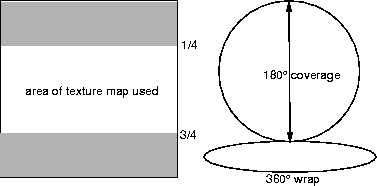
The best way to create a spherical environment map is to generate a ramp image and then paint objects onto it that avoid the poles and the edges.
Consider the case of the default transformation and an eye point on the positive x-axis looking at the origin. If the spherical environment map is used directly as a background, the edge join will be visible. However, if a surface is viewed that has been reflection mapped, the join will be behind the surface and hardly visible.
Also consider the resolution of spherical reflection maps and how crisp they will appear. The horizontal resolution corresponds to 360º. A 5122 image will have one pixel every 1/2º. Flat surfaces that are reflection mapped will appear as blurred indistinct reflections. Higher resolution images may be used, but they are difficult to paint and use a lot of memory. It is better to use rounded geometry instead.
|
Argument Name
|
Absolute Range
|
Useful Range
|
Default
|
Description
|
|
image
|
|
|
no default
|
Name of pix file for reflection maps
|
|
flip
|
0, 1
|
|
0
|
Flag to indicate whether to swap u, v
|
|
shear_v
|
-infinity, infinity
|
-5, 5
|
0.0
|
Change of u for change in v
|
|
shear_u
|
-infinity, infinity
|
-5, 5
|
0.0
|
Change of v for change in u
|
|
source_texture
|
|
|
no default
|
Texture to be used as the image
|
"Sphere" is an environment texture.
Cube
The procedure "Cube" is an environment map defined by six faces of a cube. These faces are just square texture images in the form of pix files. Each file corresponds to a perspective view with a field of view of 90º, with a view direction along the positive and negative x, y, z axes. These images can be painted or digitized. However, the real application of cubic reflection maps is using rendered images. It is possible to construct an environment map about a particular point in a scene merely by using a few lines of SDL.
For the origin point 0.0 0.0 0.0 use the following statements:
In the DEFINITION section:
	startframe = 1;
	endframe = 6;

	triple camera_view(0.0, 0.0, 0.0);
In the MODEL section use:
if (	frame == 1.0 ) camera_view = (1.0, 0.0, 0.0);
else if	(frame == 2.0 ) camera_view = (-1.0, 0.0, 0.0);
else if	(frame == 3.0 ) camera_view = (0.0, 1.0, 0.0);
else if	(frame == 4.0 ) camera_view = (0.0, -1.0, 0.0);
else if	(frame == 5.0 ) camera_view = (0.0, 0.0, -1.0);
else if	(frame == 6.0 ) camera_view = (0.0, 0.0, -1.0);
camera (eye = (0,0,0), view = camera_view, fov = 90,
	viewport = (0.0, 255.0, 0.0, 255.0),
	aspect = (1.0)
);
For further information on creating cubic environment maps, please refer to the Cubic Environment Tutorial.
"Cube" is an environment texture.
Cubic environment maps are very fast to reference so they are the preferred method for animation sequences. The same scene may render 3 or 4 times faster using a cubic reflection map in place of the Sky procedure. It is possible to use other environment maps to create cubic environment maps merely by rendering them as backgrounds. It is, of course, not worth doing if the environment such as Sky varies every frame. However, if the environment is static for many frames, the speed savings will be considerable.
Cubic environment maps have the advantage that they may be blurred by an arbitrarily large amount without any additional cost. When generating a background from an environment map the amount of blurring required to prevent aliasing increases with the field of view. In practice, with 5122 texture images and a field of view less than 90º this will result in very little required blurring. For reflection mapped surfaces, however, the amount of blurring will depend upon the surface curvature and the distance from the eye point. Currently, this is not computed automatically. However, the variable "bluroffset" will allow the user to defocus the reflections by a desired amount. In fact, soft focus reflections can be used to simulate less than perfectly polished surfaces.
|
Argument Name
|
Absolute Range
|
Useful Range
|
Default
|
Description
|
|
top
|
|
|
no default
|
Pix file name for top image
|
|
bottom
|
|
|
no default
|
Pix file name for bottom image
|
|
right
|
|
|
no default
|
Pix file name for right image
|
|
left
|
|
|
no default
|
Pix file name for left image
|
|
front
|
|
|
no default
|
Pix file name for front image
|
|
back
|
|
|
no default
|
Pix file name for back image
|
In y-up systems, these are relative to the view down the z-axis; in z-up systems, they are relative to the view down the y-axis.
Sky
The Sky procedure is an environment map that generates images of a planetary atmosphere as seen from the surface of the planet. Parameter sets enable you to control the composition of the atmosphere and the cloud layer. If no floor is specified, the environment below the horizon is a vertical mirror reflection of the environment above the horizon. If a floor is specified, it must be given an altitude and other variables to control the positioning of a color pix file texture map on the surface.
|
Argument Name
|
Absolute Range
|
Useful Range
|
Default
|
Description
|
|
floor_texture
|
|
|
no default
|
pix file name for floor texture 24 bits
|
|
cloud_texture
|
|
|
no default
|
Mask file name for cloud texture 8 bits
|
|
cloud_altitude
|
0, 1
|
0, 0.5
|
|
y coordinate of cloud layer as a fraction of sky_thickness (if Y-up)
|
|
space_samples
|
0, infinity
|
1, 10
|
5.0
|
# of samples above clouds
|
|
floor_samples
|
0, infinity
|
0, 3
|
1.0
|
# of samples in front of floor
|
|
cloud_samples
|
0, infinity
|
0, 3
|
5.0
|
#. of samples below clouds
|
|
air_density
|
0, infinity
|
0, 10
|
1.0
|
Density of air molecules
|
|
dust_density
|
0, infinity
|
0, 3
|
0.0
|
Density of dust particles
|
|
sun_azimuth
|
-infinity, infinity
|
0, 360
|
145.0
|
Rotation of sun vector about vertical vector
|
|
sun_elevation
|
-infinity, infinity
|
-10, 90.0
|
45.0
|
Angle of elevation of sun vector relative to floor
|
|
sun_size
|
0, infinity
|
0, 30
|
0.531
|
Radius of sun's disc in degrees
|
|
sun_blur
|
0, infinity
|
0, 50
|
1.0
|
Radius of halo around sun in degrees
|
|
sun_halo_brightness (triple)
|
0, infinity
|
0, 1
|
0.2,0.3,0.2
|
Multiplicative color for halo around the sun
|
|
sky_brightness (triple)
|
0, infinity
|
0, 10
|
1.0, 1.0, 1.0
|
Multiplicative color for the sky
|
|
sun_brightness (triple)
|
0, infinity
|
0, 10
|
1.0, 1.0, 1.0
|
Multiplicative color for the sun
|
|
floor_altitude
|
-infinity, infinity
|
-100, 100
|
-1.0
|
y coordinate of the floor (if y-up)
|
|
cloud_density
|
0, infinity
|
0, 5
|
1.0
|
Density of the sky
|
|
cloud_radius
|
0, infinity
|
0, 50
|
20.0
|
Radius of halo around sun
|
|
cloud_width_mult
|
-infinity, infinity
|
-0.2, 0.2
|
0.1
|
Scaling factors for cloud map position on floor
|
|
cloud_depth_mult
|
-infinity, infinity
|
-0.2, 0.2
|
0.1
|
" " "
|
|
cloud_blurmult
|
0, infinity
|
0, 10
|
1.0
|
Scaling factor for cloud blur size
|
|
cloud_bluroffset
|
0, infinity
|
0, 1
|
0.0
|
Offset for cloud blur size
|
|
cloud_threshold
|
0, infinity
|
0, 1
|
0.5
|
Threshold for presence of clouds
|
|
cloud_brightness
|
0, infinity
|
0, 10
|
1.0, 1.0, 1.0
|
Multiplicative color for ambient cloud illumination
|
|
cloud_sunset_brightness
|
0, infinity
|
0, 500
|
300, 300, 300
|
Multiplicative color for front lighting
|
|
cloud_power
|
0, 1
|
0, 1
|
1.0
|
Exponent for cloud density falloff
|
|
floor_width_mult
|
-infinity, infinity
|
0, 10
|
1.0
|
Scaling factors for color map position on floor
|
|
floor_depth_mult
|
-infinity, infinity
|
0, 10
|
1.0
|
" " " "
|
|
floor_width_offset
|
-infinity, infinity
|
0, 1
|
0.0
|
Offsets for color map position on floor
|
|
floor_depth_offset
|
-infinity, infinity
|
0, 1
|
0.0
|
" " " "
|
|
floor_blurmult
|
0, infinity
|
0, 10
|
1.0
|
Scaling factor for floor blur size
|
|
floor_bluroffset
|
0, infinity
|
0, 1
|
0.0
|
Offset for floor blur size
|
|
floor_color (triple)
|
0, infinity
|
0, 255
|
255, 255, 255
|
Color of floor
|
|
sky_radius
|
0.01, infinity
|
0.01, 300
|
50.0
|
Radius of planet as a multiple of sky_thickness
|
|
sky_thickness
|
1, infinity
|
100, 10000
|
1000
|
Thickness of atmosphere
|
|
total_brightness
|
0, infinity
|
0, 10
|
1.0
|
Scales the overall brightness of environment
|
|
has_floor
|
TRUE FALSE
|
|
TRUE
|
Flag setting whether or not a floor is used.
|
"Sky" is an environment texture.
[email protected]
Copyright © 1998, Alias|Wavefront, a division of Silicon Graphics Limited. All rights
reserved.