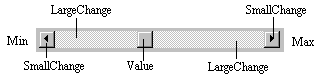
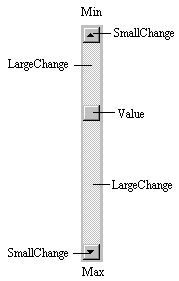
| LargeChange |
Increment added to or subtracted from the scroll
bar Value property when the bar area is clicked. |
| Max |
The value of the horizontal scroll bar at the far right and
the value of the vertical scroll bar at the bottom. Can range
from -32,768 to 32,767. |
| Min |
The other extreme value - the horizontal scroll bar at the
left and the vertical scroll bar at the top. Can range
from -32,768 to 32,767. |
| SmallChange |
The increment added to or subtracted from the scroll
bar Value property when either of the scroll arrows
is clicked. |
| Value |
The current position of the scroll box (thumb) within the
scroll bar. If you set this in code, Visual Basic moves the
scroll box to the proper position. |