You did so well with last week�s assignment that, now, a school
wants you to develop the beginning structure of an input screen for
its students. The required input information is:
Student Name
Student Grade (1 through 6)
Student Sex (Male or Female)
Student Date of Birth (Month, Day, Year)
Student Picture (Assume they can be loaded as bitmap files)
Set up the screen so that only the Name needs to be typed; all
other inputs should be set with option buttons, scroll bars, and common
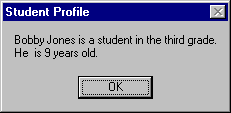
dialog boxes. When a screen of information is complete, display the
summarized profile in a message box. This profile message box should
resemble this:
Note the student�s age must be computed from the input birth
date - watch out for pitfalls in doing the computation. The student�s
picture does not appear in the profile, only on the input screen.
My Solution:
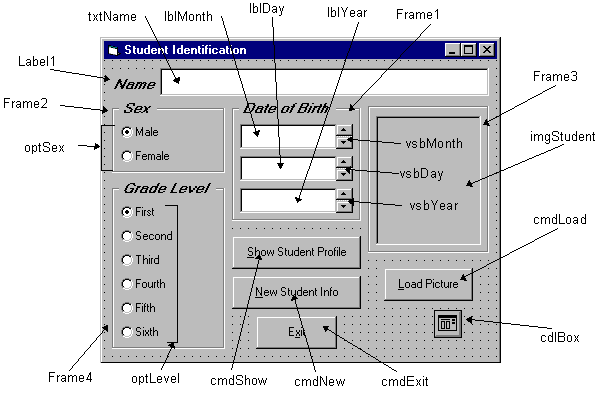
Form:
Properties:
Form frmStudent:
BorderStyle = 1- Fixed Single
Caption = Student Profile
CommandButton cmdLoad:
Caption = &Load Picture
Frame Frame3:
Caption = Picture
FontName = MS Sans Serif
FontBold = True
FontSize = 9.75
FontItalic = True
Image imgStudent:
BorderStyle = 1 - Fixed Single
Stretch = True
CommandButton cmdExit:
Caption = E&xit
CommandButton cmdNew:
Caption = &New Profile
CommandButton cmdShow:
Caption = &Show Profile
Frame Frame4:
Caption = Grade Level
FontName = MS Sans Serif
FontBold = True
FontSize = 9.75
FontItalic = True
OptionButton optLevel:
Caption = Grade 6
Index = 5
OptionButton optLevel:
Caption = Grade 5
Index = 4
OptionButton optLevel:
Caption = Grade 4
Index = 3
OptionButton optLevel:
Caption = Grade 3
Index = 2
OptionButton optLevel:
Caption = Grade 2
Index = 1
OptionButton optLevel:
Caption = Grade 1
Index = 0
Frame Frame2:
Caption = Sex
FontName = MS Sans Serif
FontBold = True
FontSize = 9.75
FontItalic = True
OptionButton optSex:
Caption = Female
Index = 1
OptionButton optSex:
Caption = Male
Index = 0
Frame Frame1:
Caption = Date of Birth
FontName = MS Sans Serif
FontBold = True
FontSize = 9.75
FontItalic = True
VScrollBar vsbYear:
Max = 1800
Min = 2100
Value = 1960
VScrollBar vsbDay:
Max = 1
Min = 31
Value = 1
VScrollBar vsbMonth:
Max = 1
Min = 12
Value = 1
Label lblYear:
Alignment = 2 - Center
BackColor = &H00FFFFFF& (White)
BorderStyle = 1 - Fixed Single
FontName = MS Sans Serif
FontSize = 10.8
Label lblDay:
Alignment = 2 - Center
BackColor = &H00FFFFFF& (White)
BorderStyle = 1 - Fixed Single
FontName = MS Sans Serif
FontSize = 10.8
Label lblMonth:
Alignment = 2 - Center
BackColor = &H00FFFFFF& (White)
BorderStyle = 1 - Fixed Single
FontName = MS Sans Serif
FontSize = 10.8
TextBox txtName:
FontName = MS Sans Serif
FontSize = 10.8
CommonDialog cdlBox:
Filter = Bitmaps (*.bmp)|*.bmp
Label Label1:
Caption = Name
FontName = MS Sans Serif
FontBold = True
FontSize = 9.75
FontItalic = True
Code:
General Declarations:
Option Explicit
Dim Months(12) As String
Dim Days(12) As Integer
Dim Grade As String
'Blank out name and picture
txtName.Text = ""
imgStudent.Picture = LoadPicture("")
End Sub
cmdShow Click Event:
Private Sub cmdShow_Click()
Dim Is_Leap As Integer
Dim Msg As String, Age As Integer, Pronoun As String
Dim M As Integer, D As Integer, Y As Integer
'Check for leap year and if February is current month
If vsbMonth.Value = 2 And ((vsbYear.Value Mod 4 = 0 And vsbYear.Value Mod 100 <> 0) Or vsbYear.Value Mod 400 = 0) Then
Is_Leap = 1
Else
Is_Leap = 0
End If
'Check to make sure current day doesn't exceed number of days in month
If vsbDay.Value > Days(vsbMonth.Value) + Is_Leap Then
MsgBox "Only" + Str(Days(vsbMonth.Value) + Is_Leap) + " days in " + Months(vsbMonth.Value), vbOKOnly + vbCritical, "Invalid Birth Date"
Exit Sub
End If
'Get current date to compute age
M = Val(Format(Now, "mm"))
D = Val(Format(Now, "dd"))
Y = Val(Format(Now, "yyyy"))
Age = Y - vsbYear
If vsbMonth.Value > M Or (vsbMonth.Value = M And vsbDay > D) Then Age = Age - 1
'Check for valid age
If Age < 0 Then
MsgBox "Birth date is before current date.", vbOKOnly + vbCritical, "Invalid Birth Date"
Exit Sub
End If
'Check to make sure name entered
If txtName.Text = "" Then
MsgBox "The profile requires a name.", vbOKOnly + vbCritical, "No Name Entered"
Exit Sub
End If
'Put together student profile message
Msg = txtName.Text + " is a student in the " + Grade + " grade." + vbCr
If optSex(0).Value = True Then Pronoun = "He " Else Pronoun = "She "
Msg = Msg + Pronoun + " is" + Str(Age) + " years old." + vbCr
MsgBox Msg, vbOKOnly, "Student Profile"