Athletic Level (Extreme, Advanced, Intermediate, or Beginner)
Set up the screen so that only the Name and Age (use text boxes) and,
perhaps, City (use a combo box) need to be typed; all other inputs should
be set with check boxes and option buttons. When a screen of information
is complete, display the summarized profile in a message box.
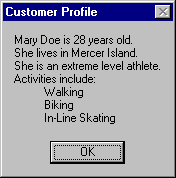
This profile message box should resemble this:
My Solution:
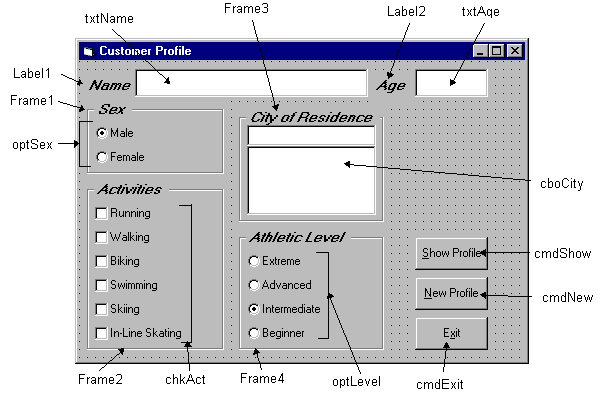
Form:
Properties:
Form frmCustomer:
BorderStyle = 1 - Fixed Single
Caption = Customer Profile
CommandButton cmdExit:
Caption = E&xit
Frame Frame3:
Caption = City of Residence
FontName = MS Sans Serif
FontBold = True
FontSize = 9.75
FontItalic = True
ComboBox cboCity:
Sorted = True
Style = 1 - Simple Combo
CommandButton cmdNew:
Caption = &New Profile
CommandButton cmdShow:
Caption = &Show Profile
Frame Frame4:
Caption = Athletic Level
FontName = MS Sans Serif
FontBold = True
FontSize = 9.75
FontItalic = True
OptionButton optLevel:
Caption = Beginner
Index = 3
OptionButton optLevel:
Caption = Intermediate
Index = 2
Value = True
OptionButton optLevel:
Caption = Advanced
Index = 1
OptionButton optLevel:
Caption = Extreme
Index = 0
Frame Frame1:
Caption = Sex
FontName = MS Sans Serif
FontBold = True
FontSize = 9.75
FontItalic = True
OptionButton optSex:
Caption = Female
Index = 1
OptionButton optSex:
Caption = Male
Index = 0
Value = True
Frame Frame2:
Caption = Activities
FontName = MS Sans Serif
FontBold = True
FontSize = 9.75
FontItalic = True
CheckBox chkAct:
Caption = In-Line Skating
Index = 5
CheckBox chkAct:
Caption = Skiing
Index = 4
CheckBox chkAct:
Caption = Swimming
Index = 3
CheckBox chkAct:
Caption = Biking
Index = 2
CheckBox chkAct:
Caption = Walking
Index = 1
CheckBox chkAct:
Caption = Running
Index = 0
TextBox txtName:
FontName = MS Sans Serif
FontSize = 12
Label Label1:
Caption = Name
FontName = MS Sans Serif
FontBold = True
FontSize = 9.75
FontItalic = True
TextBox txtAge:
FontName = MS Sans Serif
FontSize = 12
Label Label2:
Caption = Age
FontName = MS Sans Serif
FontBold = True
FontSize = 9.75
FontItalic = True
Code:
General Declarations:
Option Explicit
Dim Activity As String
cmdExit Click Event:
Private Sub cmdExit_Click()
End
End Sub
cmdNew Click Event:
Private Sub cmdNew_Click()
'Blank out name and reset check boxes
Dim I As Integer
txtName.Text = ""
txtAge.Text = ""
For I = 0 To 5
chkAct(I).Value = vbUnchecked
Next I
End Sub
cmdShow Click Event:
Private Sub cmdShow_Click()
Dim NoAct As Integer, I As Integer
Dim Msg As String, Pronoun As String
'Check to make sure name entered
If txtName.Text = "" Then
MsgBox "The profile requires a name.", vbOKOnly + vbCritical,
"No Name Entered"
Exit Sub
End If
'Check to make sure age entered
If txtAge.Text = "" Then
MsgBox "The profile requires an age.", vbOKOnly + vbCritical,
"No Age Entered"
Exit Sub
End If
'Put together customer profile message
Msg = txtName.Text + " is" + Str$(txtAge.Text) + " years old." + vbCr
If optSex(0).Value = True Then Pronoun = "He " Else Pronoun = "She "
Msg = Msg + Pronoun + "lives in " + cboCity.Text + "." + vbCr
Msg = Msg + Pronoun + "is a"
If optLevel(3).Value = False Then Msg = Msg + "n " Else Msg = Msg + " "
Msg = Msg + Activity + " level athlete." + vbCr
NoAct = 0
For I = 0 To 5
If chkAct(I).Value = vbChecked Then NoAct = NoAct + 1
Next I
If NoAct > 0 Then
Msg = Msg + "Activities include:" + vbCr
For I = 0 To 5
If chkAct(I).Value = vbChecked Then Msg = Msg + String$(10, 32) +
chkAct(I).Caption + vbCr