<a href="http://bsads.immerce.com/gosite.asp" target="_top"><img width=468 height=60 border=0 alt="Advertisement" src="http://bsads.immerce.com/prd/banner.asp?src=29580&page=home" ismap NOSAVE></a> <!---->
<a href="http://swap.immerce.com/" target="_top"><img width=468 height=16 border=0 src="http://bsads.immerce.com/bs_adlogo.gif"></a>
Learn Visual Basic 6.0
2. The Visual Basic Language
Exercise 2-2: Flash Card Addition Problems
Write an application that generates random addition problems. Provide some kind of feedback and scoring system as the problems are answered.
My Solution:
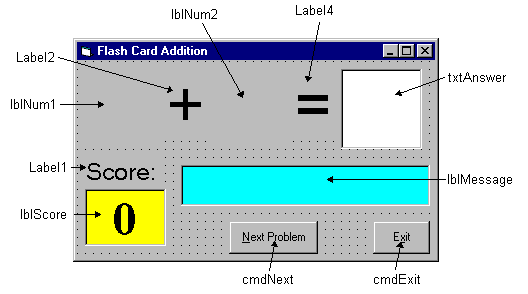
Form:
Properties:
Form
frmAdd
:
BorderStyle = 1 - Fixed Single
Caption = Flash Card Addition
CommandButton
cmdNext
:
Caption = &Next Problem
Enabled = False
CommandButton
cmdExit
:
Caption = E&xit
TextButton
txtAnswer
:
FontName = Arial
FontSize = 48
MaxLength = 2
Label
lblMessage
:
Alignment = 2 - Center
BackColor = &H00FFFF00& (Cyan)
BorderStyle = 1 - Fixed Single
FontName = MS Sans Serif
FontBold = True
FontSize = 24
FontItalic = True
Label
lblScore
:
Alignment = 2 - Center
BackColor = &H0000FFFF& (Yellow)
BorderStyle = 1 - Fixed Single
Caption = 0
FontName = Times New Roman
FontBold = True
FontSize = 36
Label
Label1
:
Alignment = 2 - Center
Caption = Score:
FontName = MS Sans Serif
FontSize = 18
Label
Label4
:
Alignment = 2 - Center
Caption = =
FontName = Arial
FontSize = 48
Label
lblNum2
:
Alignment = 2 - Center
FontName = Arial
FontSize = 48
Label
Label2
:
Alignment = 2 - Center
Caption = +
FontName = Arial
FontSize = 48
Label
lblNum1
:
Alignment = 2 - Center
FontName = Arial
FontSize = 48
Code:
General Declarations:
Option Explicit
Dim Sum As Integer
Dim NumProb As Integer, NumRight As Integer
cmdExit Click Event:
Private Sub cmdExit_Click()
End
End Sub
cmdNext Click Event:
Private Sub cmdNext_Click()
'Generate next addition problem
Dim Number1 As Integer
Dim Number2 As Integer
txtAnswer.Text = ""
lblMessage.Caption = ""
NumProb = NumProb + 1
'Generate random numbers for addends
Number1 = Int(Rnd * 21)
Number2 = Int(Rnd * 21)
lblNum1.Caption = Format(Number1, "#0")
lblNum2.Caption = Format(Number2, "#0")
'Find sum
Sum = Number1 + Number2
cmdNext.Enabled = False
txtAnswer.SetFocus
End Sub
Form Activate Event:
Private Sub Form_Activate()
Call cmdNext_Click
End Sub
Form Load Event:
Private Sub Form_Load()
Randomize Timer
NumProb = 0
NumRight = 0
End Sub
txtAnswer KeyPress Event:
Private Sub txtAnswer_KeyPress(KeyAscii As Integer)
Dim Ans As Integer 'Check for number only input and for return key If (KeyAscii >= vbKey0 And KeyAscii <= vbKey9) Or KeyAscii = vbKeyBack Then
Exit Sub
ElseIf KeyAscii = vbKeyReturn Then
'Check answer
Ans = Val(txtAnswer.Text)
If Ans = Sum Then
NumRight = NumRight + 1
lblMessage.Caption = "That's correct!"
Else
lblMessage.Caption = "Answer is " + Format(Sum, "#0")
End If
lblScore.Caption = Format(100 * NumRight / NumProb, "##0")
cmdNext.Enabled = True
cmdNext.SetFocus
Else
KeyAscii = 0
End If
End Sub
Counter Hit
This
Homepage
is special brought to you by
CK Tan