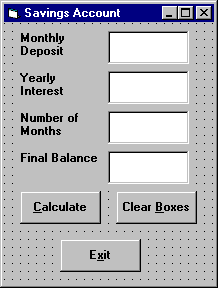
Here, we modify the Savings Account project to allow entering any
three values and computing the fourth. First, add a third command button
that will clear all of the text boxes. Assign the following properties:
Command3:
Caption
Clear &Boxes
Name
cmdClear
The form should look something like this when you�re done:
Code the cmdClear button Click event:
Private Sub cmdClear_Click ()
�Blank out the text boxes
txtDeposit.Text = ""
txtInterest.Text = ""
txtMonths.Text = ""
txtFinal.Text = ""
End Sub
This code simply blanks out the four text boxes when the Clear
button is clicked.
Code the KeyPress event for the txtFinal object:
Private Sub txtFinal_KeyPress (KeyAscii As Integer)
�Only allow number keys, decimal point, or backspace
If (KeyAscii >= vbKey0 And KeyAscii <= vbKey9) Or
KeyAscii = vbKeyDecPt Or KeyAscii = vbKeyBack Then
Exit Sub
Else
KeyAscii = 0
Beep
End If
End Sub
We need this code because we can now enter information into the
Final Value text box.
The modified code for the Click event of the
cmdCalculate button is:
Private Sub cmdCalculate_Click()
Dim IntRate As Single
Dim IntNew As Single
Dim Fcn As Single, FcnD As Single
�Read the four text boxes
Deposit = Val(txtDeposit.Text)
Interest = Val(txtInterest.Text)
IntRate = Interest / 1200
Months = Val(txtMonths.Text)
Final = Val(txtFinal.Text)
�Determine which box is blank
�Compute that missing value and put in text box
If txtDeposit.Text = "" Then
�Final value missing
Final = Deposit * ((1 + IntRate) ^ Months - 1) / IntRate
txtFinal.Text = Format(Final, "#####0.00")
End If
End Sub
In this code. we first read the text information from all four text
boxes and based on which one is blank, compute the missing information
and display it in the corresponding text box. Solving for missing
Deposit, Months, or Final information is a
straightforward manipulation of the equation given in Example 2-2.
If the Interest value is missing, we have to solve an Mth-order
polynomial using something called Newton-Raphson iteration - a good
example of using a Do loop. Finding the Interest value is
straightforward. What we do is guess at what the interest is, compute
a better guess (using Newton-Raphson iteration), and repeat the process
(loop) until the old guess and the new guess are close to each other.
You can see each step in the code.
Test and save your application. Go home and relax.