Guaranteed Hits to your web site!


Learn Visual Basic 6.0


1. Introduction to the Visual Basic Language and Environment


Setting Properties of Objects at Design Time

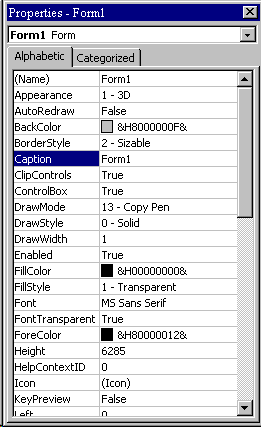
  1. Each form and control has properties assigned to it by default when you start up a new project. There are two ways to display the properties of an object. The first way is to click on the object (form or control) in the form window. Then, click on the Properties Window or the Properties Window button in the tool bar. The second way is to first click on the Properties Window. Then, select the object from the Object box in the Properties Window. Shown is the Properties Window for the stopwatch application:

    Properties The drop-down box at the top of the Properties Window is the Object box. It displays the name of each object in the application as well as its type. This display shows the Form object. The Properties list is directly below this box. In this list, you can scroll through the list of properties for the selected object. You may select a property by clicking on it. Properties can be changed by typing a new value or choosing from a list of predefined settings (available as a drop down list).

    Properties can be viewed in two ways:
    Alphabetic and Categorized.

    A very important property for each object is its name. The name is used by Visual Basic to refer to a particular object in code.


  2. A convention has been established for naming Visual Basic objects. This convention is to use a three letter prefix (depending on the object) followed by a name you assign. A few of the prefixes are (we�ll see more as we progress in the class):

    Object Prefix Example
    Form frm frmWatch
    Command Button cmd, btn cmdExit, btnStart
    Label lbl lblStart, lblEnd
    Text Box txt txtTime, txtName
    Menu mnu mnuExit, mnuSave
    Check box chk chkChoice


  3. Object names can be up to 40 characters long, must start with a letter, must contain only letters, numbers, and the underscore (_) character. Names are used in setting properties at run time and also in establishing procedure names for object events.


Pen Line


Counter Hit Counter Hit


This Homepage is special brought to you by CK Tan
Hosted by www.Geocities.ws

1
