Guaranteed Hits to your web site!


Learn Visual Basic 6.0


1. Introduction to the Visual Basic Language and Environment


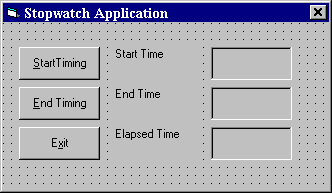
Example 1-2: Stopwatch Application - Setting Properties

  1. Set properties of the form, three buttons, and six labels:

    Form1: BorderStyle 1-Fixed Single
    Caption Stopwatch Application
    Name frmStopWatch
    Command1: Caption &Start Timing
    Name cmdStart
    Command2: Caption &End Timing
    Name cmdEnd
    Command3: Caption E&xit
    Name cmdExit
    Label1: Caption Start Time
    Label2: Caption End Time
    Label3: Caption Elapsed Time
    Label4: BorderStyle 1-Fixed Single
    Caption [Blank]
    Name lblStart
    Label5: BorderStyle 1-Fixed Single
    Caption [Blank]
    Name lblEnd
    Label6: BorderStyle 1-Fixed Single
    Caption [Blank]
    Name lblElapsed


    In the Caption properties of the three command buttons, notice the ampersand (&). The ampersand precedes a button's access key. That is, in addition to clicking on a button to invoke its event, you can also press its access key (no need for a mouse). The access key is pressed in conjunction with the Alt key. Hence, to invoke 'Begin Timing', you can either click the button or press Alt+B. Note in the button captions on the form, the access keys appear with an underscore (_).

  2. Your form should now look something like this:


    Stopwatch


Pen Line


Counter Hit Counter Hit


This Homepage is special brought to you by CK Tan
Hosted by www.Geocities.ws

1