
 LOADING BRUSHES
LOADING BRUSHES
Lets say you spend 2 hours creating the perfect brush, but now you cant use it because you don't know how to load it. Wouldn't that be a waste? This tutorial was written to help you understand how to load custom and default brushes.
Lets begin by opening up Photoshop (logically) and open
a new document or the image you wish to put brushes on. Now on the tool bar
choose the airbrush tool. 
Now just follow the steps in the screenshot below:
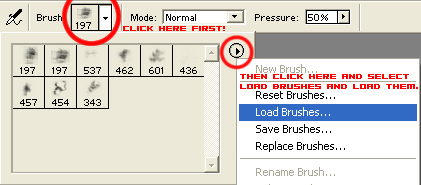
Now have fun by tweaking the color and pressure settings and enjoy!