Have you seen
"Hey room you can create custom emotions by editing the
emote_user.dat file" or strange emotions in a yahoo chat
room?
Wonder how to make your own emotions for yahoo! messenger chat?
emote_user.dat
(custom emotions)
To make your own custom emotions go to the folder:
C:\Program
Files\Yahoo!\Messenger\
on your hard drive and open the file emote_user.dat with
notepad.
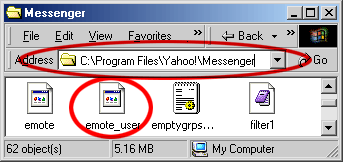
type
a new emotion at the bottom of the file in this format:
EmotionName\Text for room emote\Text for single user emote.
-
include
\ between each part
-
Put
%s where you want the person your emoting's name.
Example:
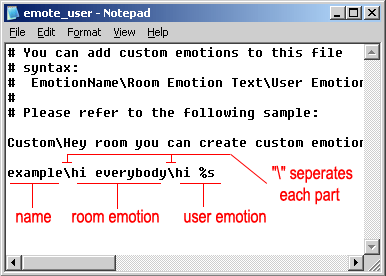
example\hi everybody\hi %s
typing this makes a new emotion called "example"
and makes the messages appear like this in the chat window:
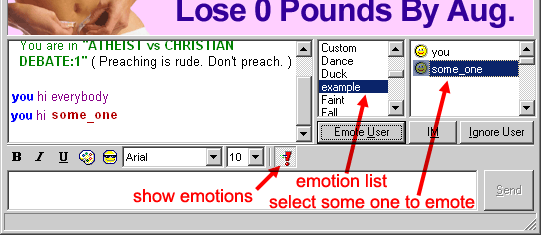
-
remember
to save your changes to emote_user.dat! (file->save)
-
you
will need to close and reopen any chat room you had open for
your emotion to appear.
-
this
does not work for the java based chat.
-
to
emote the whole room don't select anyone
-
to
emote one person select their ID from the list to the right

 YAHOO
EMOTES
YAHOO
EMOTES