
 COLORS
COLORS
Dreamweaver handles Hexadecimal values and HTML standard color names:
Dreamweaver also
offers many of its own built-in tools to allow color selection to be much
easier. These can be accessed from many places within the program by clicking on
this button: 
This brings up the standard palette as well as a color picker. The color picker can be used to pick a color from elsewhere on the screen, including other open windows. All one must do is click on a color and that will become the active color for the element selected.
There are other tools available, such as the Color Dialog. This can be accessed from the Text Menu by choosing Color. It can also be accessed from the Color Palette:
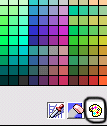
Click on the circled icon to access the Color Dialog Box.

From this dialog one can choose from all the colors in the bar (most of them are web safe). RGB values can also be entered. This is useful when working with graphics programs such as Photoshop or Fireworks.
These colors can also be added to the 'Custom Colors' so that they may be used again. To do this simply select an empty (white) box under Custom colors, choose your color and click on the 'Add to Custom Colors' button. This color can now be used from the Color Dialog anytime.
Copyrights -Jehanzeb.Tk