. .
Main Index
Buy LED lights
Introduction
Walkthroughs
Forums
Contributors
Links
Guestbook
Home

Tech Index
Version Guide
Progress
Reviews
Submissions
LED info
News Archive


Here's a great message with some very useful information for anyone who might be experimenting on their own with variations on the modification. Great work Andy!

I built the GBA LED light mod per your web instructions, and it worked great. Those instructions were awesome.

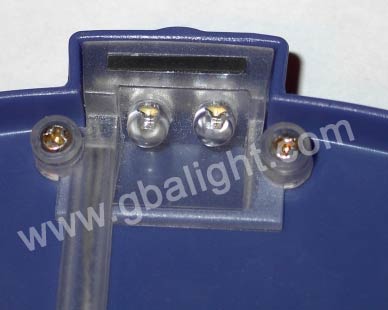
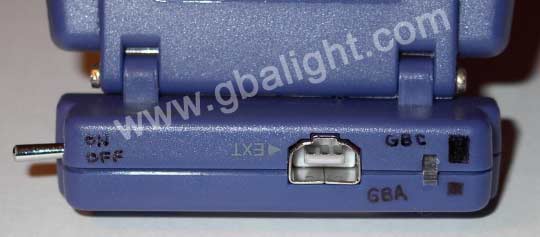
After that, I bought another Pelican light at Wal-Mart, and modified it a little differently. Attached are two pictures. I put in two Radio Shack white LEDs, and bypassed the internal circuit altogether. I removed the dimmer switch, and used the old on/off switch for a dimmer. In 3V (GBA) mode, the LEDs are both in parallel straight across the power supply. At 3.3 V, I measured well under 20 ma each. An 5V (GBC) mode, you have to flip the little black switch, and it puts a 47 ohm resistor in series with the LEDs. The long switch on the side is the power switch. Since this switch was easier to accidently bump off and on, that is why I used it (the big switch) for power, and the little switch for dimming. By not using the internal circuitry from the original Pelican light, I could get noticably more current through the LEDs. I reverse engineered the schematic from the Pelican light, and can send you a copy if you're interested. There's 3 transistors and a handful of resistors. It appears that the circuit draws 100ma in both 3V and 5V mode, when the dimmer is set at maximum.

The toggle switch in my modified light is epoxeed in place.


One other mod I made to your plans was to drill the holes at a slight angle, so that they would point right at the center of the GBA screen. What's interesting, is that as you rotate the shield up and down, the center of the LED illumination pattern stays amazingly centered.

I found a great way to jig up the clear plastic piece for drilling. If I do another one, I'll send you a picture. After removing the clear plastic piece from the Pelican light, I screwed it to a small block of wood, the same as if the wood was the Pelican lid. I used two very small screws from a 5/8" miniature hinge set I got at Home Depot. Then, I took the plastic/wood block assembly, and stuck it in a vice. I rotated it in the vice until I got the angle I wanted, and then drilled the two LED holes with a drill press. The results look professional, and I was able to aim the LED holes so the LED beams would be centered on the GBA screen.


Editor's Note: Andy has since mailed me a clarification regarding the process explained above:
"On the way to work, I realized I mis-spoke on one detail of how I drilled the angled holes in my clear plastic piece from the Pelican Light. When I screwed it to the block of wood, I screwed it face-down, *NOT* face-up, which is what I think I implied in my e-mail.

I really need to re-enact the process and take a picture of it
- a picture's worth a thousand words."

I've tested both 20-degree angle (bought over the web) and 100-degree (Radio Shack) LEDs. The Radio Shack ones have the problem that they have a blue ring pattern. The 20-degree bulbs don't illuminate all of the GBA screen, because their pattern is too small. I think you mention this either on your web site, or in one of your postings. I took photos and measured the angles, and it looks like the GBA screen is about 30 degrees wide, so a 45-degree or 50-degree bulb may be the best tradeoff in terms of brightness and good full-screen coverage. I'm going to try 45 or 50-degree white LEDs next.

I've also been looking into better power supply circuits. It appears that the Maxim MAX1698 is the ultimate DC-to-DC boost converter for running LEDs from low voltages. It is specifically designed to drive LED strings (e.g. two to 4 LEDs in series) with 2.7 to 5.5 Volts input. It requires an external NMOSFET, shotky diode, inductor, 20-ohm resistor, and couple of capacitors. If you care to add a 500K-ohm potentiometer, you can also have full dimming capability. It is 90% efficient. Unfortunately, the potentiometer in the Pelican Light has the wrong resistance to work with the dimming circuit in the Maxim power converter. Oh well. The beauty of it is that the output current will be the same independant of what game you are playing.

By the way, I found a great way to test modified Pelican lights without risking damage to the GBA console. I attach the Pelican light to a wood mock-up of the GBA. I bought a multi-player cable, cut off the end and strip the wires, and plug it in the back of the Pelican light. I can then run a variable power supply into the modified Pelican light and easily take current measurements. On the cable I disassembled, the black wire is ground, and the white wire is VCC.

Feel free to post any portion of this note, and/or the accompanying pictures if you think it would be of interest. I'm going back to the lab.

-Andy


This is an unauthorized, unofficial website and is not affiliated or associated with nintendo, radioshack or pelican accessories in any
way, shape or form. All material on this site including photos � 2001 [email protected] All rights reserved.
Hosted by www.Geocities.ws

1