I figured people would like to have a place where they can find the things that they need to make their own web pages. So here you are! ENJOY!
(NOTE: I have mostly just put links to other places on this page because I'm too lazy to put it all here myself.)
 STEP 1: Server
Most casual home users will not have their own dedicated server for storing their web site. For them, there are free web page services or possibly even their own Internet Service Provider (ISP) to facilitate those personal homepage needs.
Step 2: HTML
Anybody writing a web page has to know some very basics of HTML code. Though written with GeoCities members in mind, "Athens2090" is still a great place to start. There are more links there if you need further HTML help. There are actually TONS of pages out there with HTML tutorials. Use Altavista, Ask.com, or your favorite search engine to look for help on a specific tag or other HTML issue (like Java applets).
Once you have gained some common HTML knowledge, check out The Totally FREE Homepage Resource Center.
Esjs's Hint: If you find a web page that has done something "cool" that you want to incorporate into your page, you can find out how the author did it by using "view source." Internet Explorer and Netscape both have a "view source" command of some sort.
About text colors.
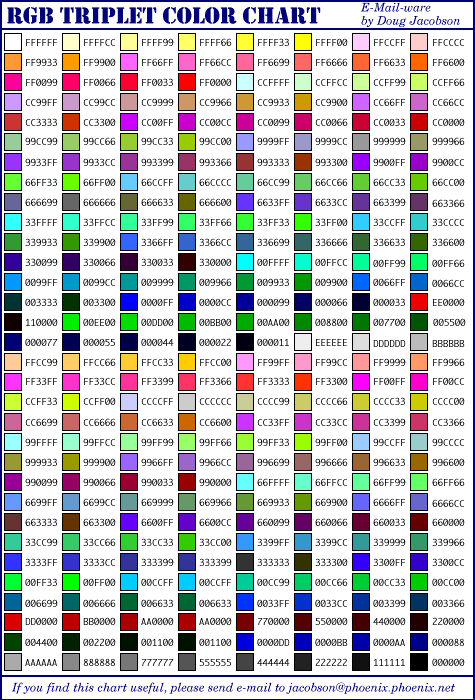
OK, here is the deal about colors. Every color of the rainbow has a six digit code. These digits can be either a number (0-9) or a capitalized letter (A-F). This is called hexadecimal (from the number 16).
Now, the six digits are actually three sets of two digits (ie think of it as xx xx xx, not xxxxxx). Each set represents a level of red, green, or blue (in that order). Thus, you can make any color from a mixture of these three colors in various strengths. 00 means that NONE of that color exists, while FF means that color is full strength. This text color ("Medium-dark green") is derived from TEXT="#005500" in my BODY tag. Now that I have explained this to you (oops you might have just learned something), you can copy this quick reference chart so you don't spend too much time trying to figure out what code gives the color that you want.
Esjs's Hint: Though the TEXT attribute of the BODY tag sets the default text color on a page, text color (and size, style, etc.) can temporarily be changed with the FONT tag.
Esjs's Hint: If you aren't trying to be too specific about the shade of the color, modern browsers will recognize common colors in a color attribute (such as TEXT or BGCOLOR). For instance, I could have used TEXT="green" in my BODY tag, though the shade would not have been the same.
The FUN stuff: Graphics
Here is what makes the World Wide Web look GREAT! In the links below, you'll find backgrounds, icons, buttons, or just about anything.
Again, the Internet is full of this stuff. Use search engines like Altavista to find what you are looking for.
Esjs's Hint: If you enough practice with a powerful graphics program such as Adobe's Photoshop, then make your own graphics! If the program has sophisticated features (like "Texture Fill" which can be used to create some pretty neat looking backgrounds), then it is really easy to create professional looking graphics.