

This is for newbies and those that have forgotten !!
1. Turn animation off , for speed ... type CN2qq from main prompt.
2. Buy any number of holds at any time ,they will cost the same price reguardless
of what the port may indicate (from one hold to 255 holds , the total credits spent will be the same).
3. Always scan , this may save your life.
4. Some keys to remember : (/) for your current ship info , (C;) for max of your current ship
5. On Vid's World IF your animation is set to off you can check planets before building any by typing CJ? and looking then over.
6. If you choose to play RED you will need a few formulas :
But first get these values from the main T screen (to enter game of choice) , by typing *
and write down the %'s for Rob factor and Steal factor.
Rob=(3/RF%)*EXP
Steal=EXP/(30*SF%)
7. Class 0 Ports Highest prices for Fighter = 239 Shields = 189
Lowest prices for Fighters = 160 and Shields = 110
Ok to all you Swath users , these are macro's that go in the "hammer icon" at top of your Swath window when your playing.
You should be in playing menu when using them.
And the suggested keys can be anything you like , it was easyest to use these for the examples :)
| Actual code to cut & paste in them
| |
| V
V
F8 -- cxv0^Myn this one is for clearing avoids (combo F8 & F9)
F9 -- ^Mq before you use this one, you need to type a displayed #
F5 -- ctq# Time and who is online :)
F12 -- f1^Mct drop a toll (an extra thing I like to keep handy)
Shift F10 -- cv2^Mv3^Mv4^Mv5^Mv6^Mv7^Mv8^Mv9^Mv10^Mqcf^M1^Mq
(this ones for finding back door to tera , used with Shift F11)
Shift F11 -- cv0^Myn2^Mv0^Myn3^Mv0^Myn4^Mv0^Myn5^Mv0^Myn6^Mv0^Myn7^Mv0^Myn8^Mv0^Myn9^Mv0^Myn10^Mxq
(this ones to clear those avoids just set)
Ctrl F5 -- ay1^May1^May1^May1^May1^May1^May1^May1^May1^Mi
(finnal capture , must be on a corp to use the safty feature)
Ctrl F6 -- ay1000^M Attack !!
Now if you use the features J.P. put into TWGS for navigation :
(# replaced by numbers 1,2,3,4 or T or S)
To use type n1 , n2 , n3 , n4 ,ns , nt
(nice short cut for typing sector jumps :)
Tag to macro keys like :
Shift F9 - n1^Myd
-- Tips and other Help --
I usually turn the comm off when colonizing so my script doesn't lockup.
So I use the shifted \ key to toggle comm on and off.
-- To get commision in a game with NO REDS : --
You need to trade and make about 1.1 mill credits , then buy g-torps and pop
alot of planets (dont distroy any).
When you get to 500 alinment , go to (P)olice station on Star Dock and (A)pply
for your commishion and they give you extra 500 so that you leave with a total
of 1k alinment.
And ready to get into an ISS when you can afford one.
=== Paper Notes ===
-- USING PAPER --
TradeWars can be fun but its much better when you take notes :>
I use 4 sheets of tractor paper for each game I play .
In most games the max planets a sector will hold will be 6.
This is why I use tracktor paper ..
And USE a pencel .. keeping an eraser handy.
To erase the dots used to indicate days left for next upgrade.
--- Here is sample ---
SBB L3 ... T9 L2 .... L1 . T10
1234 H - 5 , O - 9 , L - 15
--- explanation below ---
The sector is 1234 with a port SBB , planet #5 is an H level 3 with three days
till its next upgrade and
a transporter with a range of 9.
Next planet is an O # 9 , level 2 and 4 days left.
The L is # 15 with one day left till its a level 2 and transported range of
10.
So you see this is NICE info to have on paper , no need to even fire up your
computer to figure your next upgrade :>
I have chosen 4 dots across because I stack them usually no more then 3 high
, for up to 12 days.
The dots get erased at midnite and sometimes the level # needs changing :)
=== Paper for Buble Map ===
I normally draw the buble map on the top of my planet page
with a short hand in top right corner for locations of
SD - stardock
RY - rylos
AC - alpha centuri
Then the buble map below that , from left to right on the page.
Leaving room for the sector numbers on the left side of paper
scrolling downwards with the planet info discussed above.
--- Sample Map ---
SD-79
RY-39
AC - 995
6225<> 456 <> 1489 <> 3589 <> 125
|
SSS --- DE
1234 <> 615
1234 H - 5 , O - 9 , L - 15
etc ...
------------------------------------------------------
As you can see easy to understand , DE = deadend.
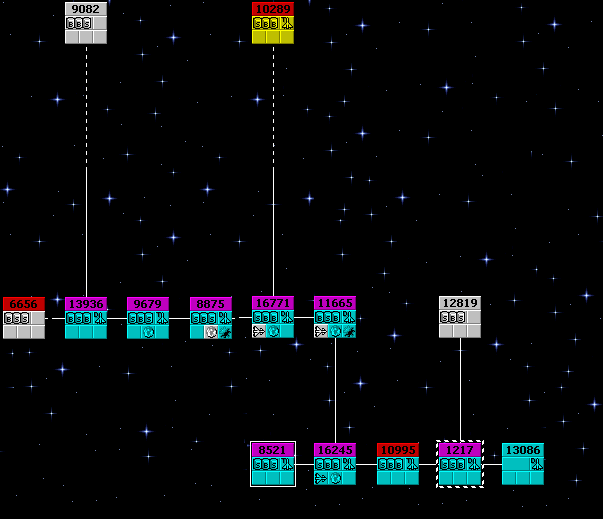
The Best Buble I have ever seen.
Seen in SWATH Map feature.
------------------------------------------------------
-- Balancing ports for exp/alinment and better trades -- >:)
Port trading for best $$ if exp and alinment don't bother your playing style.
You can send out eprobes to locate paired ports to trade , saving tons of turns.
Then you can type CR sector# on both of them to see thier condition.
For the purpose of this lesson lets pretend its at 100%.
And only consern ourselves with org/eq type port.
--- Sample Ports ---
So you've found ports in 7302 / 4331
And see that they are BSB / BBS
Now CR # (type CR and port 7302 R 4331 Q) that way info will be stacked for
easy viewing.
Looking for .. the least amount in B sides of the ports ( we will only consern
ourselves with org/eq type port).
=== Port 7302 ===
Items Status Trading % of max OnBoard
----- ------ ------- -------- -------
Fuel Ore Buying 2480 100% 0
Organics Selling 2100 100% 0
Equipment Buying 2800 100% 0
=== Port 4331 ===
Items Status Trading % of max OnBoard
----- ------ ------- -------- -------
Fuel Ore Buying 1000 100% 0
Organics Buying 3000 100% 0
Equipment Selling 800 100% 0
Ok here is how we get exp and alinment
and a better set of ports to boot :>
Now remember when upgrading that 1 point product = 10 products on the port.
Lets look at sample ports , the lowest B product is on port 7302.
So that is our targer number to upgrade any of the Selling products , conserned
with org/eq only.
Target # = 2800 , so we only upgrade port 7302 in org by 70.
And port 4331 in eq for 200.
This will cost a little but allows you to trade longer on that port.
Not to
mention when you CIM the next day , you will have a nice port to trade at again
:) or someone will.
--- To upgrade a port ... type O (oh) in the sector of said port. ---
--- USE TURNS BEFORE ZTM'ing ---
It is tricky at start of a game so be sure to trade and use some turn make credits
cause
when you ZTM you can get turns back and ZTM info >:)
These are the HAMMER , RED DOT , and RIGHT ARROW icons in swath.
We will start with the red dot icon :
get a transwarp ship .. make sure you have planet with fuel , and a ship with holds and twarp.
You as a Blue colonise.
So here is a tip :
Fill your holds to max fuel , this one run will
set you up with the needed info for this macro.
1) Warp to tera and back , don't land or anything else.
2a) Write the free holds number down somewhere.
3) land on target planet and drop all fuel.
4) take the number you got in step # 2a and get that much fuel and exit planet.
Here is the macro record feature.
1) Press RED DOT (Record)
2) twarp to tera , land and take cols , warp home.
3) land on target planet , drop cols , take fuel from step # 2a and exit planet.
4) PRESS RED DOT again (Turn Record OFF).
You are about done.
This can be used now as a Quick macro , with EXPRESS MODE or NOT (discussed later).
For now , lets test it.
PRESS RIGHT ARROW icon (Run Macro) and let it do one run.
Do it again with EXPRESS unchecked and scroll back and see cols on tera.
We are done here .
You can edit this as well .
Now lets press HAMMER icon (Macro)
and pick an empty macro button and pull the tab arrow down to Quick macro ..
This will copy it to the F key you chose.
Press OK and it is saved.
With this combo of features in Swath , It can help a player do almost anything.
Now Swath has 31-32 macro key combo's depending on OS.
For the most part launching a TWX script is nothing more then cut and paste.
Pick your key and paste something like this to F5 Macro:
$ss5_SetAvoids.cts^M
Then PICK another Key like F8 and PULL the TAB down
to Send string and TYPE IN :
cxv0^Myyq
Now you can set avoids before you buy down or work in sector.
And clear them all with F8 key.
This example was to show the versitility of Swath and Macros.
Vid Kid's Zoc logon script
This is Looper.zrx and can be used in Swath 1.6.2 and up.
For those Swath scripters looking for SPEED in eprobing. Sector Hunter
Also for those wishing to use probe hunter you will need THE DATA
Be sure to put the un-zipped files in C:/ so script can see them.
Here is one that has been asked for a long time Grab-Sell-Buy-Dump
Free Scripts & Sound Effects
These are the ones I feel are my best works and could not be let out till now.
Registration names can be requested by paypal to [email protected] with username in subject
Vid Kid/CareTaker
Here is a SysOp/Game Op script for setting Up ports before games.
It has been requested for a long time , now release it to any sysop needing this help.SysOp Port Fixer
Requires SETTING TWX ACTIVATION key to other than $
And ADD PLAYER to GAME , activate PLAYER to USER/OBSERVER mode
Then SCRIPT should function perfectly every run
Reds Help
QCannons.
Vid Kid
Please check back I'll add more as I think them up.
Vid Kid's Trade Wars Page
Back to Coastgames
Vid Kid's Home Page