You will create the loader for the above animation.
Click here to download the source file
Click here to download the extension
You will need to get Macromedia extension manager 1.5 or later get it here
Macromedia
extension manager
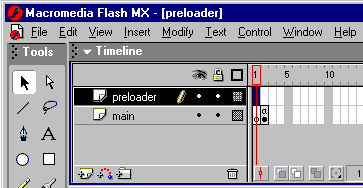
once you open the fla file your flash timeline should look like this
in the first frame of the preloader layer open the components panel find the
loader component and drag it onto the stage
remember make sure you have inserted a keyframe.
you should see that a small grey box appears that is the loader. In the second
frame insert a blank keyframe this will make sure the load bar dissapears when
the movie starts.
your timeline should now look like this
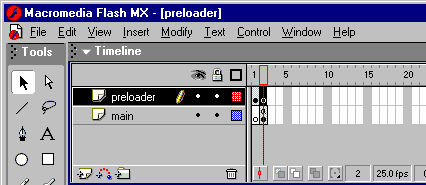
thats the setup finished to view the full animation press ctrl+enter then ctrl+enter
once more
this will tell flash to show the full movie
hope this is helpful
-Tom
http://www.typhoon-extensions.cjb.net