phish·ing
|'fiSHiNG|
noun
The activity of defrauding an online account holder of financial information by posting as a legitimate company.
fishing + phreaking = phishing
Phishing is a form of cyber crime where sensitive information such as usernames, passwords, and credit card details are stolen by those disguising themselves as legitimate and trustworthy companies or electronic communication entities. It is an example of social engineering techniques used to deceive users.
Attempts to deal with the growing number of reported phishing incidents include legislation, user training, public awareness, and technical security measures.
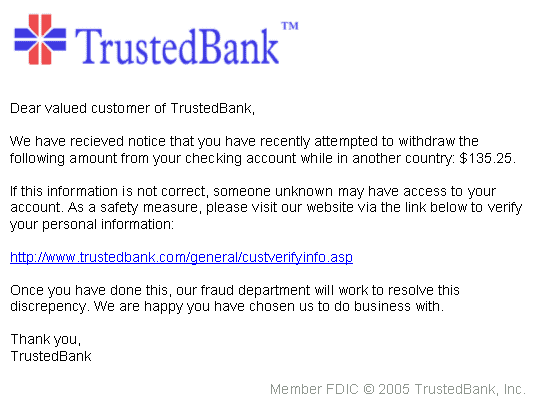
An example of a phishing email disguised as an official email from a (fictional) bank:
Phishing is often done through the use of bogus emails and websites, both designed to emulate a legitimate company. There are several ways that fraudsters can phish for information:
Link Manipulation
Most methods of phishing use some form of technical deception designed to make a link in an email and the spoofed website it leads to appear legitimate. This can be done through the use of cleverly misspelled URLs or subdomains to trick users into thinking that they are accessing a trustworthy site.
Example of a misspelled URL:
http://www.yuotube.com
Example of a subdomain:
http://www.yourbank.phisher.com
Example of a hidden URL:
<a href="http://www.somewhereelse.com">http://www.somewhere.com</a>
Filter Evasion
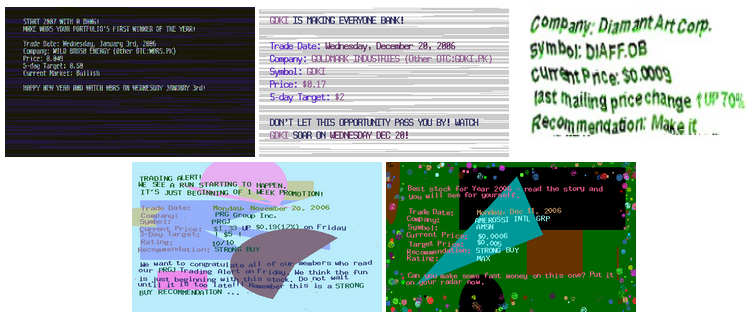
Phishers have started using images instead of text in emails to make it harder for anti-phishing filters to detect text commonly used in phishing emails. These images can contain cursive, hand-written, rotated, distorted, or obfuscated text designed to mask the content from automated filters while still leaving it legible to the reader.
Example of filter-evading images:
Don't reply to emails asking for personal or financial information
Banks or e-commerce companies generally personalize emails, while phishers do not. Phishers often include false but sensational messages ("urgent - your account details may have been stolen") in order to get an immediate reaction. Reputable companies don't ask their customers for passwords or account details in an email. Even if you think the email may be legitimate, don't respond - contact the company by phone or by visiting their website.
Visit suspicious URLs by manually typing them into the address bar
Even if a URL appears to be legitimate, it can still by hyperlinked to a malicious website. To verify the legitimacy of the link itself, you should type the URL manually into the address bar of your browser. It is generally not a good idea to click on links in emails that you were not expecting.
Don't open suspicious attatchments
On some operating systems, especially Windows OS, can allow for the execution of arbitrary code upon the opening of a malicious email attatchment.
Look for spelling or grammatical mistakes
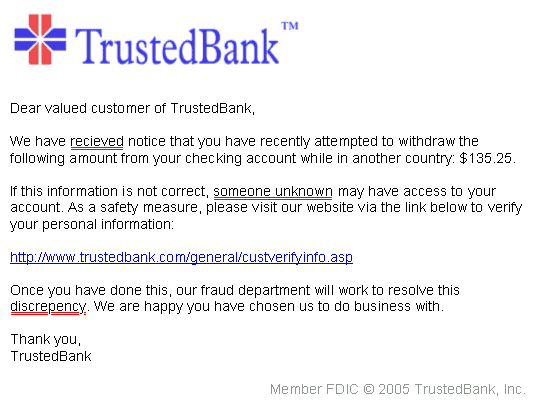
Look for common spelling and/or grammatical mistakes. Emailes sent by legitimate companies and e-commerce entities often do not include spelling or grammatical mistakes while phishers may not be as careful.
Notice the spelling mistakes and the urgent nature of this example phishing email:
Visit the United States Computer Emergency Readiness Team's website or more information →
Advisory publication by the US-CERT about recognizing and avoiding email scams →
Methods of Reporting Phishing Email to US-CERT
In Outlook Express, you can create a new message and drag and drop the phishing email into the new message. Address the message to
[email protected]and send it.
In Outlook Express you can also open the email message* and select File > Properties > Details. The email headers will appear. You can copy these as you normally copy text and include it in a new message to
[email protected].
* If the suspicious mail in question includes a file attachment, it is safer to simply highlight the message and forward it. Some configurations, especially in Windows environments, may allow the execution of arbitrary code upon opening and viewing a malicious email message.
If you cannot forward the email message, at a minimum, please send the URL of the phishing website.
Reporting scams and phishing in browsers and emailing services
There are a number of ways to report suspicious sites and emails and they can vary from browser to browser. It is best to do some research concerning your specific browser.
Report a phishing page to Google →