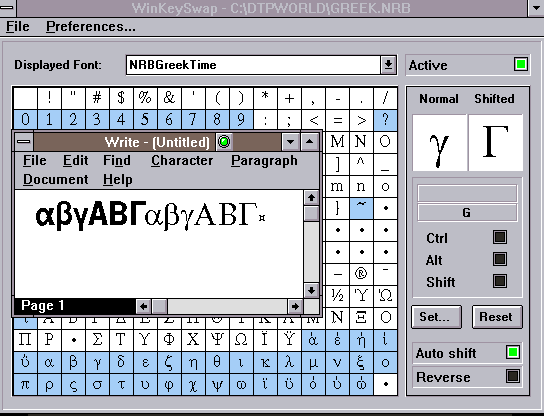
WinKeySwap is the easy way to remap your keyboard. So you can choose what key shall produce what character on the screen. This can be particularly useful for logo or symbol fonts, or foreign languages. A "right to left entry" function is also provided (for hebrew and arabic for example).
You will find a green button on the current application bar, which you can click on, to enable and disable the remapping of your keyboard.
Here an example how you'd remap (re-programme) your keyboard. After starting WKS you will see the complete character-set of your font. Then you just click on any character, then click the SET button, and a little window will pop up. Now you can simply hit the key (-combination) on the keyboard, which shall activate the choosen character, that's all!. The keystroke may be a single key, a ALT-key, CTRL-key or Shift-Key combination, or a two-key combination, or any combinations thereof.
To define a shifted (capital letter maybe) combination, just click into the Shifted window, and drag onto the desired character.
Sub MAIN
Chan = DDEInitiate("KeySwap", "System")
DDEExecute Chan, "LoadTable(EEURO.NRB)"
DDEExecute Chan, "Activate (1)"
DDETerminate Chan
End Sub
This small macro will load a table with the name EEURO.NRB and enable the
remapping.
The standard keyboard driver of Windows should be used. Some programmes replace the original windows keyboard driver with another driver, (i.e. PC-Tools), in such cases results may be not as desired. In Windows 3.1 the original entry in system.ini is:
keyboard.drv=keyboard.drvOther programmes don't allow the reprogramming of ALT- and CTRL- keys (i.e. Pagemaker 5). In this case you can't use those combinations.
Other programmes don't allow access to the high ANSI region (i.e. Microsoft Works, Ventura Publisher), don't use WKS with those programmes.
However, the vast majority of programmes work a breeze with WKS, if you want to test please try the demo, look on this page for the "download demo" link
Read the README file ...and test it, just
download the demo (100k)...from here
Prices: 75 NZD (35???US$) (incl p&p) via Airmail delivery from
DTP-Software
Norbert H A L E Y         <<  (spell this clearly!)
Poste Restante           (this address gets redirected and is valid for ever!)
P.O. Wellesley St.
Auckland
New Zealand
email: click here (please email if you have any questions).
We accept VISA/MasterCard, a "normal account-only" cheque is fine as well, has to be in the currency of the issueing bank, use a fair exchange rate. (More details on payment see the Type Designer Homepage )
Other products from DTP Software: